
How To Track Support Agent Performance

Let’s talk about something that’s probably been keeping you up at night – your support agents’ performance.
You know how crucial it is for your business that your agents are performing their best. So it’s frustrating when you can’t figure out why your customer satisfaction scores are poor. You might feel like you’re playing a guessing game.
Are your support agents really nailing it with customers? Or are they struggling to provide consistent service? Without solid performance metrics, this uncertainty can leave you feeling helpless, and leave your business vulnerable to customer churn.
To ease your mind on this issue, we’ll walk you through setting up a system to track and boost your support team’s performance. By the time we’re done, you’ll have all the tools you need to crank up your agents’ productivity, and keep customers singing your brand’s praises.
How Agent Performance Impacts Your Business
So why is agent performance a big deal? It’s not just about answering phones or emails quickly. For small businesses, agent performance boils down to:
- Effectively solving customer problems
- Providing high-quality and professional interactions
- Representing your brand positively
Understanding agent performance is important, as it directly impacts your key business objectives. When your agents perform well, you’ll see:
- Improved customer satisfaction scores
- Higher retention rates
- Stronger brand loyalty
- Increased business growth through word-of-mouth recommendations
These positive outcomes help you expand your customer base without additional marketing costs. On the flip side, poor agent performance can turn customers away, damage your reputation, and result in plenty of negative reviews.
Your support agents are the face of your company. Their performance doesn’t just impact your day-to-day operations. It shapes your business’ future. That’s why tracking and improving agent performance is a must if you’re looking to thrive in today’s competitive market.
How To Measure Agent Performance: 3 Key Metrics To Track
Metrics can sound boring, and you’re probably not thrilled about the numbers you’ll have to study. But stick with me here.
When it comes to tracking support agent performance, choosing the right metrics is paramount. You want to measure what truly reflects your business goals and customer expectations.
So what performance metrics can give you a clear picture of how well your agents perform, and where they might need a little boost?
1. First Response Time (FRT)
First Response Time measures how quickly agents respond to customer queries. Having to wait for long hours before receiving a response leaves a bad impression on customers.
In contrast, a low FRT boosts customer satisfaction. It shows that you value their time, leading to improved retention rates.
So how should you measure FRT? You’ll need some kind of dedicated tool. There are lots of options, but it’s simplest if the functionality is built right into your primary support platform.
For example, our own customer service helpdesk, Groove, features built-in reporting. Important metrics are automatically tracked and displayed in a clear, beginner-friendly way.
How does it work? You’ll need to sign up (there’s a free trial!) and log into your Groove account. Then complete the preliminary setup process, and add your support team members.
Once you’ve moved your agents to Groove’s shared inbox, you’ll simply go to Reports > Productivity. By default, the report displays your median resolution time. But you can select the dropdown arrow and choose Median First Response Time:
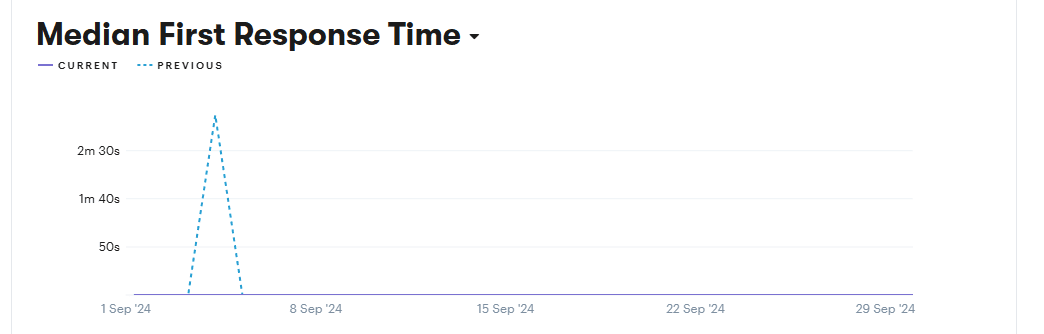
Enter a time frame, and you can see how your team has been performing. Keep an eye out for trends – is their performance is steady, or does it fluctuate over time?
Soon, we’ll talk more about how to address subpar agent performance metrics. But first, let’s look at a few other numbers you’ll want to watch.
2. Resolution Rate
Resolution rate is the percentage of issues resolved on first contact, without the need for customer follow-ups or escalations.
A high resolution rate indicates that your agents are knowledgeable and efficient at solving problems quickly and accurately. As you might expect, this tends to result in higher customer satisfaction and reduced operational costs.
Groove can help you keep an eye on this metric as well, so you know if your team’s crushing it or needs a hand:
Again, you’ll go to the Reporting menu and then scroll down to Productivity. The first report displayed will be your team’s Median Resolution Time. You’ll be presented with a graph that displays the highs and lows of resolution times across a specific period.
This is a good time to note that along with team-wide stats, you can also view individual agent performance in Groove. In the same reporting section, under Teammates, you’ll find all the metrics we’re talking about broken down for each team member.
Keeping an eye on both sections lets you know when you have big-picture operational issues, and when specific agents need more attention or training.
3. Customer Satisfaction (CSAT)
Speed is great, but let’s not forget about quality. That’s where Customer Satisfaction scores come in. CSAT measures how happy customers are with their support experience.
This data is usually collected through post-interaction surveys. High CSAT scores correlate with increased customer loyalty, positive word-of-mouth, and ultimately, business growth.
Groove allows you to send automated CSAT surveys after ticket resolution. This makes it easy to gather valuable, in-the-moment feedback:
Under Apps > Satisfaction Ratings, you can configure the settings and enable the ratings. Once you’ve started sending surveys out, you can view the results via Reporting > CSAT:
This provides vital insights into how customers truly feel about their experience with your brand. If they aren’t happy, considering these scores in combination with the other metrics we’ve discussed helps identify where your team’s performance can improve.
5 Strategies for Improving Agent Performance
Now, let’s talk about putting all that data to work. Understanding current performance is only the first step.
Improving agent performance means implementing focused strategies that elevate your team’s capabilities and effectiveness. Here are our top five tips gathered from over a decade in the customer service industry!
1. Targeted Training
If your team isn’t performing the way you’d like, sometimes training is in order. However, this isn’t about a one-size-fits-all training program. Instead, you can encourage personalized learning paths that address each agent’s specific needs.
Here’s how to make it happen.
Use Technology for Insights
Leverage your help desk’s analytics capabilities to inform your training approach. For instance, Groove’s performance reports provide detailed insights into each agent’s strengths and weaknesses. This will allow you to tailor training programs more effectively.
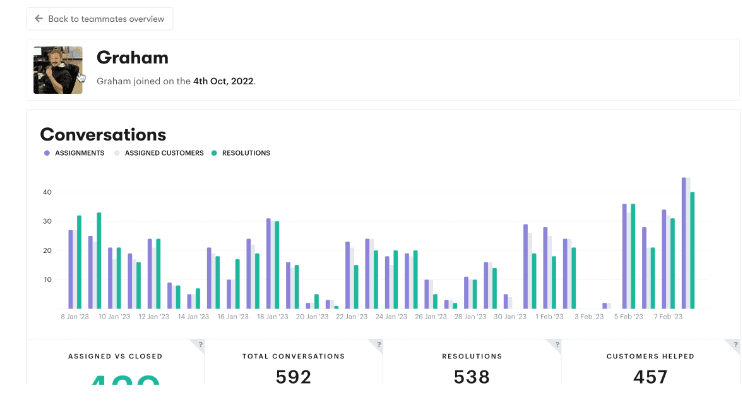
To access individual agent performance reports, you’ll head over to Teammates in your Reporting menu. You’ll see a list of team members. In each of their profiles, you’ll get information about their:
- Recent conversation ratings
- Ticket work load
- Average first response time
- Average resolution time
- Average replies per resolution
Identify Skill Gaps
Based on the performance data, pinpoint specific skills that need improvement for each agent. For example, an agent with high average resolution time might need training in efficient problem-solving techniques.
Develop Personalized Training Plans
Create individualized training programs that address the specific skill gaps identified. This could include:
- One-on-one coaching sessions
- Online courses focused on particular skills
- Role-playing exercises to practice challenging scenarios
- Peer mentoring with high-performing team members
Implement Continuous Learning
Establish a system for ongoing training and development. You could schedule regular skill assessments and refresher courses to ensure that improvements are maintained over time.
Monitor Progress and Adjust
Regularly track performance metrics after implementing training programs. If you don’t see the desired improvements, adjust your training strategy or content.
This approach not only boosts individual agent performance, but also contributes to the overall effectiveness of your support team.
2. Streamlining Feedback and Coaching
Effective feedback and coaching are crucial for continuous improvement. By implementing a data-driven approach to feedback, you can help your agents identify areas for growth, and provide them with the support they need.
Here’s how to streamline your feedback and coaching process:
- Establish regular performance reviews. Set up a consistent schedule for performance evaluations. This could be monthly or quarterly, depending on your team’s needs.
- Use data to drive discussions. Leverage performance metrics to form the basis of the review sessions. This would be the perfect time to go over Groove’s reporting dashboard with your team.
- Provide specific and actionable feedback. Instead of general comments, offer concrete examples of both strengths and areas for improvement.
- For example: “Your average resolution time has decreased by 15% this month, which is excellent. However, your customer satisfaction scores have dipped slightly. Let’s look at some specific interactions to identify why.”
- Set measurable goals. Work with each agent to establish performance targets based on their current performance metrics and potential for improvement. These goals should be specific, measurable, achievable, relevant, and time-bound (SMART).
- Develop individualized coaching plans. Based on the feedback and goals set, create personalized coaching plans for each agent. This might include shadowing high-performing colleagues, additional training, or more frequent check-ins.
- Monitor progress regularly. Use your help desk’s reporting features to track progress towards set goals. Groove’s customizable reports can help you keep a close eye on key performance indicators between formal review sessions.
3. Optimizing Knowledge Management
A well-organized, up-to-date knowledge base can significantly enhance agent efficiency and improve customer satisfaction. Your agents and your business will benefit from:
- Reduced response time. Agents can quickly find accurate information and resolve issues faster.
- Consistency. All agents get access to the same information. This promotes uniform responses across the team.
- Easier training. New agents can use the knowledge base to familiarize themselves with products, services, and common issues.
- Lowered workloads. Customers can find answers to common questions independently, thus reducing ticket volume. Agents get more time to spend on the truly complex/challenging inquiries.
Groove’s integrated knowledge base makes it very easy to set this resource up. It offers:
- Seamless integration with the ticketing system, allowing agents to easily access and share relevant articles while handling customer inquiries
- Built-in analytics to provide insights into article usage and effectiveness
- A user-friendly interface, which makes it easy for agents to contribute new articles or suggest updates
- Customizable categories and tags that enable efficient organization and quick retrieval of information
Sometimes, the best way to improve agent performance is to take rote work off their plates. A knowledge base is an excellent way to do that – and so is automation.
4. Enhancing Efficiency with Smart Automation
In today’s fast-paced customer support environment, automation is a game-changer. By identifying and automating repetitive tasks, you can significantly boost your team’s productivity and response times.
The first step is recognizing which tasks are prime candidates for this process. Look for:
- Frequently asked questions that receive standard responses
- Routine ticket categorization and assignment tasks
- Regular status updates to customers
- Data entry tasks that follow a consistent pattern
By automating this repetitive work, you free up your agents to focus on high-value interactions that require human insight and empathy. To make this easier, Groove provides a range of features to facilitate smart automation:
- AI-powered summaries. Groove’s conversation summaries turn lengthy threads into concise, bulleted lists. This saves time for agents who need to quickly understand the context of an ongoing issue.
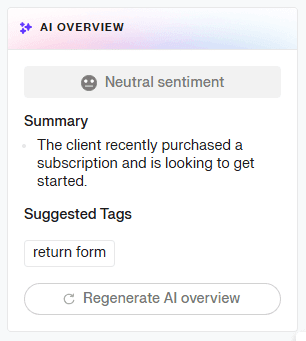
- Instant replies. This feature allows you to turn specific responses into reusable and automated replies with a single click.
- Intelligent routing. Automatically assign tickets to the most appropriate agents based on factors like expertise, workload, or availability.
5. Fostering a Culture of Continuous Improvement
Keeping your support team motivated and constantly improving isn’t always a walk in the park. But with the right approach, you can create an environment where your agents are excited to up their game.
Here’s how to make that happen:
Spice Things Up with Gamification
Who says work can’t be fun? Introduce a little friendly competition to your team with gamification. Set up leaderboards, create challenges, or even design a points system.
For example, you could award points for positive customer feedback or quick resolution times. The key is to make it engaging without adding stress. The goal is to motivate, not intimidate.
Introduce Performance-Based Incentives
We all like to be rewarded for our hard work. Therefore, set up a performance-based incentive program that ties bonuses or other perks to achieving specific goals. This could be hitting a certain CSAT score or improving first response time. Just make sure the goals are clear and achievable.
And hey, incentives don’t always have to be cash. They could be extra time off, prime parking spots, or even a fancy coffee machine for the break room. Don’t be afraid to think outside the box.
Practice Public Recognition
Do not underestimate the power of a good old pat on the back. Public recognition can be a huge motivator. Make it a habit to celebrate wins, big and small.
Did someone get an amazing customer review? Share it with the team. Has an agent consistently improved their performance metrics? Give them a shout-out in the next team meeting.
Creating a culture of appreciation not only boosts team morale. It also sets the bar for what great performance looks like.
Improve Your Agents’ Performance Today, One Step at a Time
By now, you know why tracking agent performance is crucial and how to go about improving it. But knowledge without action is just trivia, right?
So here’s your challenge: Pick one strategy from this guide and implement it this week. Just one. Whether it’s setting up a new metric to track or kicking off a peer mentoring program, that first step makes the rest feel much more achievable.
Building a top-notch support team isn’t an overnight process. It’s about consistent and incremental improvements. If you’re looking for a tool to make the journey easier, sign up for your free 7-day trial of Groove today.
The ball’s in your court now. Let’s see what you can do!
5 Help Scout Alternatives: Why Growing Support Teams Switch to Groove
Groove Fixes What Teams Don't Like About Help Scout: Flat Pricing, Built-In AI, and Native SLA Management. See the Full Comparison.
How Helply's Hallucination-Proof AI Eliminates the #1 Fear of AI Customer Support
Customer Support Automation That Hits 65% AI Resolution, Guaranteed. Helply's Action-Based AI, Safe Escalations, and Optimization.
