
Agent Availability Status and Mailbox-Specific Twitter and Facebook Integrations

We’re excited to announce that we’ve pushed two new features that have been requested by many of you.
The first is agent availability status.
In your Preferences (Settings → Preferences), you can now set your status as “Available” or “Not Available.”
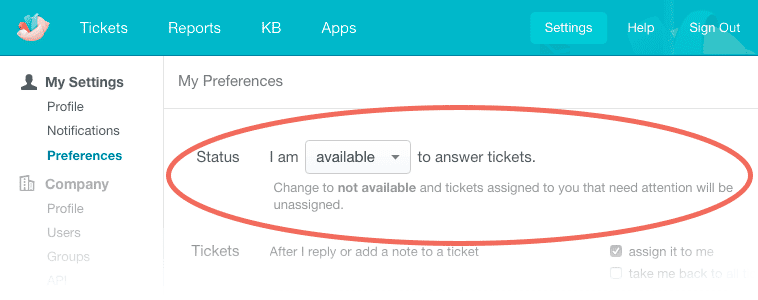
When you’re “Available,” everything functions as it always has.
When you change your status to “Not Available,” anytime a response comes in on a ticket that’s been assigned to you, that ticket will become unassigned and go into your team’s main mailbox.
Also, any currently open tickets that are assigned to you will become unassigned as well, and other agents can pick them up.
This is really useful if you’re going on vacation, or if you’re off for the weekend and have someone else manning the support mailbox that you’d like to cover for you in case your customers reach out.
The second feature is the ability to link Twitter and Facebook accounts to specific mailboxes in Groove, rather than just to your Groove account.
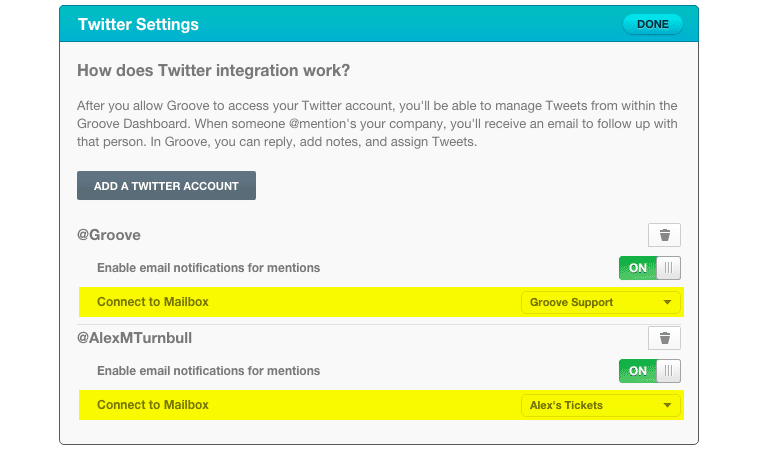
Now, instead of having Tweets and Facebook posts go into Twitter or Facebook folders, you can have them go into any mailbox you’d like.
This is helpful if you have a particular team or team member that handles social media and other types of tickets, too.
We hope you dig these new features, and as always, we’d love to hear your feedback!
Groove Partners with Import2 for Seamless Help Desk Data Import!
We are thrilled to share some fantastic news with you! Groove has joined forces with Import2 to bring you a seamless and efficient solution for importing data from other help desks. Our partnership with Import2 opens up new possibilities, making it easier than ever to transition your data into Groove. Whether you’re migrating from another […]
Groove 2023 in Review – A Year of Supercharged Support
2023 was a year of exponential growth and innovation for Groove! We poured our hearts (and countless cups of coffee) into crafting new features and optimizations to make your customer support experience smoother, faster, and more delightful than ever. Here’s an overview of the biggest and best changes that transformed Groove this past year. New […]
