
Better Routing, Account Switching, and Easier Integration

Accounts broken into groups, such as sales and developers, can now route incoming emails directly to the right type of agent.
Logging into multiple accounts just got a whole lot easier, and we even made some improvements for our developer friends.
Assign to Next Available Agent in Group
We added the ability to automatically assign incoming emails to the next available agent a few months back. It’s a great way for small teams to break up the workload, because emails are assigned to the agent w/ the least number of open tickets. However, it breaks down when companies are broken into groups by responsibility.
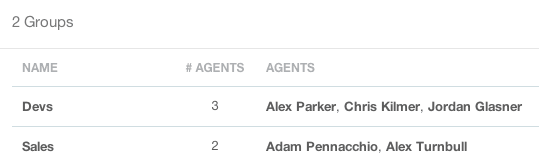
As of last Monday, accounts with groups can create rules that assign emails to the next available agent in a specific group. This way emails from new prospects can go to a salesperson while technical questions are routed straight to a developer.
Switching Accounts
A lot of our customers run multiple businesses through Groove, and most choose to run all of their email through a single Groove account. There are a few that prefer, mainly for legal or accounting reasons, to keep their businesses completely separate.
It turns out that these customers would get stuck in a particular account if they didn’t first sign-out before trying to sign-in to another account. They were jumping through all of kinds of hoops just to use Groove including running:
- Chrome in incognito mode
- Chrome and Safari side by side
- two completely separate computers(!?!)
All because of one little cookie! It was a simple fix, and now customers are seamlessly signed-out before trying to sign-in to a different account.
Easier to Integrate Widget
We also added a couple of new methods to the Javascript API for our Widget to make integrating it even easier.
Developers using the latest version of Rails will be happy to know the Widget now works as expected with turbolinks! The Widget always worked if you included at the end of your **tag like:
But it would disappear if it was included in the** tag. To make it possible to include the widget in the ** tag we added two new utility methods:
- GrooveWidget.add
- GrooveWidget.remove
We’ll be updating our knowledge base later this week, but it only takes a few lines of code to get everything working:
We also added the ability to temporarily remove the Widget from the page if needed. This has been the most requested addition to the widget, and we’d love to hear how you use it.
Groove Partners with Import2 for Seamless Help Desk Data Import!
We are thrilled to share some fantastic news with you! Groove has joined forces with Import2 to bring you a seamless and efficient solution for importing data from other help desks. Our partnership with Import2 opens up new possibilities, making it easier than ever to transition your data into Groove. Whether you’re migrating from another […]
Groove 2023 in Review – A Year of Supercharged Support
2023 was a year of exponential growth and innovation for Groove! We poured our hearts (and countless cups of coffee) into crafting new features and optimizations to make your customer support experience smoother, faster, and more delightful than ever. Here’s an overview of the biggest and best changes that transformed Groove this past year. New […]
