
How to Create a Knowledge Base from Start to Finish: Building Self-Service for Customer Support

Help your customers help themselves.
What’s the first thing that comes to mind when you think about customer support?
Support agents answering tickets? On-site chat widgets where you can talk to a real person? Phone support?
Good customer service is super important for any company striving for customer support greatness, but it shouldn’t be all there is to it.
Sometimes, the best solution allows your customers to help themselves by giving them access to immediate knowledge without requiring personal assistance.
Today, we’re going to talk about knowledge bases—why you should have one, what makes one great (or not so great) and how to get started with building your own.
Note: 2,000+ companies use Groove to delight customers with fast, personal support at scale. All without breaking the bank. Start your free 7-day trial today! (No credit card required)
What is a knowledge base?
A knowledge base is a tool that lets your customers find answers to their support questions on their own—without having to email you for help.
A knowledge base doesn’t solve every problem a customer might have. Just the most common ones.
As we’ve learned from talking to hundreds of businesses over the years, if you feel overwhelmed by everything you have to do in a day, you’re not alone.
Dozens of founders, CEOs, and small business owners we’ve talked to describe the same morning routine as the one I described above. For some, it’s how they start every single day, seven days a week, 365 days a year.
Support leaders have similar experiences—and many report feeling understaffed to keep up with all the support requests.
Ultimately, you have two choices:
- Hire someone to help you with support.
- Give customers resources they can use to find answers on their own.
Most growing companies will eventually need to hire staff to help customer support.
But before you jump straight to hiring, get your knowledge base software in place.
Why should you have a knowledge base?

An effective knowledge base allows you to stay two steps ahead of your customers’ issues. Waiting for customers to come to you is a dangerous strategy.
Some people immediately submit a ticket, call, or email support when they encounter an issue. But, most prefer to fix their own problems without getting others involved.
An overwhelming 91% of customers said they would use an online knowledge base if it were available and tailored to their needs. Beyond that, 55% of consumers fall in love with a brand when that brand offers “easy access to information and support.” Reduce customer effort and you’ll improve customer loyalty.

Imagine this: A customer discovers your business and has some basic questions, but you don’t have a knowledge base.
How many steps does the customer have to take to contact you and get answers to their questions? Something that could have taken 10 seconds has now turned into 10 minutes of their time and yours. Why would you not make that process easier?
Your customers will be empowered to find their own solutions, feel accomplished, and appreciate your effort to make things as easy as possible.
A good knowledge base will also give a boost to your customer support agents by:
- Helping them be more productive: Shifting basic support queries over to the knowledge base frees up your support staff for the really important issues.
- Making them happier: Employees are happier when they’re able to spend more time on meaningful interactions. (For example, preempting a problem rather than resolving it after it has already negatively affected the customer.)
Keep in mind, knowledge base software isn’t there to replace the humans on your support team. It’s there to assist them, while allowing your customers the luxury of getting answers to their questions with no hassle.
You’ll save time and money on high-volume, simple questions, and make your customers and team members happier and more productive. What’s not to love?
Note: Groove’s Knowledge Base is included for free with all Groove accounts. Try it today by starting a free 7-day trial today! (No credit card required)
Getting started with your knowledge base
Your knowledge base tool must do more than just exist. It has to be good. The first thing to note is that a knowledge base is, at its core, documentation. According to the Oxford dictionary:
Documentation is the media—text, images, and video—that explain a product or service, the material that provides official information.
Keep that in mind when thinking about your knowledge base. You’re not writing a blog post on wordpress or a novel. You’re writing documentation.
Like any other documentation, your knowledge base should:
- Be easily accessible
- Be organized and easy to navigate
- Solve common problems
- Save a customer time
- Be up to date
Understand your goals and the tone you want to set with your knowledge base. Then, move on to the fun part.
Here’s the basic process of building a knowledge base:
- Decide on the core elements of your knowledge base
- Choose your knowledge base content
- Agree on the structure of your knowledge base articles
- Write your knowledge base articles
- Add visuals to your content
- Publish your knowledge base
- Analyze and improve your articles
Seems like a big bite? We’ve got you. Let’s go through all these steps in depth and talk about some best practices to keep in mind.
Decide on the core elements of your knowledge base
If you’re using a convenient pre-designed knowledge base foundation (like Groove’s solution), it’ll most likely have all the core elements already included. Then it’s just up to you to provide the content.
Here are three core elements of a knowledge base:
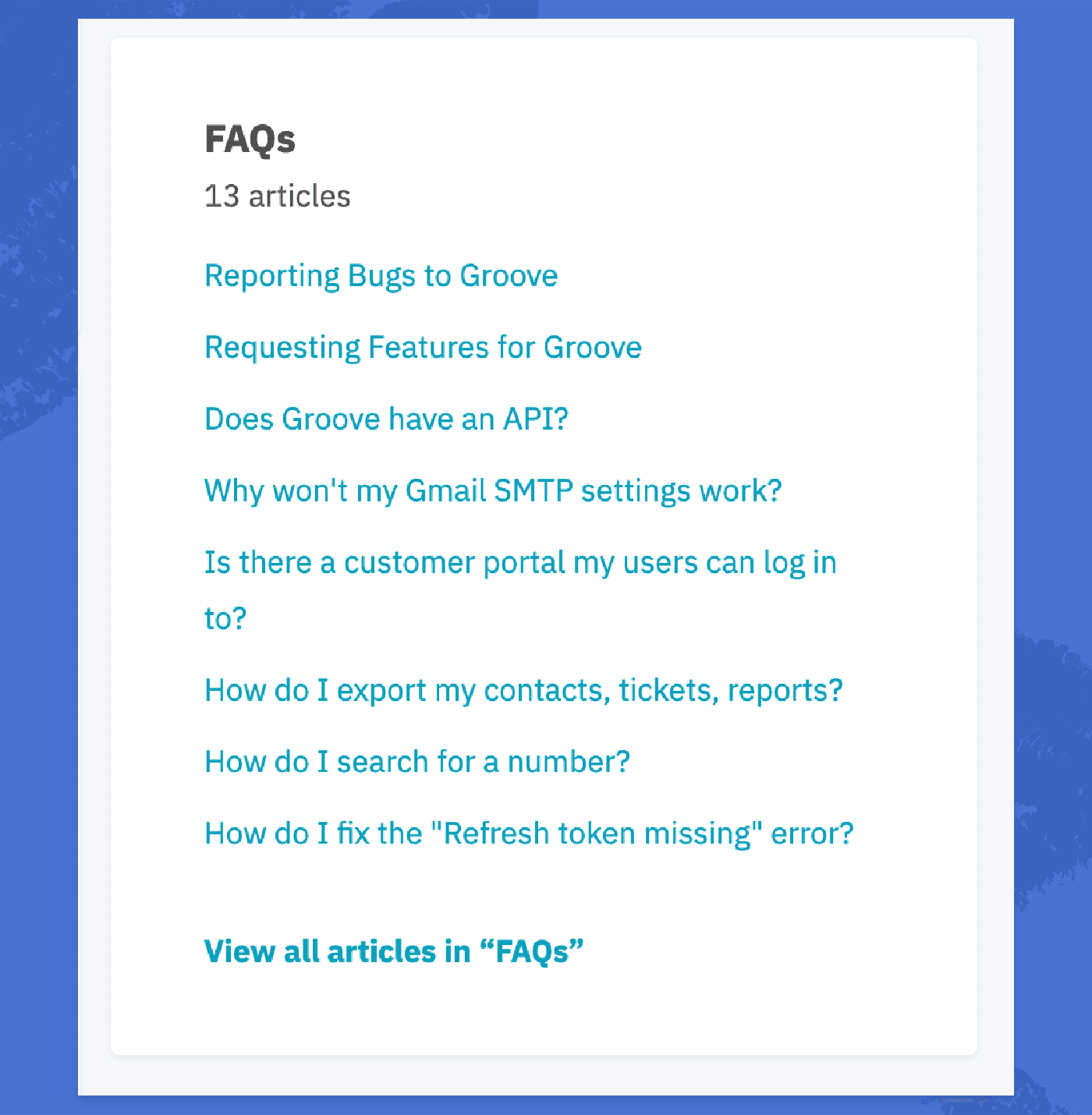
1. FAQ section
If a customer has a basic question about your product or service, the first place they generally look is the FAQ section. Save them the effort and have one readily available.
2. Contact support option
No matter how amazing your knowledge base is, sometimes it doesn’t cut it. For these cases, make sure you’ve got a “contact support” option available on the actual article or page, so your customer doesn’t have to go looking for it once they’ve realized they need personalized support.

3. Search function
Just like Google’s search bar, you’ll usually see this before the full list of knowledge base articles. Some people will treat your knowledge base as a homepage, simply looking around to learn more about the product or service. But others are looking for a very specific thing. Again, make it easy for them to find it.

Outside of these basic necessities, what else to include in your knowledge base depends entirely on your unique needs.
Want there to be a separate section for video tutorials? Do it.
Want to have a “top articles” section based on which ones are read most? Go for it.
What’s important is that you’ve got the structure and components of your knowledge base section figured out before you start writing content for it.
Choose your knowledge base content
Deciding on which help topics to start with can seem like an overwhelming task. What should you write about? How do you judge the importance of a topic? How do you know what your customers need help with?
As with any other overwhelming task, start small. Being with these two topics, no time-consuming customer or behaviour research needed.
- Basics: Every single question a complete stranger would have about your company or service.
- Getting started: The basic onboarding and setup process a customer goes through when starting to use your service/product, broken down into steps.
From there, you can go more in-depth into the topics you need to cover within separate sections of your knowledge management database.
For example, here at Groove, our customers want to know more about specific sections of our product. So we separate topics using different parts of the platform:
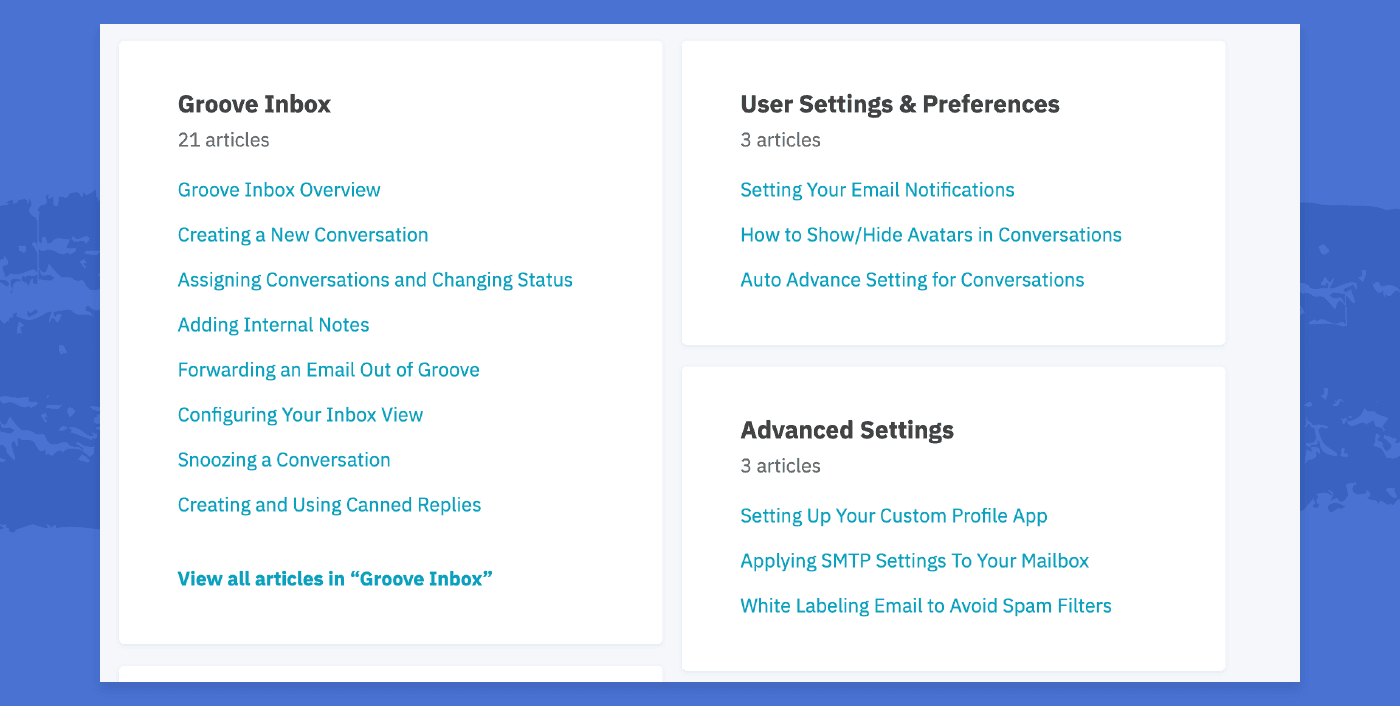
Once you’ve covered onboarding and basic features, look into previous customer support tickets, help desk requests, and questions to spot common issues. (In Groove, you can look at which canned replies you’ve used most, for example). This will be your FAQ section.
No matter how many articles you have, categorize them into sections for the best user experience—nobody likes seeing a huge wall of article headings.
When crafting the titles of your topics, remember that people tend to search using very basic terms.
You should either go for action words like:
- “How to…”
- “Using…”
Or use exact phrases of the actions they’ll take, such as:
- “Uploading Your First Video”
- “Installing Your Plugin”
Build a solid foundation for content by first creating overall topics, then plotting out individual articles within each section, and finally coming up with clear titles for each.
Agree on the structure of your knowledge base articles
We’ve talked about the importance of structure and language in previous articles, but there are a couple of things to keep in mind when it comes to knowledge bases specifically.
First, focus on scaling the structure of your help content. Create a simple knowledge base template to use for every article.
For example, agree that every one of your articles will contain these things:
- Problem or topic: Describe the task on hand or the customer issue.
- Step by step process: Describe the process of completing the task or solving the issue in detailed, but simple, steps.
- Result: What should happen after the steps have been completed by the customer?
- Related resources: Similar articles, questions, or topics
Second, prioritize the customer’s workflow and use cases. Most of your knowledge base articles probably include a set process the user needs to follow. Make it as smooth as possible.
- Put the most important information first. If there’s something the user absolutely needs to know before they get into the process of taking action, make it the first thing they see, before any actionable steps.
- Chronological order. Make sure the order of each step makes sense and doesn’t interfere chronologically with any other steps.
- If there’s no chronological order or dependencies between tasks, make the easiest ones the first ones. Completing a simple task gives the user a sense of accomplishment and makes them more confident when they get to the harder steps.
- Avoid distractions. Structure the instructions in a way that keeps them focused on the tasks on hand and won’t interrupt their workflow.
Having information architecture guidelines to follow on every topic page helps ensures consistency. If there are various people writing content, it’ll be consistent throughout the knowledge base.
The ultimate goal is to keep your communication crystal clear throughout your knowledge base.
Write your knowledge base articles
It’s time to get crackin’.
When writing the actual text for your articles, mind your language first and foremost to make your knowledge base as effective as possible. Assume the reader is a complete beginner.
Don’t use any advanced terminologies or industry-related jargon, even if it makes sense to you. This might be the first time the reader has seen any of this information. Make it simple.
When it comes to actually formatting your text, simplicity is key. Focus on making your communication as scannable as possible.
- The less text, the better: Customer support isn’t the place to practice your novel writing skills. Keep explanations as simple and to-the-point as possible.
- Short paragraphs: Nobody has the time or attention span to pick out important information from a wall of text.
- Bullet points and lists: You’ll make everyone’s life easier by structuring information in a way that’s easy to read and follow.
- Bold and italics: Use them to give more dimension to your text. Do not underline words unless they contain a link.
- Adding links: Point out resources that go more in depth so you don’t have to explain everything in one article.
Basically, make copy as short and structured as possible. Use correct spelling and grammar. Keep it classy.
Add visuals to your content
Visual materials enrich your support content and keep users engaged.
The most obvious type of visuals to use in your knowledge base are screenshots of new products to show how things work. But you can also play around with instructional videos, GIFs, or whatever else you feel would add a little something extra to your content.
However, with the great power of visuals comes great responsibility. Visuals shouldn’t entirely replace text. For example, some people hate video tutorials. Give your customers options.
Ask yourself this question to stay in control of visuals:
“If I took away this image, video, or screenshot, would the instructions still be clear?”
Many visuals are at the mercy of technology and formatting. If a customer can’t access an image or video for whatever reason, provide a back up in the form of good old text.
Publish your knowledge base
Got everything prepared? Cool. Time to get it out there.
If you’re already a Groove user, we have a customizable, collaboration-savvy knowledge base ready to be published with the click of a button.
Make your knowledge base easy to find both on your own website and through popular search engines.
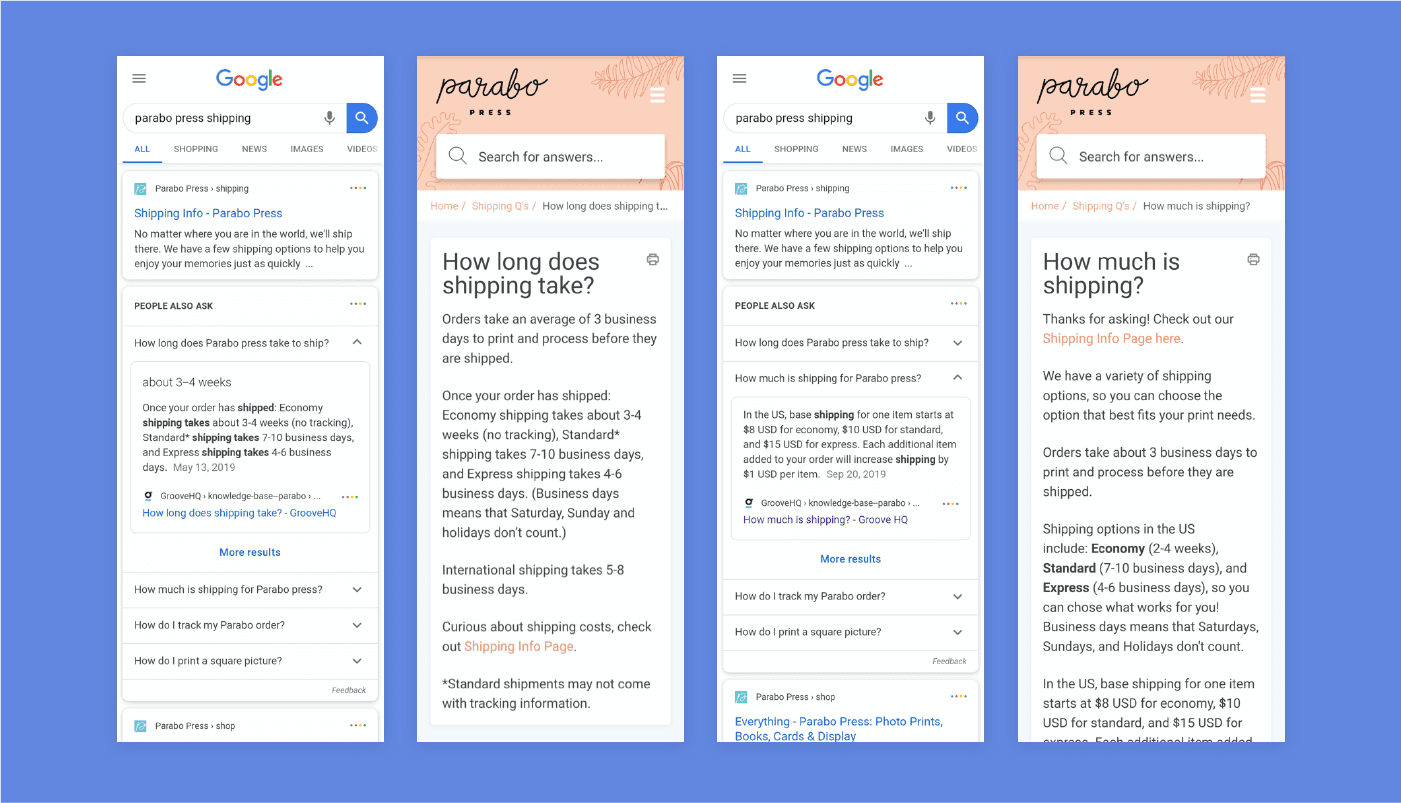
Feel free to link to your knowledge base from other forms of support, too. Don’t be afraid to rub the fact that you have a knowledge base into people’s faces. How else are your customers going to find it?
The more places you feature your knowledge base link, the better.
Analyze and improve your articles
As with anything else in business, the success of your knowledge base (or lack of success) should be constantly measured to see where to improve.
When looking at your knowledge base performance, focus on impact. Examples of what to track include:
- Increase in customer satisfaction
- Decreased volume of tickets
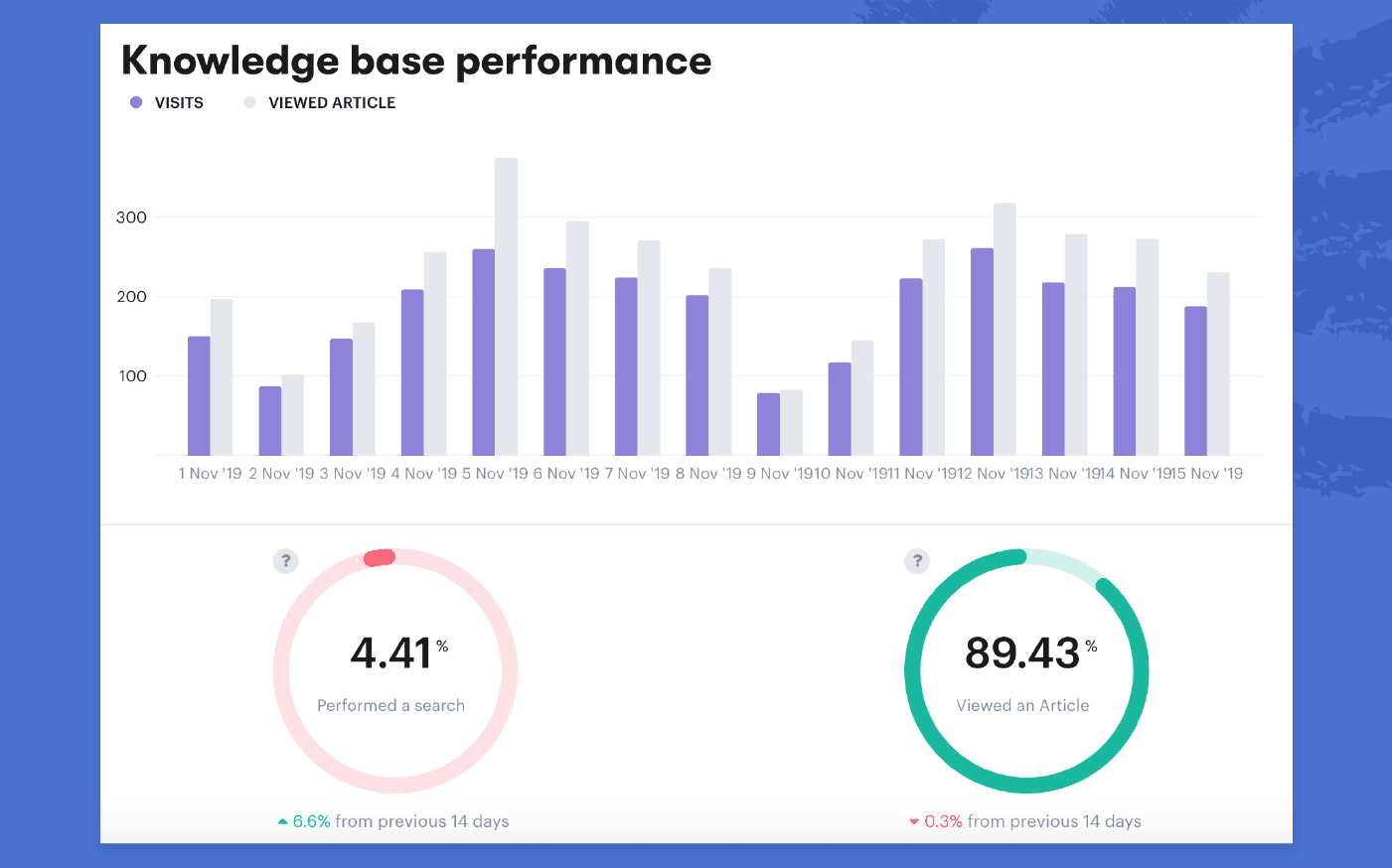
Examine how your customers are using your company’s knowledge base. What parts are customers engaging with most? What are they searching for?
Keep your eye on these customer questions to identify any areas where you can improve, including which topics to add to your knowledge base.
Groove’s platform includes a reporting database specific to knowledge base metrics:
A good knowledge base is never complete. Don’t be that company with an outdated, useless portal. Audit the entire base on a recurring basis, aim for monthly or quarterly check-ins.
Add new products, updates or other changes to your knowledge base articles, and delete old, irrelevant posts about features that don’t exist anymore.
For content additions, keep an eye on incoming support tickets, requests, and common questions. Add anything that pops up often to the knowledge base, instead of dealing with it manually every time.
Build a knowledge base and a process around it that continues to grow as your company does.
Save time, money, and resources with a knowledge base
A good knowledge base will save you tons of time, and make both your customers and support agents happier. It takes time up front, but it’s worth it.
Gather your customer support team and start simple. Figure out the basics, then get writing.
Once you have a functioning and effective knowledge base, you can build and improve on it anytime.
Note: Is your business growing? Groove’s Shared Inbox, Knowledge Base, and reporting can help you delight customers with fast, personal support at scale—without breaking the bank. Sign up for a 7-day trial today! (No credit card required)
5 Help Scout Alternatives: Why Growing Support Teams Switch to Groove
Groove Fixes What Teams Don't Like About Help Scout: Flat Pricing, Built-In AI, and Native SLA Management. See the Full Comparison.
How Helply's Hallucination-Proof AI Eliminates the #1 Fear of AI Customer Support
Customer Support Automation That Hits 65% AI Resolution, Guaranteed. Helply's Action-Based AI, Safe Escalations, and Optimization.
