
How To Use Customer Feedback Reports To Grow Your Small Online Business

Are you overwhelmed by the volume of customer feedback across multiple platforms: reviews, social media, email? It’s a struggle to organize and analyze all that data, while also managing the pressure to respond quickly and effectively.
Direct feedback from your buyers is invaluable. But that value is limited if you’re uncertain how to leverage it. Customer feedback reports provide the structure and insights you need to make sense of the noise, pinpoint key issues, and transform customer opinions into a roadmap for growth.
This article will guide you through the process of creating, analyzing, and acting on customer feedback reports. We’ll also give you the tools to turn customer voices into a strategic advantage for your small business.
The Evolving Landscape of Customer Feedback
The way businesses gather and use customer feedback is constantly changing. New technologies and evolving consumer expectations keep us all on our toes.
Here are just some of the trends shaping the modern feedback landscape:
- AI-powered analysis. Artificial intelligence and machine learning now affect how businesses analyze customer feedback reports. When used appropriately, these technologies can identify patterns, extract insights, and predict future behavior.
- Real-time collection. Instant messaging platforms and chatbots enable businesses to gather feedback in real time. This allows for immediate issue resolutions and more personalized interactions.
- Comprehensive VoC programs. Some businesses are implementing Voice of the Customer (VoC) programs that integrate data from multiple feedback channels, including surveys, social media, and service interactions. This helps create a more holistic view of the customer experience.
- Personalized requests. Other businesses are tailoring feedback requests, including customer satisfaction survey reports, to individual buyers based on their preferences and behaviors. This tends to result in higher response rates and more valuable insights.
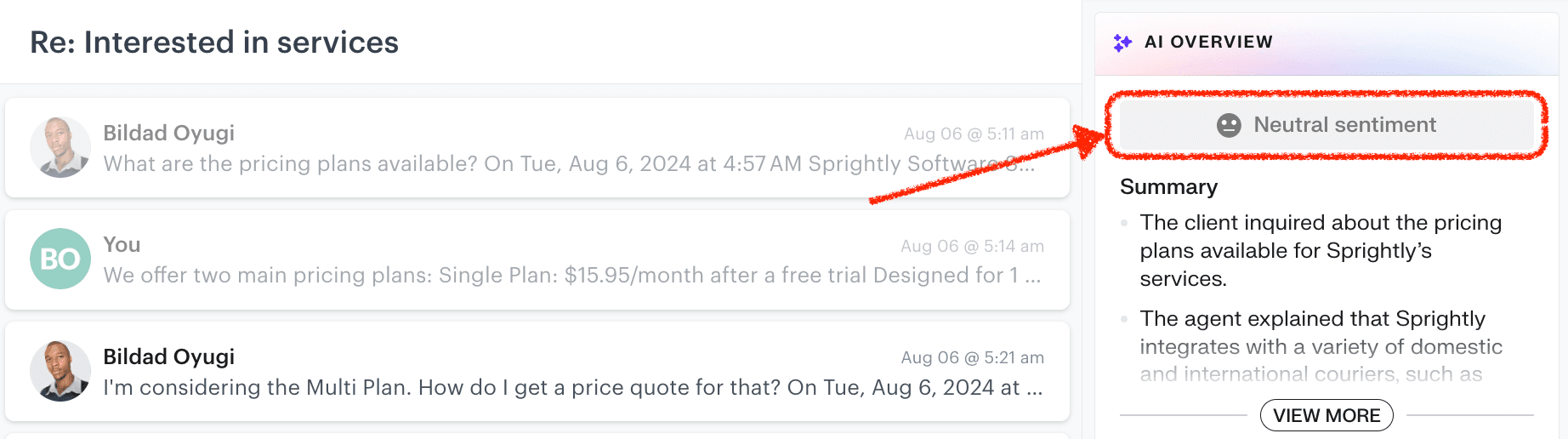
- Emotional feedback. In addition to gathering factual data, companies are increasingly focusing on understanding the emotions behind customer feedback. Sentiment analysis tools are used to gauge customer feelings and improve experiences.
- Feedback-driven development. It’s become more common to involve customers in the product development process through beta testing, focus groups, and co-creation initiatives. This helps to ensure that new products meet customer needs.
- Data privacy and transparency. Finally, with growing concerns about data privacy, businesses are prioritizing transparency and ethical data handling practices to build trust.
What Customer Feedback Reports Can Do For Your Business
Given all this complexity, customer feedback reports take plenty of work to develop and use. That effort is worthwhile, though, since they benefit your business’ current survival and long-term growth.
Let’s talk about the advantages on offer, so you know what goals to set:
- Rapid iteration and improvement. Feedback reports empower you to make quick, data-driven decisions about product features, user experience, and service enhancements.
- Cost-effective market research. Small businesses often lack the budget for extensive market research. However, feedback reports offer a cost-effective alternative. They provide valuable insights into preferences, pain points, and customer expectations.
- Personalization at scale. You can leverage feedback reports to segment your customer base and personalize your offerings. You might customize onboarding, create targeted feature sets, or develop personalized pricing tiers based on user feedback.
- Reducing churn in subscription-based models. Feedback reports help identify at-risk customers before they churn. This allows for proactive issue resolution and improved retention rates.
- Building trust in a virtual environment. Without face-to-face interactions, building trust is hard. Consistently collecting and acting on feedback shows a commitment to customer satisfaction. And transparency in sharing both positive and negative feedback, along with the steps you’ve taken to address issues, can further enhance trust.
6 Steps for Gathering and Using Customer Feedback Reports
To get the most out of customer feedback, you’ll need a structured approach. In this section, we’ll take you through a six-step process for building a robust customer feedback system.
Step 1: Build a Customer Feedback Strategy
A clear strategy ensures that you’re gathering the right information in the most effective way. That starts with defining your goals. Begin by asking yourself (or your team):

“What do I want to achieve with my feedback strategy?
Your goal could be:
- Improving your product or service
- Enhancing customer satisfaction
- Reducing customer churn
- Identifying new market opportunities
Just be specific about what you want to learn. For example, instead of a vague goal like “improve our product”, aim to “identify the top three features customers want in our next software update”.
Next, map out the customer journey and pinpoint the critical “moments of truth“. These are the interactions that shape your customers’ perceptions of your product or service, or your business as a whole. They often include:
- First visit to your website
- Product purchase process
- Onboarding experience
- Customer support interactions
- Product usage milestones
Understanding these touchpoints helps you determine when and how to request feedback for maximum impact.
Step 2: Leverage Technology for Feedback Management
Technology can streamline the process of feedback collection. Plus, you get valuable insights that would otherwise be difficult to obtain. Using the right tools also enhances your ability to collect, analyze, and act on CX data.
Groove, our powerful and user-friendly customer support platform, can streamline your feedback collection and analysis process. Groove is a help desk, knowledge base, and feedback management system all in one. That means it serves as your central hub for gathering and leveraging insights.
Here’s how you can get started with Groove:
- First, you’ll need to sign up for Groove. Our 7-day free trial means you can give it a try with no risk involved!
- Next, you’ll set up your shared inbox to centralize all customer communications.
- Then you can start organizing messages, customizing workflows, and even creating a knowledge base to address common questions.
- To gather more feedback, you can enable CSAT surveys and knowledge base article ratings.
- Finally, you’ll be able to leverage Groove’s reporting features to analyze feedback trends.
Check out our quick-start guide for more details!
Feedback Management with Groove
Before we move on, let’s take a closer look at some of the Groove features you can use for better feedback collection and management.
Shared Inbox
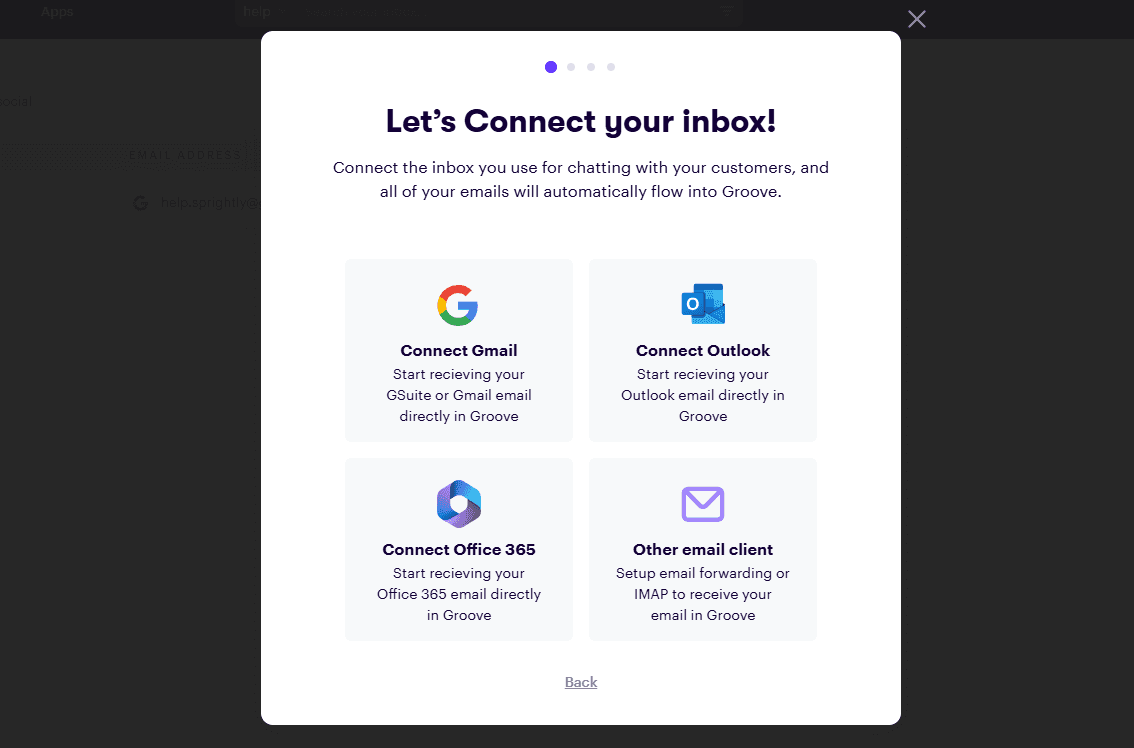
Groove’s shared inbox collects all consumer communications from various channels in one location. This feature allows your team to:
- Monitor and respond to feedback from emails, social media, and web forms using a single interface
- Assign conversations to specific team members
- Use internal notes to collaborate on complex customer issues
- Track the history of interactions with each buyer through customer profiles, giving your team more context for personalized responses
Customer Satisfaction Surveys and Other Reports
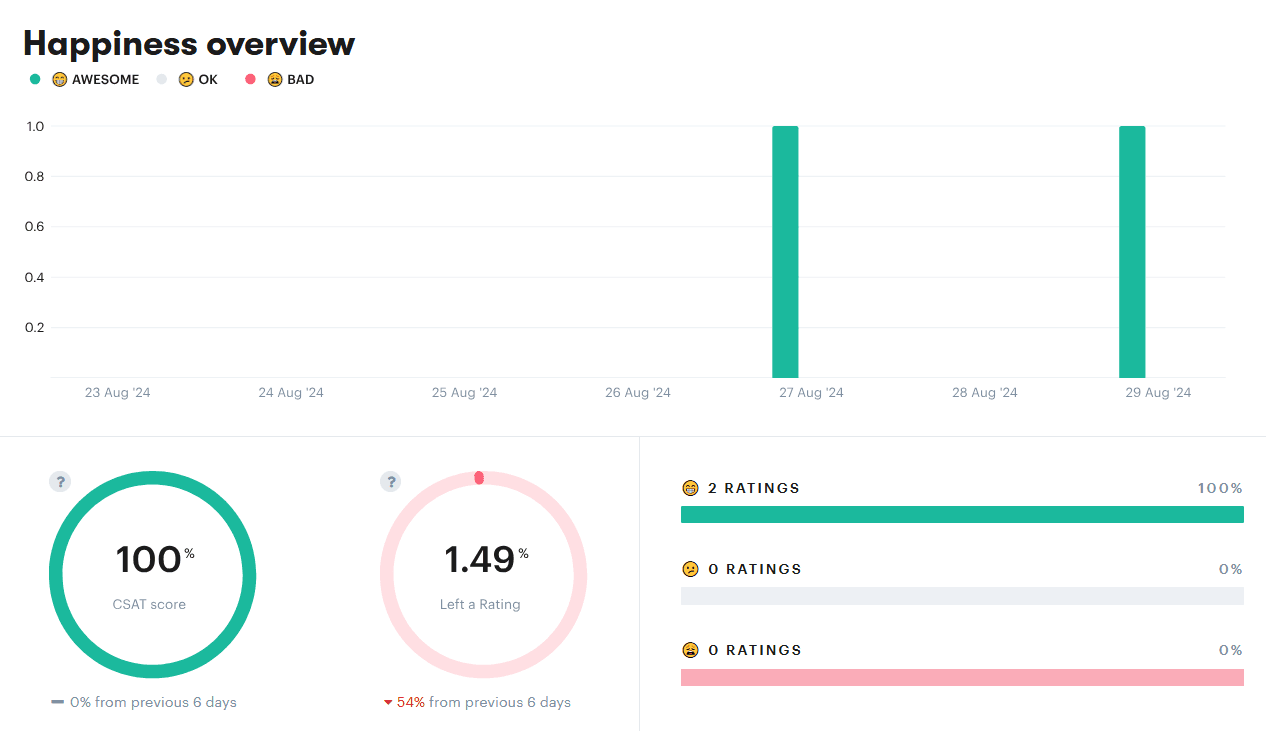
Groove’s Customer Satisfaction (CSAT) surveys are a tool for getting instant feedback. Enabling them lets you:
- Automatically trigger surveys after you’ve resolved support interactions
- Customize survey questions to align with your specific feedback goals
- Set up rules to send surveys based on specific criteria
- Analyze results in real time to identify trends and areas for improvement
Groove’s other reporting capabilities also provide deep insights into your customer feedback. You can view key performance indicators such as response times and resolution rates, and even generate reports on individual agent performance.
Knowledge Base
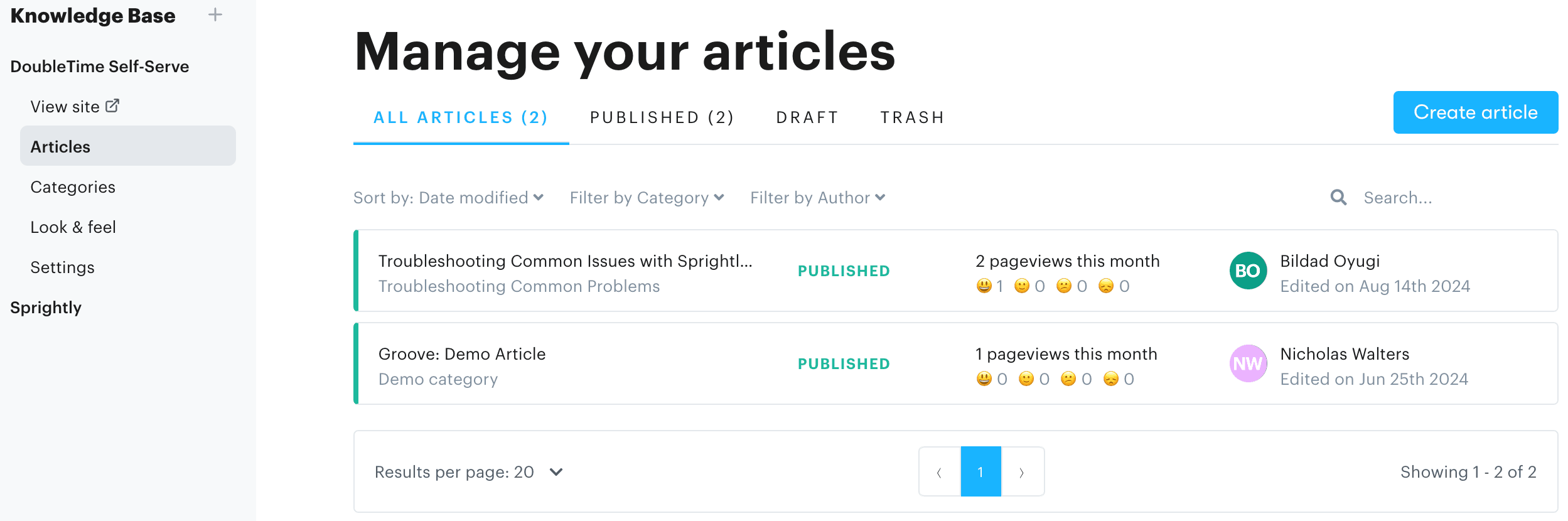
Groove’s knowledge base feature goes beyond just reducing support tickets. You can:
- Track which articles are most viewed, to identify common customer questions or issues
- Identify gaps in your documentation based on search queries that don’t return results
- Use insights from the knowledge base to inform product development and customer education initiatives
Tagging System
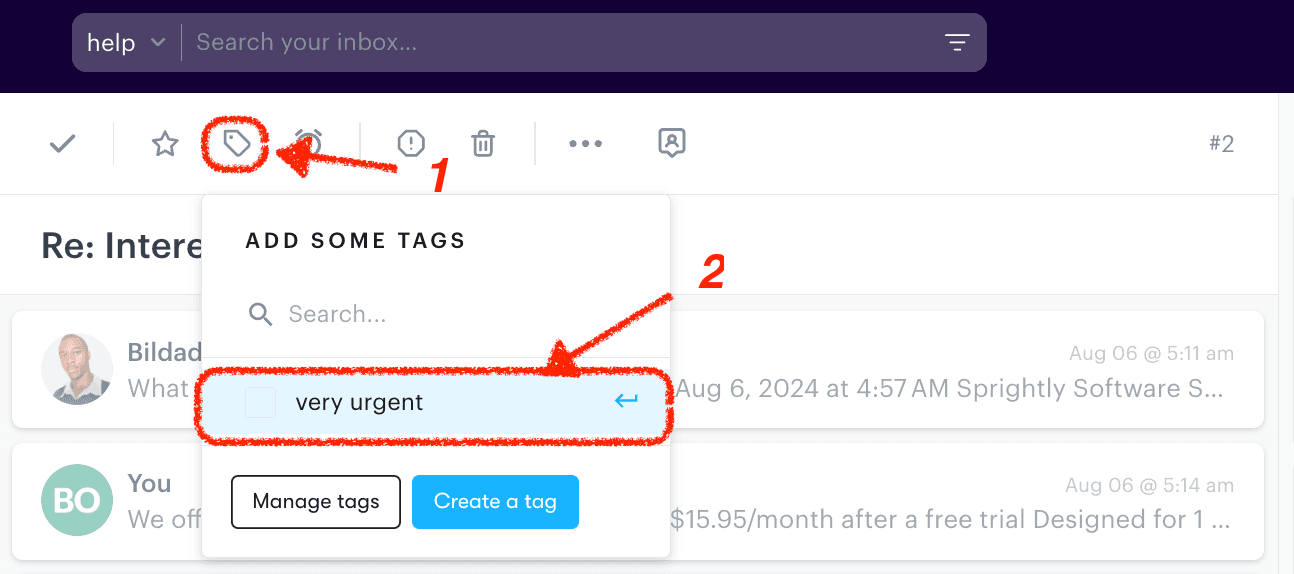
Groove’s tagging system allows for efficient organization and analysis of customer feedback. It allows you to:
- Create custom tags to categorize feedback by topic, sentiment, urgency, or any other relevant criteria
- Use tags to filter and sort feedback, so your team can identify patterns and priorities
- Set up automated rules to apply tags based on specific keywords or conditions
- Generate reports based on tags, to track the frequency of different types of feedback over time
Other Options for Your Feedback Management Toolkit
Finally, there are plenty of other tools that enhance the feedback management process. What you need will depend on what methods you’ll use to collect feedback. You might consider:
- Short surveys after key interactions
- In-depth user feedback reports for product development
- Regular customer satisfaction surveys to track overall sentiment
- Social media monitoring for real-time feedback
- Customer interviews for deeper insights
The best strategy often involves a mix of methods. This way you’ll get a comprehensive picture of your customers’ experiences. To support your efforts, you can check out tools like:
- Survey platforms such as SurveyMonkey, Typeform, and Google Forms, for creating and distributing more complex questionnaires
- Sentiment analysis tools like MonkeyLearn and Brand24, for analyzing text data from reviews and social media comments
Step 3: Follow Best Practices for Gathering Customer Feedback
The success of your customer feedback reports relies on what information you gather and how. Choosing your methods carefully and crafting your questions thoughtfully results in more accurate, relevant, and actionable data.
Let’s look at some best practices for a few popular feedback channels.
Online Surveys
Surveys are great for gathering both quantitative and qualitative data. You can reach a large audience quickly. Plus, you get to gather structured feedback on very specific aspects of your business.
However, you’ll need to build your surveys carefully if you want high response rates and useful results. Check out our full guide on the topic for all the details, but here are a few key suggestions:
- Write clear, concise, and specific questions
- Use multiple question formats, like multiple-choice, rating scales, and open-ended responses, to get better insights and improve engagement
- Keep your surveys brief, and optimize them for mobile use
Social Media Monitoring
Social media is perfect for gathering unsolicited, real-time comments. It provides information on public perception about your brand, and enables you to discover problems that customers aren’t reaching out about directly.
You can track brand and competition mentions with a social listening platform like Hootsuite. You can also encourage and guide feedback by:
- Actively engaging in conversations with your customers on social media
- Responding to comments and answering questions
- Asking questions and sharing polls
Review Site Analysis
Review websites offer valuable insights on how customers experience your products or services. To get the most out of this opportunity, you’ll need to analyze reviews on relevant sites, categorize them, and identify common themes. Pay attention to both negative and positive feedback, in order to get a balanced view of your performance.
While you’re at it, don’t forget to respond to those reviews! Here’s how you can manage that process through Groove:
- Create response templates for common review scenarios (positive feedback, negative feedback, specific issues)
- Use Groove’s task assignment feature to delegate responses to appropriate team members
- Track response times and completion rates using Groove’s analytics tools
Email Feedback Forms
Email lets you send personalized and targeted requests to your existing customers. It’s a direct and handy way to capture all kinds of information.
For example, you can use embedded feedback forms within your emails, to capture feedback at key moments in the customer journey. This process can even be automated with Groove:
- Use email templates to create personalized feedback requests with clear calls-to-action
- Set up automated workflows that send your requests based on specific customer actions (e.g., after a purchase or at a set milestone)
- Track open rates and responses directly in your dashboard
Finally, remember to personalize your email requests. People are more likely to respond if you treat them like individuals. You can:
- Address customers by name
- Reference their specific interactions or purchases to give context, and make them feel specially chosen
- Let them them know why their feedback is important to you and how it will be used
Step 4: Create Actionable Customer Feedback Reports
Once you’ve collected feedback, it’s time to turn it into clear and actionable reports. This process involves organizing, analyzing, and presenting the information in a way that highlights key insights and facilitates data-driven decision making.
You can start by organizing your feedback into categories. Identify key CX issues, customer journey stages, and/or touchpoints, and use them to sort feedback based on:
- Product quality
- Customer service
- Website usability
- Pricing
- Specific features
- Etc.
How should you create your report in a logistical sense? You can get a lot of use out of simple spreadsheet tools. You can include both quantitative data (e.g., CSAT scores, ratings) and qualitative data (e.g., customer comments, verbatim feedback) to present a complete picture.
For best effect, it’s a good idea to create a visual report that highlights key findings. Use charts, graphs, and concise summaries to make the data easy to understand and digest. This is vital when the report is long, and when multiple people need to understand and review it quickly.
Depending on what tools you’re using, some of those visuals may be readily available. In Groove you can access various report types, including Conversations, Productivity, Happiness, and Knowledge Base reports:
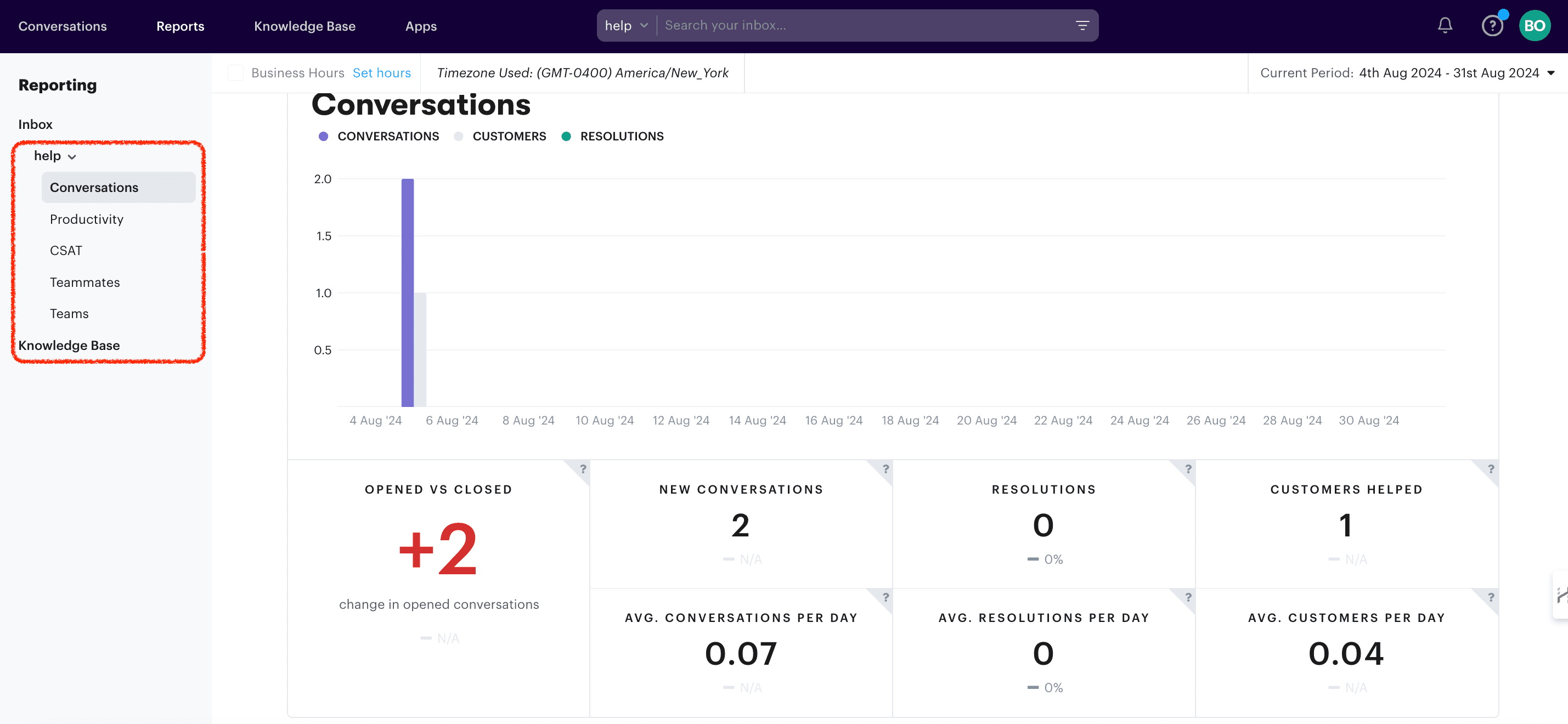
You can customize the existing reports by selecting the type you’re looking for, choosing a date range, and applying filters. The results can be used as-is or imported into your larger spreadsheet-based feedback report.
Step 5: Analyze Your Feedback Reports
Once all of your feedback is in one place, and it’s organized and illustrated with visuals, you can dive into the analysis!
Look for Patterns and Trends
Within each category of feedback, you’ll want to look for recurring issues and trends. Are multiple customers expressing frustration with a particular aspect of your website’s navigation? Do you see a lot of praise for a specific feature?
Maybe you notice that many customers are reporting difficulty integrating your SaaS product with other tools they use. This could indicate a need to improve your API documentation or develop new integrations. Either way, it’s a key pattern to note down.
Segment Your Feedback
You can also break the feedback down further into customer segments. For example, you might reference your customer profiles in Groove, and see if new users have more complaints about a particular issue than long-term subscribers do.
You might also determine whether customers on different pricing tiers have varying levels of satisfaction or feature usage. This segmentation will help you tailor your product roadmap, support resources, and marketing messages to better meet the specific needs of each customer group.
Compare Time Periods
Data isn’t stagnant. It’s important to look at how the feedback changes over time. This is especially useful when analyzing customer satisfaction survey reports or churn rate data.
Has there been an improvement or decline in satisfaction scores or churn rate since your last report? If you’ve recently released a new feature or updated your pricing, this comparison can help you gauge the impact on customer satisfaction and retention.
Use Sentiment Analysis
Two customers can be unhappy about the same thing, but to wildly different degrees. One may find a feature a little annoying, but ignorable. Another might see that same feature as a roadblock to success with your product.
Understanding the difference helps you prioritize. If you find a lot of trends in your analysis, you’ll need to know which actions to take first.
You can use sentiment analysis tools or manual assessment to gauge the overall tone of the feedback within each category. Is the sentiment primarily positive, negative, or neutral? What kind of language is being used? Do the unhappy customers in this category complain about other issues as well?
In particular, you’ll want to identify the areas where sentiment is especially negative. That tells you what will require immediate attention and action.
Identify Your Strengths
It’s easy to focus on the negatives. And most of your analysis will be about finding problems and areas for improvement.
Still, don’t forget to pay attention to what customers praise! These are your strengths – areas you should continue to invest in and highlight in your marketing materials.
Analyzing positive feedback tells you what not to change. And it’s a perfect starting point for acknowledging your teams’ successes and sharing positive stories with customers.
Keep an Eye Out for Unexpected Insights
At the beginning of this process, you set goals. Those goals will guide what feedback you gather, what trends you look for, and how you focus your analysis.
At the same time, don’t restrict your focus too tightly. Sometimes the most valuable insights come from unexpected places. So keep an eye out for unique/unusual feedback.
This feedback can reveal new opportunities or issues you hadn’t considered. For example, a customer comment about using your SaaS product in a way you hadn’t anticipated could spark an idea for a new feature or marketing campaign. If these insights don’t align with your current goals, they can be noted down for future development.
An Example Analysis
So what does this all look like in aggregate? Let’s say you run a project management SaaS business. After analyzing your feedback reports, you notice:
- A lot of users requesting a specific new feature
- High praise for your mobile app’s user interface
- Frequent complaints about the complexity of your onboarding process
- An increase in churn rate among users on your free plan
Based on this analysis, you might consider:
- Prioritizing development of the desired feature, or at least conducting further research into its viability
- Continuing to invest in your mobile app’s user experience, and borrowing what works there to apply in other areas (such as in your website’s design)
- Simplifying your onboarding process (perhaps with interactive tutorials or personalized support)
- Adjusting your free plan’s features or pricing to improve retention
The goal of analysis is to uncover why customers are giving particular types of feedback, how important the issues are, and what you can do about them. It takes time, but when it’s done you’ll be well-equipped to make informed decisions that improve CX and growth.
Step 6: Put What You’ve Learned into Action
Now it’s time to start taking action!
It’s easy to go overboard on this step too quickly. You’ve just discovered all kinds of things that might make your customers happier and your business more profitable, and you’re naturally tempted to do everything at once.
So before making any changes based on what you learned from your feedback reports, it’s time to prioritize. Not all feedback is equally important. List out the ‘issues to be addressed’, and sort them according to:
- Frequency and severity of complaints
- Potential impact on customer churn
- Alignment with your business’ overall goals
A minor bug that affects many users may be more urgent to fix than a feature request from a handful of customers – even if the latter is (potentially) more valuable in the long term.
Creating a Plan of Action
Next, you’ll need to develop a clear action plan for the items you’re prioritizing. To do that, define the specific change you’d like to make, and:
- Set a realistic timeline and clear goals
- Assign your team members the necessary responsibilities
- Establish the metrics you’ll use to measure success
If your feedback reports show that customers want a more streamlined onboarding process, your action plan might look like this:
- Specific Change: Create interactive tutorials for key features.
- Timeline: Develop and implement tutorials within the next two sprints.
- Responsibility: Assign the task to the product team, with collaboration from the customer success team.
- Success Metric: Track user activation rates and time-to-first-value after implementing the tutorials.
Implementing Changes Incrementally
Unless the change you’re making is very minor, it’s a good idea to roll it out in phases or run a pilot test. This lets you gather feedback on the changes themselves, make adjustments before full implementation, and minimize disruption to your business operations.
Suppose you’re redesigning your website’s home page based on customer feedback. You might first launch the new design to a small segment of your website visitors using A/B testing tools. This lets you gather data on how the new design impacts user engagement, bounce rates, and conversion rates before rolling it out to your entire audience.
Communicating Changes to Your Customers
Finally, remember to inform your customers when you make changes based on their input! This demonstrates your appreciation for their feedback and your dedication to improving their experience. It also encourages participation when you ask for more feedback in the future.
“You spoke, we listened! Based on your feedback, we’ve simplified our onboarding process so it only takes five minutes to get started with Sprightly.”
You might:
- Send email updates to your customer base
- Post announcements on your website or social media channels
- Highlight changes in your newsletter
And of course, be sure to measure the impact of your feedback-driven improvements. When gathering and assessing this information is a key part of your ongoing business development, everyone wins!
Setting the Foundation for a Customer-First Business
The future of customer feedback lies in predictive insights. The right analytics help you anticipate needs and preferences, allowing you to proactively address potential issues and develop innovative solutions.
Remember, your business only succeeds if customers are happy. The more you know about how they feel, individually and as a whole, the better positioned you are to provide customer-first service.
It’s a lot of work, but you can leverage Groove’s features to streamline feedback collection! Our help desk lets you automate workflows, generate insightful reports, and collaborate with your team to implement positive changes.
Start your free trial of Groove, and embark on your journey towards feedback-driven success.
What Is Intelligent Customer Experience? (Plus 5 Steps for Making It a Reality)
You’ve poured your heart and soul into creating a product you’re proud of. But lately, you’ve noticed a troubling trend. Your customers aren’t as engaged as they used to be. And your poor support team? They’re drowning in a sea of tickets. Success isn’t just about having a killer product. It’s about providing exceptional experiences […]
How To Develop a Winning Digital Customer Experience Strategy
Finding it difficult to determine how customers interact through your digital channels? Maybe your buyers have a hard time moving from one channel to the next with your brand? If your business fails to create a personalized experience across all channels, you’ll face low engagement rates, high bounce rates, and hampered customer satisfaction. The solution? […]
