
How To Prioritize Support Tickets: A Guide for SMBs

Is your team struggling to prioritize support tickets efficiently?
When you’re relying on a traditional email platform, it’s easy for urgent messages to get buried under less important requests. This leads to delayed responses, frustrated customers, and missed opportunities to resolve crucial issues promptly.
Thankfully, there’s a way to regain control of your support inbox and ensure that nothing slips through the cracks. A clear system for categorizing and addressing tickets based on their importance provides for timely resolutions and an excellent customer experience.
Ready to learn how to prioritize tickets in a way that helps your support team and your customers? Let’s begin!
What Factors Should You Rely On To Prioritize Tickets?
It’s easy to say ‘prioritize the most important tickets’. But what counts as important? The most severe issue, the request from the most high-value customer, or something else entirely?
Most likely, you’ll make decisions about priority by relying on a few factors. It’s best to determine those upfront, so you’ll be better equipped to make quick, informed decisions. Let’s look at what you may want to consider.
SLAs (Service Level Agreements)
Let’s start with the most straightforward factor. Your SLAs and other promises can establish or at least guide your prioritization. For example, if you’ve promised VIP customers a two-hour response time, their tickets automatically gain higher urgency.
Similarly, if your website states a commitment to resolving all payment issues within four hours, those requests become top priorities. Any promises you’ve made to your customers need to be a foundational part of how you prioritize support tickets.
Urgency
In this context, ‘urgency’ defines how quickly your customer support team needs to address a ticket in order to prevent a negative impact on your customer or business. Can it wait a few days if it has to, or does it need to be dealt with now?
How do you define urgency levels? Here’s a simple yet effective system.
Critical: Drop everything and act now! These issues require immediate attention, ideally within minutes. Often these are problems that affect all or most of your customer base, like:
- Your entire online store is down, preventing purchases
- A security breach exposes customer data
High: Act fast, aiming to address these within a few hours. These may also be issues that affect many customers. However, this is also a good classification for any problem that affects one customer in a way that you know (based on historical data/feedback) carries a high risk of churn. Examples:
- A key feature of your SaaS product isn’t working properly
- A customer has been charged incorrectly or is unable to access their account
Medium: Important, but not on fire. This tends to be the largest category, and are generally inquiries you’ll want to address within 24 hours, such as:
- A customer is requesting a return or refund, or querying a delivery issue
- General troubleshooting, like a request for assistance with a feature that’s not working as expected but isn’t critical
Low: Can wait a bit. While important, these inquiries can be addressed after more pressing matters are resolved. Aim to tackle within 48 hours or at your next available opportunity. For example:
- A customer suggests a new feature
- There’s a minor bug affecting your product’s appearance but not its functionality
- Someone has a general question about your return policy
Impact
Impact represents the scope and severity of an issue. It helps you measure the ripple effect a problem creates across your business and customer base.
When gauging the impact of a ticket, consider the following:
- Number of users affected. A problem that affects a significant number of your customers carries more weight. Sometimes the needs of the many outweigh the needs of the few.
- Degree of effect on customers. A completely non-functional product will create more frustration than a minor delay in email alerts.
- Potential revenue loss. An issue that prevents checkout completion has a bigger impact than a tiny flaw in your site’s design.
- Brand reputation risk. A data breach, for example, could destroy customer trust and have long-term consequences.
By carefully considering the potential impact of each issue, you can prioritize tickets that pose the greatest threat to your business and customer relationships. When doing this, remember to balance the needs of individual customers with the overall health of your business.
For example, a VIP customer might be locked out of their account due to a password issue, while a minor bug affects product descriptions for all users. While the VIP customer is important, the bug impacting all users may have broader consequences on sales and customer satisfaction.
Whether that’s true or not will depend on your niche, product, etc. But avoid the temptation to prioritize the loudest complaints. Sometimes, seemingly minor issues can have a significant impact if left unaddressed.
Customer Type/Value
Different customer segments have varying needs. They are also of varying value to your business. Understanding this makes it easier to allocate your limited resources effectively.
You might segment your buyers based on:
- Purchase history. Consider their total spend, frequency of purchases, and average order value. A high-spending, frequent customer may warrant faster attention.
- Revenue generated. Consider both direct revenue (purchases) and indirect revenue (referrals, affiliates).
- Engagement level. Customers who regularly use your product might need more immediate support to maintain their satisfaction. On the other hand, you may be more concerned about preventing churn by attending to the needs of unengaged buyers quickly.
- Account age. Long-term, loyal customers who have been with you for a while could deserve extra care and attention.
- Potential for growth. Certain types of customers may not be major spenders now, but have the potential to increase future value.
Once you’ve segmented your customers, you can decide how to prioritize them. Here are some examples of segmenting based on value:
- VIP fast track. Create a dedicated queue or system for your most valuable customers.
- Tiered response times. Set different target response times based on customer tiers.
- Dedicated support agents. Assign your most skilled agents to handle tickets from high-value customers.
- Proactive outreach. For at-risk customers, consider reaching out proactively when you detect potential issues, demonstrating your commitment to their success.
While prioritizing based on customer value can be effective, you’ll want to maintain fairness and avoid neglecting any customer segment. Set a baseline level of support that all buyers receive. And be transparent: if you offer tiered support levels, clearly communicate this to customers so they understand what to expect.
5 Tips for How To Prioritize Support Tickets Proactively
Now, let’s look at how to create a prioritization workflow that works for your customer support team. The better defined this is now, the less time needs to be wasted debating the importance of specific tickets.
1. Choose a Prioritization Framework
First, you’ll want to choose a framework that helps you categorize and prioritize tickets based on factors like urgency, impact, and customer type/value. There are plenty of frameworks that other businesses have used, like the Value vs. Effort Matrix or the Eisenhower Matrix, which are helpful starting points.
But in most cases, it’s best to create a custom framework that’s tailored to your unique needs. A strong framework aligns prioritization with what matters most to your business, ensures consistency, and still offers some room for flexibility and growth.
To start building your framework, you can:
- Identify your key factors. Start by listing the factors you’ll use to prioritize tickets, whether the ones we discussed earlier or more unique concerns.
- Assign weights. Determine the relative importance of each factor by assigning it a numerical weight. For example, if urgency is the most crucial factor, you might assign it a weight of 5, while customer type/value may be given a weight of 3.
- Develop a scoring system. Create a system for scoring tickets based on the assigned weights. Sometimes, simple addition is all you need. For example, a ticket with high urgency (score of 5) and medium impact (score of 3) would have a total score of 8.
- Establish priority levels. Define priority levels based on score ranges (e.g., scores of 9-10 = Critical, scores of 6-8 = High, etc.).
- Document your framework. Clear documentation is essential for establishing consistency across your support team. Be sure to include the factors, weights, scoring system, and priority levels. Understanding the ‘why’ behind your framework will encourage compliance.
2. Create Workflows Based on Your Framework
The next step is to translate your custom framework into actionable workflows. This means defining specific processes/procedures for handling tickets based on their priority levels.
Here’s how to create effective workflows based on your chosen framework.
Define Clear Categories
Based on your framework, create distinct categories for ticket priorities. These categories should align with the priority levels you’ve established (e.g., critical, high, medium, and low). Use clear and concise labels that are easy for your team to understand.
Set Response Time Goals
Establish target response times for each priority level. This sets clear expectations for both your team and customers. For instance:
- Critical: Within 30 minutes
- High: Within 2 hours
- Medium: Within 24 hours
- Low: Within 48 hours
Assign Responsibility
Determine who will handle tickets at each priority level. This might look like:
- Critical: Senior support agents, team leads, or a dedicated escalation team
- High: Experienced customer service agents who can resolve complex issues
- Medium: All agents, so you have a balanced workload across the team
- Low: Junior agents (alternatively, everyone in the customer support team can handle these tickets during slower periods)
Create Escalation Procedures
Develop a clear process for escalating tickets that your customer service agents don’t resolve within the target timeframe, or that require specialized expertise.
For example:
- If a critical ticket isn’t resolved within 1 hour, automatically escalate it to the support manager or a dedicated escalation team.
- If a high-priority ticket isn’t addressed within 4 hours, automatically bump it to critical priority.
Implement a Triage Process
Establish a triage step where an experienced team member quickly assesses and assigns initial priorities to incoming tickets, based on predefined criteria. This ensures that urgent issues are identified and routed to the appropriate team members promptly.
To do this, you might
- Designate ‘triage specialists’ who have broad product knowledge and strong decision-making skills.
- Create a rotation schedule for triage duty.
- Develop a quick checklist for assessing tickets (e.g., known issue, number of affected customers, impact on core functions).
- Set up a dedicated triage queue in your help desk software.
- Implement a 2-3 minute “first look” time limit per ticket.
- Use tags to quickly categorize tickets (for instance, #urgent, #bug, #feature-request).
- Provide precise instructions for escalating important issues.
- Empower your triage specialists to resolve simple issues on the spot.
- Set up auto-responses to manage customer expectations.
- Hold regular team meetings to refine the process.
An effective triage process is your support team’s first line of defense. It ensures that their efforts are always aligned with business priorities and customer needs.
Document the Workflow
Now is the time to expand your documentation to include not only your basic framework, but your specific workflows. In a clear and accessible way, outline all the necessary steps, escalation paths, and decision trees. For best results, include:
- Logical structure with headings and bullet points
- Step-by-step guide of the prioritization process
- Visual aids like flowcharts or decision trees
- Real-world examples of ticket prioritization
- Escalation paths with contact information
- An FAQ section for common questions
- A schedule for regular updates
3. Use Technology To Streamline and Automate Your Workflows
Now that you have a well-defined prioritization framework and corresponding workflows, it’s time to implement them. With everything documented clearly, your support agents can tackle the necessary prioritization and decision-making manually.
Alternatively, you can put in place systems and automation so these new workflows are as easy as possible to follow. If you’re not already using one, now is the time to set your customer service team up with a helpdesk like Groove:
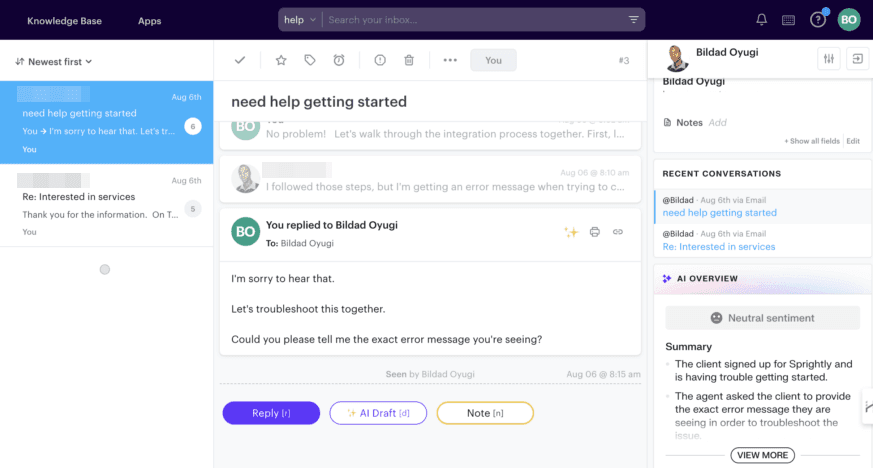
Groove is a central hub for all of your customer communications. As such, it provides a variety of features to help you effortlessly implement your new prioritization system. Here’s how to leverage Groove to bring your workflows to life.
Smart Folders and Tags
In Groove, every conversation (whether it comes in through email, live chat, social media, etc.) can be organized using smart folders and tags. The latter is especially useful for quick prioritization.
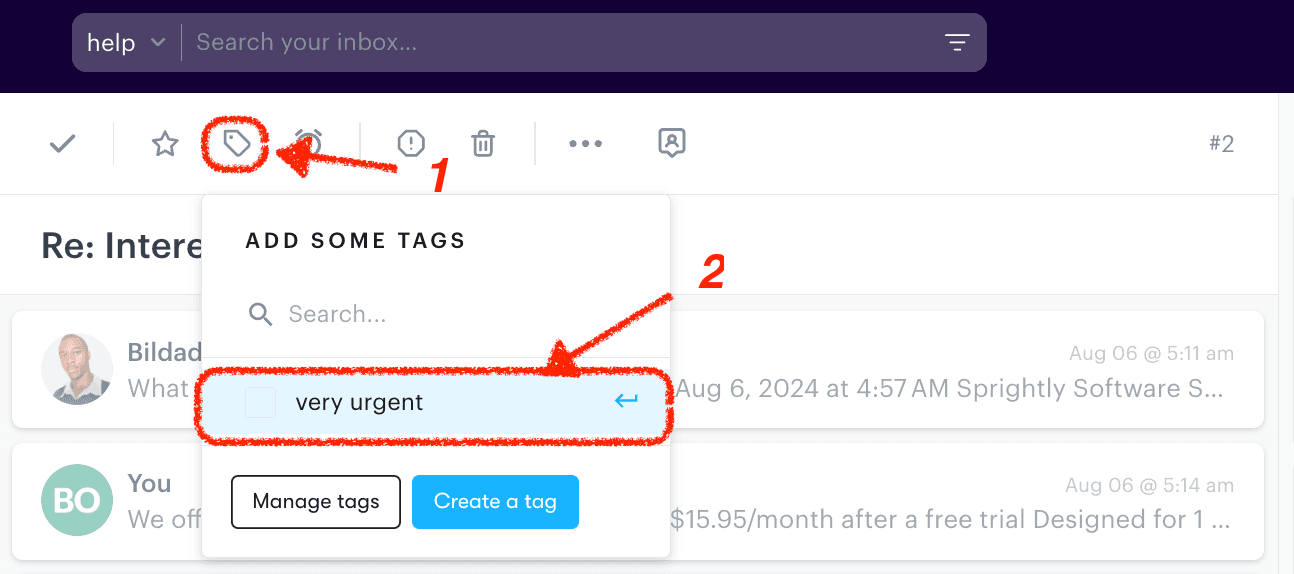
You can create custom tags that align with your prioritization categories:
- #priority-critical
- #priority-high
- #priority-medium
- #priority-low
With these in place, you can easily sort, filter, and manage requests based on their priority. This helps your customer support team see and respond to important problems right away.
Automation Rules
Groove also allows for various types of automation. Some parts of your prioritization workflows may be simple and repetitive, and if you can take those tasks off agents’ plates, they can more effectively assist customers.
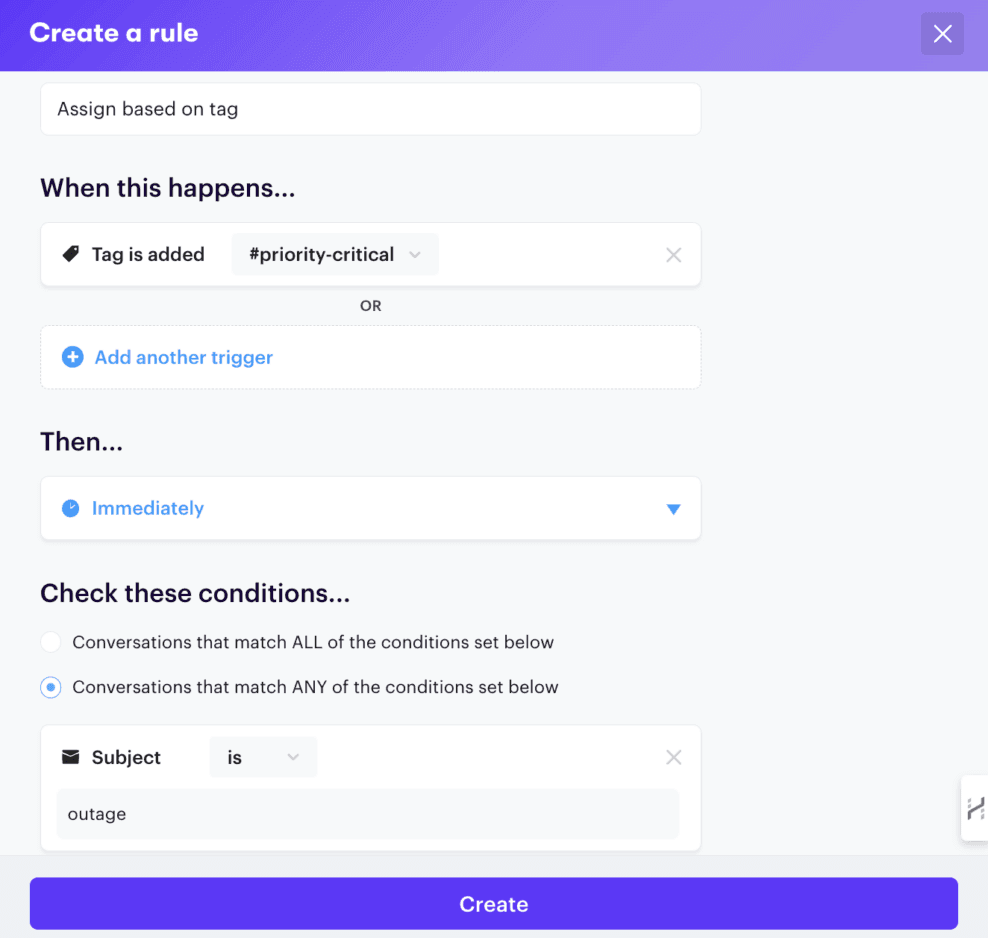
For example, you might set up custom rules to:
- Automatically assign priority levels based on keywords in the ticket’s subject or body (e.g., assign “Critical” priority to tickets containing “outage” or “server down”)
- Route high-priority tickets to specific team members or dedicated queues (e.g., route all #priority-critical tickets to your escalation team’s queue)
- Escalate tickets that haven’t been addressed within your defined SLA timeframes (e.g., automatically escalate a #priority-high ticket to “Critical” if it hasn’t been responded to within 2 hours)
Canned Replies
Instant replies (or canned emails) are messages you write up and save. Those messages can be sent as-is whenever needed, or modified for specific situations. Like automation, it’s another way to save time – no one wants to write the same simple email over and over again.
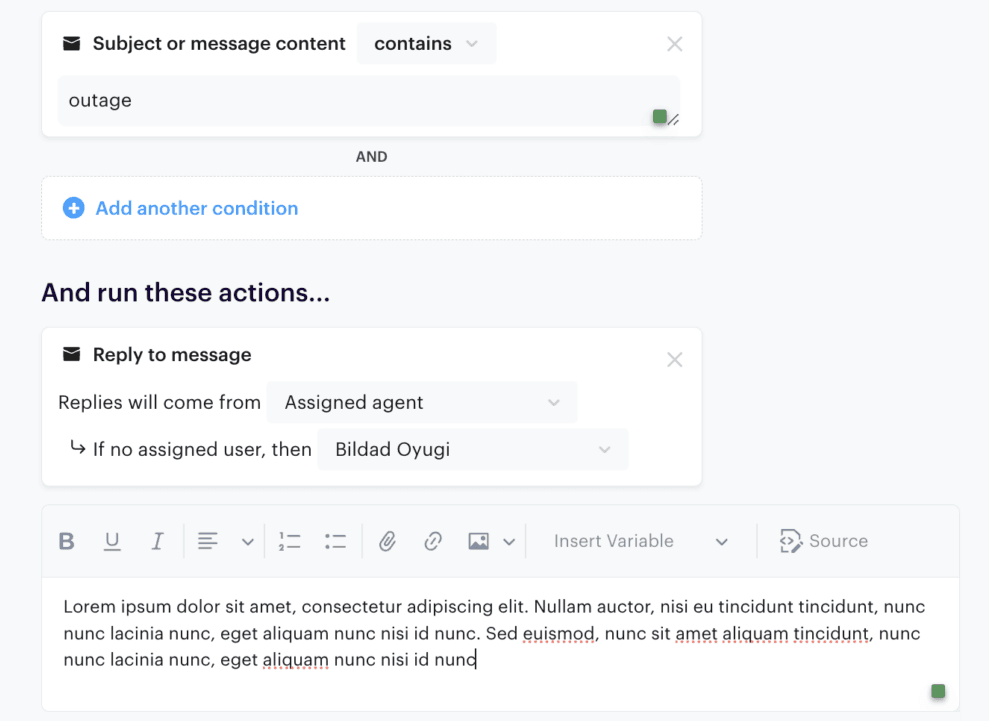
So you may want to create instant replies for different priority levels, such as:
- A message expressing urgency and acknowledging the critical nature of the issue for #priority-critical tickets
- A standard acknowledgment message for #priority-low tickets, assuring the customer that their issue will be addressed within a defined timeframe
4. Communicate Expectations with Your Team and Your Customers
To ensure the success of your ticket prioritization system, you need to equip your support team with knowledge, skills, and ongoing support. Thorough documentation (as discussed above) is a good start. But for best results, make a more regular and deliberate investment in training.
Interactive training sessions focused on prioritization can:
- Address common misconceptions. Anticipate potential areas of confusion and proactively address them during training.
- Develop practical skills. Incorporate hands-on exercises that simulate real-world scenarios. For example, you can have your agents roleplay challenging customer interactions related to prioritization.
- Promote consistency. Emphasize the importance of consistently applying the prioritization framework across the entire team.
- Encourage empathetic communication. Train your team to communicate about priority levels with customers in a way that is both informative and empathetic. Acknowledge the customer’s needs, and reassure them that their issue is being handled appropriately.
Training can be enhanced through visual aids like decision trees and infographics, to make the prioritization process more accessible. Beyond the initial training, it’s also important to provide regular oversight and personalized feedback.
Also, while your customers don’t need the full details, it’s a good idea to communicate the basics to them as well. You can explain your prioritization system on your support page or in your knowledge base, using clear and customer-friendly language. Manage expectations by sharing average response times for different priority levels.
5. Regularly Review and Adjust Your Prioritization System
To keep your ticket prioritization system aligned with evolving business needs, you’ll need to regularly review and fine-tune your approach. You can use Groove’s reporting and analytics features to track whether your prioritization system is effective, and to identify areas for improvement.
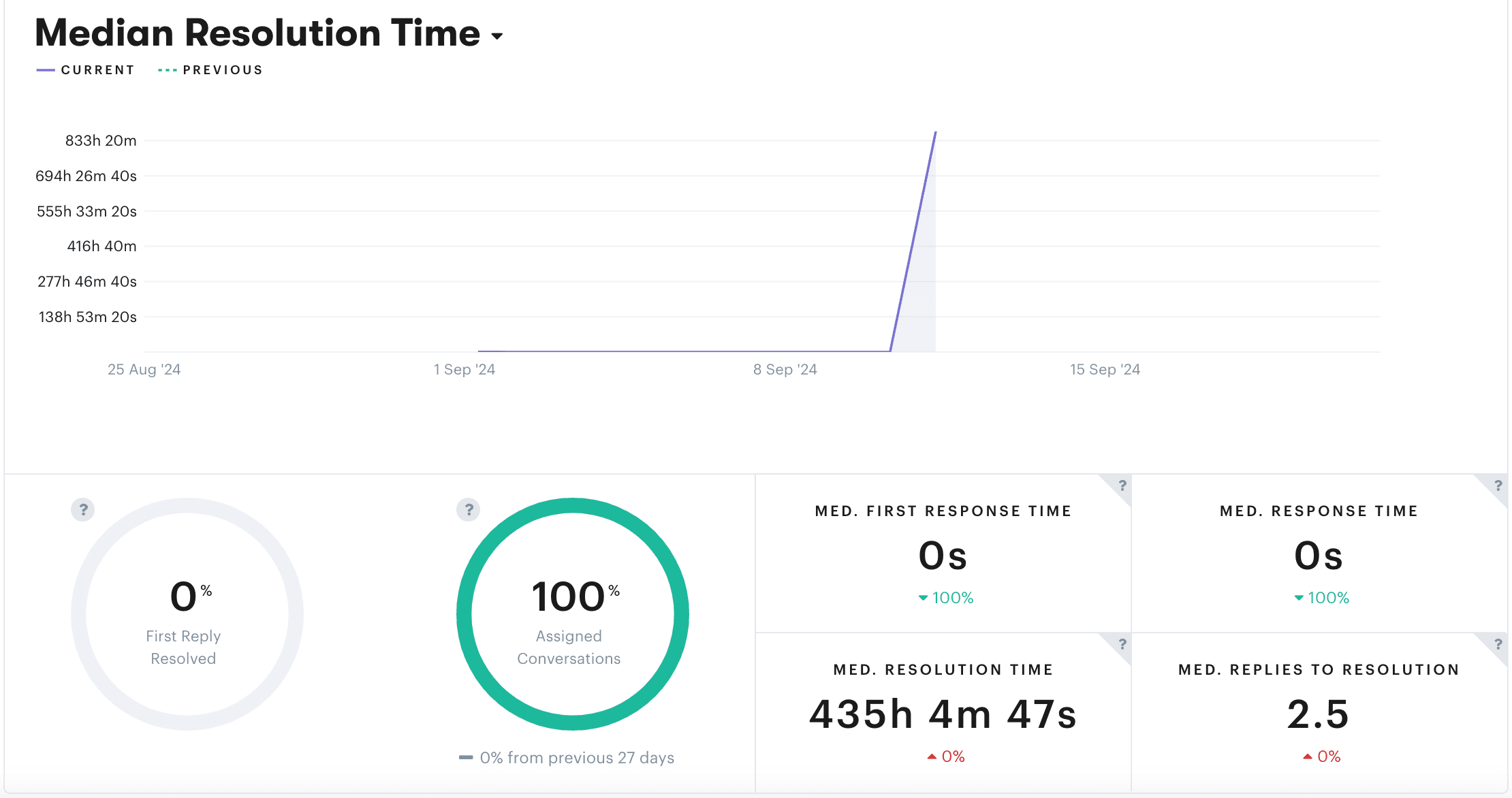
For instance, you might:
- Track average response and resolution times for different priority levels. This helps you meet your SLAs and identify potential bottlenecks.
- Analyze the distribution of tickets across priority categories, to understand the volume and types of issues your team is handling.
- Identify trends in escalations or priority changes. This highlights areas where your framework or workflows might need adjustment.
- Implement customer satisfaction ratings to see if customers are happy with how your support team prioritizes and handles issues.
Finally, a few last suggestions for overseeing and refining your prioritization workflows:
- Schedule quarterly reviews. Set aside dedicated time every three months to thoroughly evaluate performance. This lets you to collect enough data to spot trends and make changes, without allowing issues to linger for too long.
- Gather team feedback. Gather honest feedback on what’s working well and what could be improved. It’s important to create a safe space for team members to openly discuss their experiences, share challenges, and brainstorm solutions.
- Listen to customer voices. Don’t forget to incorporate customer feedback into your review process. Conduct targeted surveys or interviews to gather more in-depth feedback on their experience with your prioritization system and identify areas for improvement.
Optimize Your Support and Watch Your Business Grow
Understanding how to prioritize support tickets effectively takes time. It requires ongoing training, clear communication, and regular review and adaptation (to keep your strategy aligned with your business goals).
The result? An empowered team, happier customers, and less wasted time. Careful and consistent prioritization strengthens customer relationships and fuels business growth.
Want to make the process as easy as possible? Groove helps you set up clear organization, automate tasks, and gather key insights. It’s a support helpdesk built for the needs of small businesses – start a free trial and see for yourself!
5 Help Scout Alternatives: Why Growing Support Teams Switch to Groove
Groove Fixes What Teams Don't Like About Help Scout: Flat Pricing, Built-In AI, and Native SLA Management. See the Full Comparison.
How Helply's Hallucination-Proof AI Eliminates the #1 Fear of AI Customer Support
Customer Support Automation That Hits 65% AI Resolution, Guaranteed. Helply's Action-Based AI, Safe Escalations, and Optimization.
