
7 Tips for Delivering Better Post Purchase Customer Support

Are you struggling to hold on to your hard-won customers after their first transactions? In many ways, the real work begins after a sale is made.
Post purchase support is key to transitioning one-time buyers into lifelong fans. When done right, it builds loyalty, boosts revenue, and turns customers into your biggest advocates.
In this guide, we’ll offer some practical strategies for creating a better post purchase experience. Let’s get started!
What Defines Quality Post Purchase Customer Support?
Basic customer service means helping buyers when they reach out with questions and problems. Processing return requests, troubleshooting software problems – all of that is expected and necessary.
When we talk about ‘post purchase customer support’, though, we’re talking about a higher level of service. It’s about more than doing the bare minimum. Instead, the goal is to create an experience that keeps your customers truly satisfied and engaged with your brand.
Quality post purchase support gives them a reason to stay long-term. When you go above and beyond for customers after they’ve clicked “buy”, you demonstrate that you value them and their business beyond that single transaction.
This can be a game-changer, especially for small online businesses that rely on retention due to limited marketing budgets or small customer bases (or both). Going all-in on support:
- Builds trust: Being there for customers post-sale shows that you’re reliable and builds confidence in your brand.
- Fuels loyalty: Happy customers are more likely to become repeat customers, choosing you over competitors time and again.
- Creates brand advocates: Stellar support can transform satisfied buyers into enthusiastic fans who spread the word about your business.
- Reduces churn: Keeping existing customers around is significantly more cost-effective than constantly acquiring new ones.
- Increases Customer Lifetime Value (CLV): The longer customers stay with you, the more they’ll spend over time, boosting your profitability.
7 Ways To Improve Post Purchase Customer Support
The period immediately following a purchase is a wonderful opportunity to solidify customer relationships and build lasting loyalty. This is the point when a buyer is most engaged with and cognizant of your business, and you can capitalize on that. Here are seven of the best strategies we’ve used.
Tip #1: Thank Them For Their Purchase
A “thank you” can go a long way towards fostering loyalty and encouraging repeat business. It may sound simple, but it’s important to make your customers feel noticed and appreciated if you’d like to build strong post purchase relationships.

On the other hand, that effort won’t go far if your thanks sound generic. To make your gratitude feel genuine, consider the following:
- Personalized thank-you emails. Address the customer by name, mention their specific purchase, and convey genuine appreciation for their business. For example: “Hey John, thanks for choosing Sprightly! We hope it helps you save time.”
- If you’re using Groove (our customer support helpdesk!) you can create a template ‘thank you’ email with placeholders that can be quickly customized for each buyer.
- Handwritten notes. If you’re shipping physical items, a handwritten note can make a big impact. You don’t have to do anything fancy – just include a short, sincere message in each package. Even a quick “Thanks for your support!” can go a long way.
- Future discounts. Provide tangible thanks and encourage repeat purchases by offering a special incentive for their next visit. This could be a percentage off their next order, or free shipping. For instance: “Enjoy 10% off your next purchase with code THANKYOU10.”
- Another option is to offer customers something exclusive, such as early access to new features or entry into a members-only group. This is also a fantastic way to build community and keep them engaged with your brand.
Tip #2: Guide Customers Through an Onboarding Process
If your product or service involves any level of complexity, you can start the post purchase experience off on the right foot via onboarding.
This means providing your customers with whatever help they might need to get started with the product, understand it clearly, and use it effectively. Doing this before they have to reach out for help creates a more positive and engaging experience.
One way to conduct onboarding is to offer a welcome call or free demo. This personal touch demonstrates that you value their business, and lets you address any immediate questions or concerns. It’s especially useful if you offer a product with a fairly steep learning curve, so you can walk them through the basics and show them how to get started.
During the call, you should thank them for their purchase and then:
- Give them an overview of your product’s key features and benefits
- Address any concerns they may have
- Give them tips for getting the most out of the product
Another option that’s less time-intensive is to develop a series of ‘welcome emails’ to guide customers during their first days or weeks with your product. It’s a less personalized approach, but it’s also highly efficient, since you only have to create the emails once.
You can begin by sending an immediate “Welcome aboard!” email informing your customers on the next steps. This might include download or setup instructions, links to documentation and support, and even tutorial videos in place of individual demo calls.
Later emails in the series might:
- Introduce and explain key features
- Share tips to help customers maximize the value of their purchases
- Ask for feedback on their experiences so far, and encourage them to reach out with questions/comments
With Groove, you can create these welcome emails easily via templates. Then you can use customizable rules to ensure that the emails are sent at the right times to new customers – saving your team the need to do so manually.
Tip #3: Provide Plenty of Self-Help Resources
Some problems require customized help. Other issues, however, can be resolved without the need for you or your customer to waste time on an email or chat conversation.
When you empower customers to find solutions on their own, you save your team time handling repetitive requests. Furthermore, you offer customers a greater sense of control, and better serve those who are more hands-on.
So in addition to reactive support via multiple channels, you’ll want to offer a variety of proactive self-service options. Here are a few ideas!
Create an FAQ Section
A well-organized and easily searchable FAQ page is great for addressing simple but common questions. For best results, don’t just guess at what the FAQ should contain. Reference past customer feedback and support tickets to identify points of confusion that come up often and can be answered in a few sentences.
When writing your FAQs, it’s essential to use clear, jargon-free language. If the page is long, organize the questions into logical categories and provide jump links for easy navigation. And don’t forget to update the FAQ regularly – the answers aren’t much use if they’re out of date!
Build a Knowledge Base
Alternatively, you can take your FAQ a step further by creating a detailed knowledge base. This is a full website (or section of your site) containing articles about how to use your products/services.
A useful knowledge base for post purchase customer support might include:
- Step-by-step guides for common tasks
- Troubleshooting articles for known issues
- Product specifications and compatibility information
- User manuals and quick-start guides
As with all self-service resources, it’s vital to ensure that your knowledge base is easily accessible. Fortunately, it’s not hard to create one, especially if you’re using Groove. Our helpdesk software offers a built-in knowledge base feature:
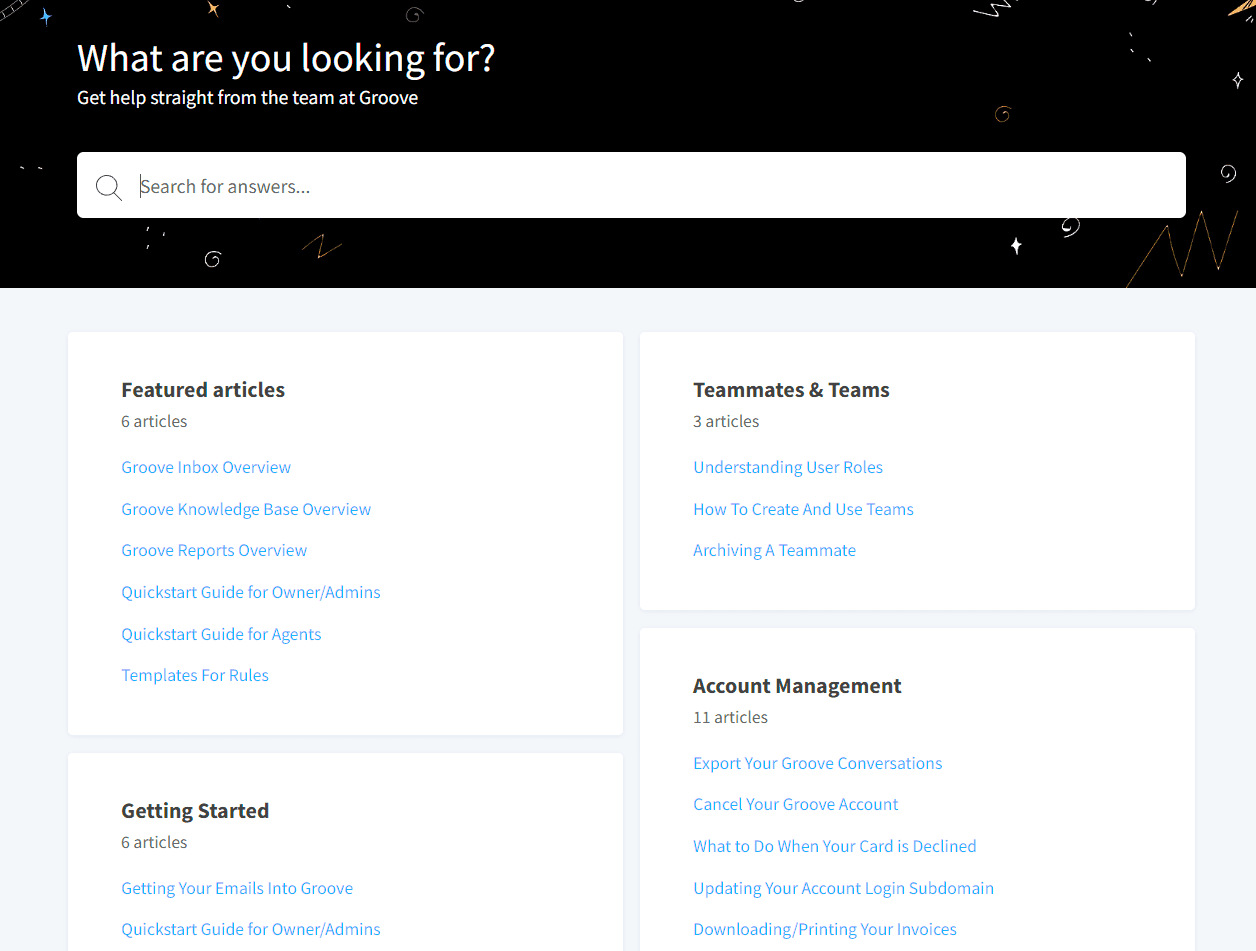
You can create, organize, and manage your self-service content with no need for additional tools or technical skills. You can even enable ratings for each knowledge base article, so you can gather feedback on what resources are helpful for customers.
Develop Video Tutorials
Sometimes, showing is more effective than telling. Short video guides can be immensely valuable, especially for visual learners. You can walk customers through product setup and installation, demonstrate how to use key features, and even offer video troubleshooting guides.
Videos are a lot harder to update than FAQs or articles. So it’s best to create a small handful for the most important scenarios, and rely on text for less common topics. You can incorporate these videos into your welcome emails, your knowledge base, or even a dedicated YouTube channel.
Offer In-App Guidance
If your business develops apps or other software, in-app guidance is a must. Contextual help and clarifications directly within the user interface provides support when and where customers need it most. They’ll appreciate not having to leave the program in order to solve their problems.
Here are a few examples of in-app guidance you might want to include:
- Tooltips. Give direct explanations of specific features when customers hover over them.
- Pop-ups. Provide targeted instructions at relevant points in the user journey, such as during the initial setup process or when a user encounters an error.
- Progress indicators. Show users their progress through a multi-step process. This helps them stay on track and understand what to expect next.
Tip #4: Provide Highly-Personalized Support
Your customers are a varied bunch. It’s hard to provide quality service if you treat them all the same. Good post purchase support relies on making people feel like individuals, and tending to their specific needs.
To make this easier, you can segment customers according to their preferences, behaviors, and past purchases. Each group can then be targeted with different types of support. For example:
- Recent purchasers: Send targeted emails with product usage tips, complementary item suggestions, or exclusive discounts on their next purchases.
- Repeat customers: Offer special deals, early access to new products, or personalized suggestions based on what they’ve bought before.
- High-value customers: Provide premium support options and personalized product recommendations to nurture your most important relationships.
- One-time buyers: Reach out to see if they need help, and use other re-engagement techniques to keep them coming back.
Building these categories upfront helps you provide both proactive and reactive service. You can go even further and set up automated emails based on specific post purchase actions, like:
- Product registration: Send a confirmation email with additional resources or tips when a customer registers their product.
- Support ticket resolution: Follow up after resolving an issue to ensure customer satisfaction and gather feedback on their support experience.
- Review requests: Ask for product reviews at the right time, such as a week or two after purchase.
If you’re a Groove user, you can easily create automated messages via custom rules. You can also build customer profiles to assist with the segmentation process!
Tip #5: Offer Live Chat Support
Live chat offers customers a convenient way to get help. It provides a real-time communication channel that allows for quick resolutions, and it’s something most buyers now expect.
You can leverage live chat to provide many types of post purchase support, such as:
- Order tracking and shipping inquiries. Customers don’t have to wait for an email response to find out what’s going on with their orders or ask questions about shipping.
- Product setup and troubleshooting. Live chat is perfect for assisting customers with product setup and troubleshooting technical issues.
- Answering post-purchase questions. Live chat allows you to address these queries, and potentially upsell or cross-sell related items.
- Personalized recommendations and guidance. You can use live chat to make personalized product suggestions. You can also offer advice informed by the customer’s past requests or purchase history.
These days, it couldn’t be easier to add live chat to your support roster. For best results, however, you’ll want it integrated with your other service channels. Agents shouldn’t have to switch back and forth between an email client and live chat software – that wastes time and increases the odds of missed messages.
The best way to do that is to provide your support team with a full-featured helpdesk platform. Our own helpdesk Groove is designed specifically to assist small businesses in providing top-tier post purchase support.
Along with everything you need to manage customer emails, you’ll also get access to a robust live chat feature:
- Real-time chat: Engage with customers seamlessly through your website.
- Proactive messages: Initiate conversations with customers based on their browsing histories.
- Canned responses: Create pre-written replies to save time.
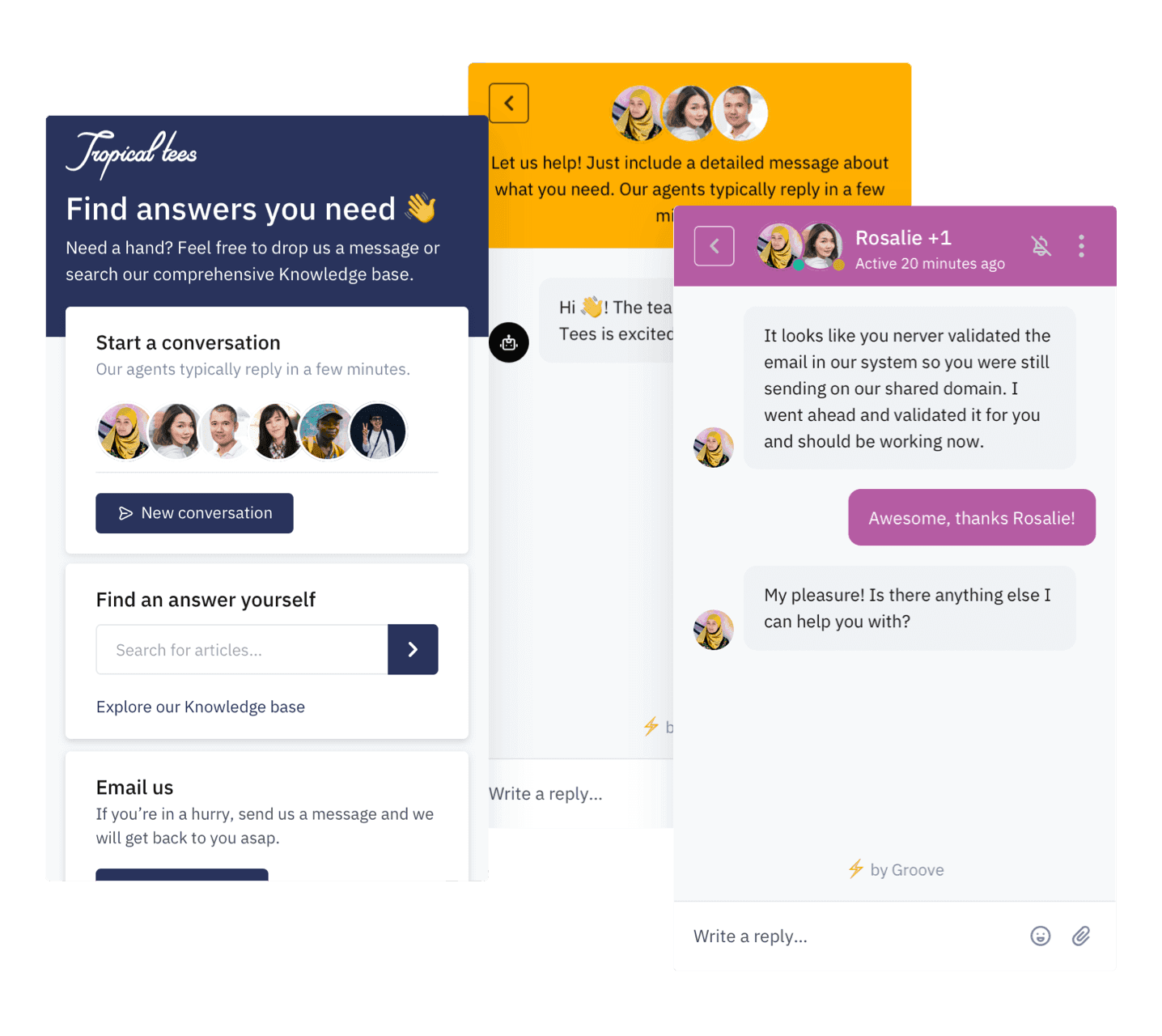
Groove is a centralized platform for managing all your customer interactions, and it makes integrating live chat with email simple. Learn more about Groove here!
Finally, a few tips for offering effective live chat:
- Set clear hours. If you don’t offer 24/7 support, you should clearly communicate your hours so customers know what to expect.
- Train your team. Ensure that your support staff is equipped to handle chat effectively. For example, they’ll need to know how to balance speed with accuracy and empathetic communication.
- Use canned responses. Prepare pre-written answers for common questions. This improves response times, and you don’t sacrifice personalization.
Tip #6: Engage With Customers on Social Media
Traditional channels like phone, email, and even live chat are essential. But don’t forget that you can also leverage social media for post purchase customer support.
There are many ways to do that, and some of your options will depend on the platforms your customers prefer. However, here are a few platform-independent tips for customer service via social media.
Monitor Brand Mentions
You can set up alerts for your brand name and product mentions across relevant social media platforms. This allows you to:
- Quickly identify and address issues or questions new customers have.
- Demonstrate to existing and potential customers that you’re active and dedicated to service.
- Celebrate and share positive feedback, amplifying customer satisfaction and building social proof.
Provide Real-Time Support
Social media is great for marketing, but it can also be an extension of your customer service team. Along with responding directly to customers who reach out, you might:
- Give quick troubleshooting tips for issues that are frequently reported.
- Direct customers to detailed resources like your FAQs or knowledge base.
Create Product-Specific Content
Share content that helps customers get the most out of your products/services. That might include:
- Setup guides and quick-start tutorials
- “How-to” videos of key product features
- Spotlights on creative ways customers are using your products (inspiring others and showcasing the versatility of your offerings)
Tip #7: Build a Digital Community
Creating a vibrant digital community around your business provides a platform for customers to interact, share their experiences, and get support from one another and from your team members. It allows you to engage in a more personal way, while also building loyalty and encouraging advocacy.
Let’s look at a few ways you can encourage and make use of an online community:
- Create active and engaging social media groups. You can begin by starting a Facebook group, or a similar community on whatever platform is most popular with your target audience. Then you can post regularly with valuable content, and facilitate discussions by asking questions and responding to comments.
- Develop interactive content. Run polls and surveys to gather customer opinions on new product features, potential improvements, and their overall satisfaction. You can also host Q&A sessions where customers can ask questions directly of your team or product experts.
- Provide value beyond products. Use your platform to share educational content related to your industry or product niche. This positions your brand as a trusted resource and thought leader. You can also invite guest experts or influencers to contribute insights, or host webinars within your community.
- Gather feedback and implement changes. You can use your community as a sounding board for new ideas, and to gather feedback on existing products or services. Once you’ve implemented changes, you can also communicate how their feedback helped shape your decisions.
Start Offering Better Post Purchase Customer Support Today
Exceptional post purchase customer support is necessary if you want to thrive in today’s competitive landscape. Just remember that it’s an ongoing journey, not something you can do perfectly all at once.
It’s important to continuously analyze data and feedback, and adapt your strategies to meet the evolving needs and expectations of your audience. By adopting a customer-centric approach, you can unlock the transformative power of lasting relationships and pave the way for sustainable growth.
Ready to create a customer experience that drives loyalty and repeat business? Our helpdesk software offers a powerful and easy-to-use suite of tools for small businesses. Get started with a free trial of Groove!
5 Help Scout Alternatives: Why Growing Support Teams Switch to Groove
Groove Fixes What Teams Don't Like About Help Scout: Flat Pricing, Built-In AI, and Native SLA Management. See the Full Comparison.
How Helply's Hallucination-Proof AI Eliminates the #1 Fear of AI Customer Support
Customer Support Automation That Hits 65% AI Resolution, Guaranteed. Helply's Action-Based AI, Safe Escalations, and Optimization.
