
How To Streamline Customer Service: 7 Tips For Small Businesses

We’re willing to bet your customer support agents have a lot on their plates. Juggling tickets, switching between apps, searching for information in disparate places…
They’re working hard, but arethey working effectively?
If your team spends more time on tedious tasks than actually helping customers, you’re wasting valuable resources. This inefficiency doesn’t just frustrate your team; it impacts your bottom line through negative reviews and lost sales.
What if your team could resolve issues much faster?
To make that happen, streamlining is crucial. In this post, we’ll explore some actionable steps you can take to transform your customer service operations, even if you’re short on personnel and/or resources.
1. Empower Your Team With a Shared Inbox
Managing customer service through multiple disconnected channels is a drain. Whether you’re using a single inbox on a platform like Gmail or Outlook, or you’re juggling multiple inboxes and other support platforms, a disorganized setup results in:
- Wasted time. Team members spend valuable time switching between platforms or socials, and searching for information.
- Missed messages. Important emails get lost without a way to prioritize them. This leads to delayed responses on important issues, and frustrated customers.
- Duplicate responses. Without a centralized system that accounts for collision detection or round robin ticket assignment, multiple agents can accidentally respond to the same query. Alternatively, a message may go unanswered because everyone is assuming someone else will handle it.
What’s the solution?
A shared inbox that brings all your customer communication channels into one central hub. A unified inbox streamlines your workflow, allowing your team to focus on exceptional support.
How Groove Unifies Inboxes for Omnichannel Support
Groove is our powerful helpdesk software, and it offers a shared inbox designed to centralize communication and streamline workflows. Let’s have a look at some of Groove’s key features, and some actionable strategies for making the most out of your shared inbox:
- Centralized communication. With Groove, you can bring all your service channels into one place. That includes email, live chat, social media, and even phone support.
- Automated workflows. Groove’s automation features take care of repetitive tasks like ticket routing, assignment, monitoring, and notifications. This frees up your team to focus on what they do best: resolving difficult customer issues and building long-lasting relationships.
- Collaboration tools. Groove makes it easy for your team to collaborate on customer issues, share knowledge, and provide seamless handoffs. Features like internal notes and mentions ensure that everyone is on the same page. This means faster resolutions and a more consistent customer experience.
Getting started with Groove is simple and intuitive. You can begin with a free trial, and get access to all the core features immediately.
The first stage of setup is to connect your existing support email address(es):
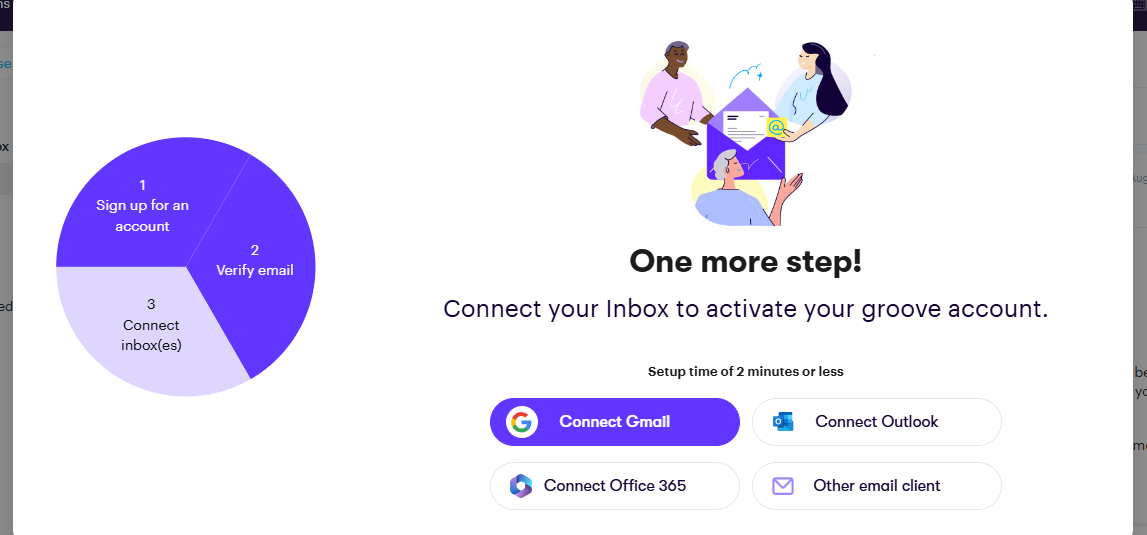
After selecting one of the displayed options, you’ll provide a name for your Groove inbox. Then head over to Apps > Channels:
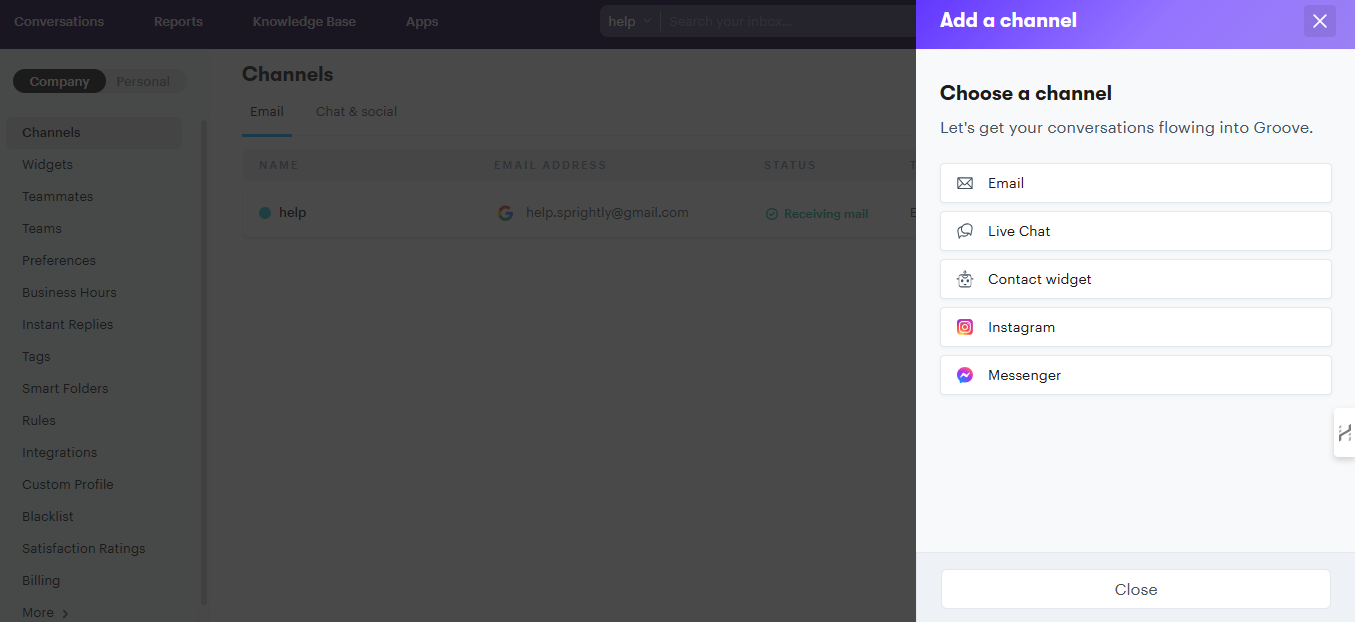
Here you can connect your other existing communication channels, including Facebook Messenger and live chat.
Next, it’s time to get everyone else on board. Under Apps > Teammates, you’ll add the email addresses for your team members:
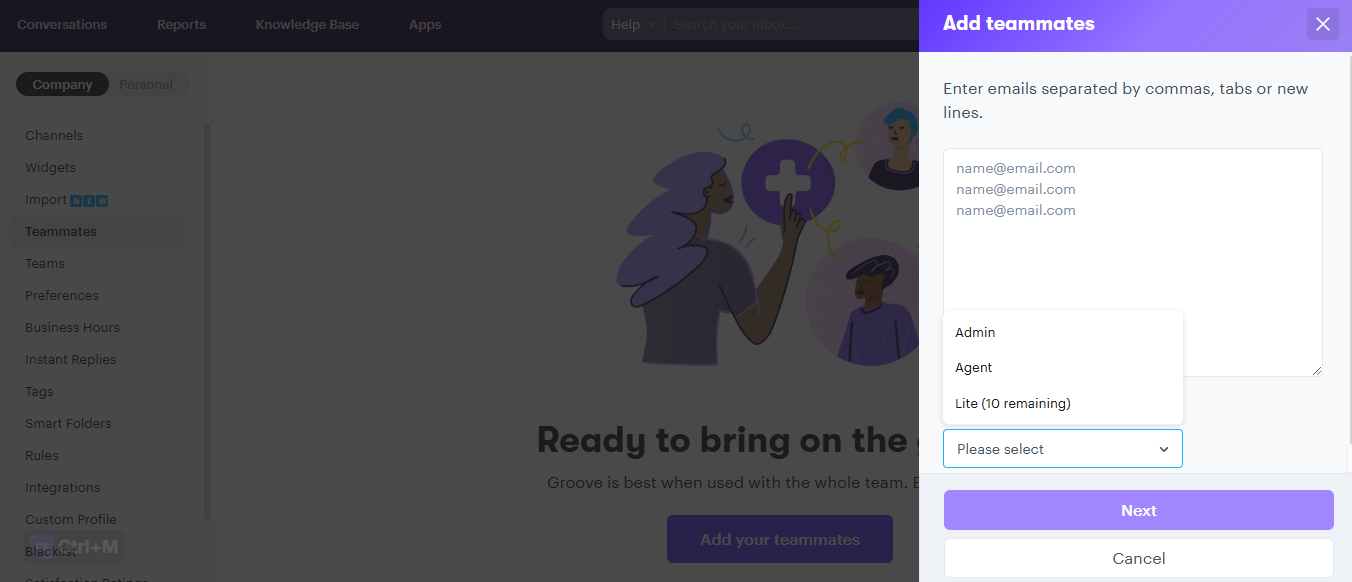
At this stage, you can also assign a role to each user. This will dictate how much access each teammate has inside your Groove space.
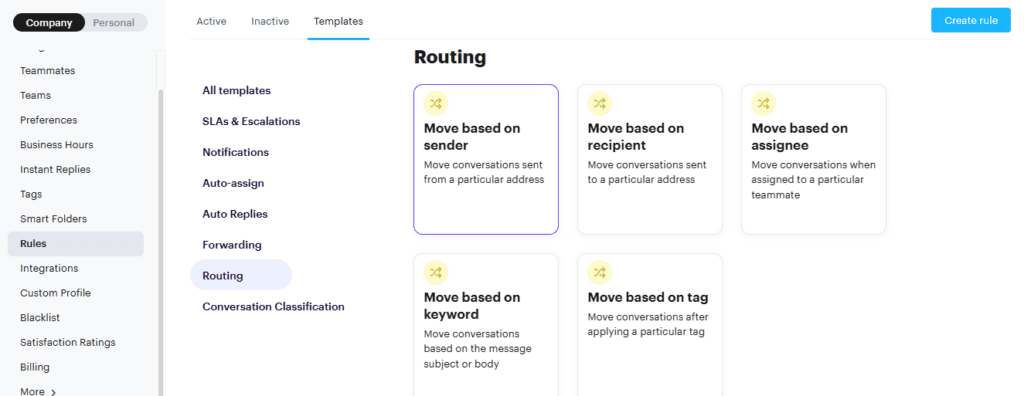
The Rules section is where you’ll set up automations customized to fit your preferred workflow. The options include auto-replies, ticket auto-assignment, and conversation routing:
Now that your Groove account is functional and your team is onboard, how can they work together to streamline customer conversations?
Your team can collaborate through internal notes, to discuss customer issues without cluttering the conversations. This can be done by expanding the field on the desired email under Note:
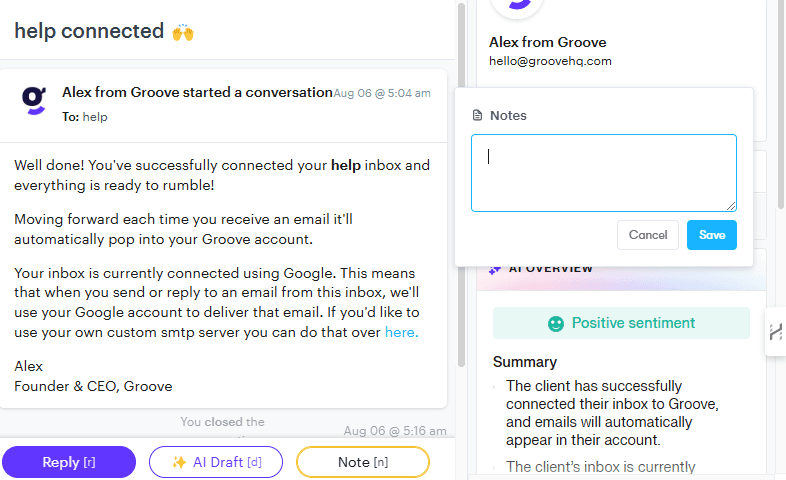
Customer details will be displayed, as will the notes left internally by team members who have spoken to the client before.
With @mentions, team members can easily direct others’ attention and assign tasks. At the bottom of any customer conversation you’ll find a Reply option, where you can leave an @mention:
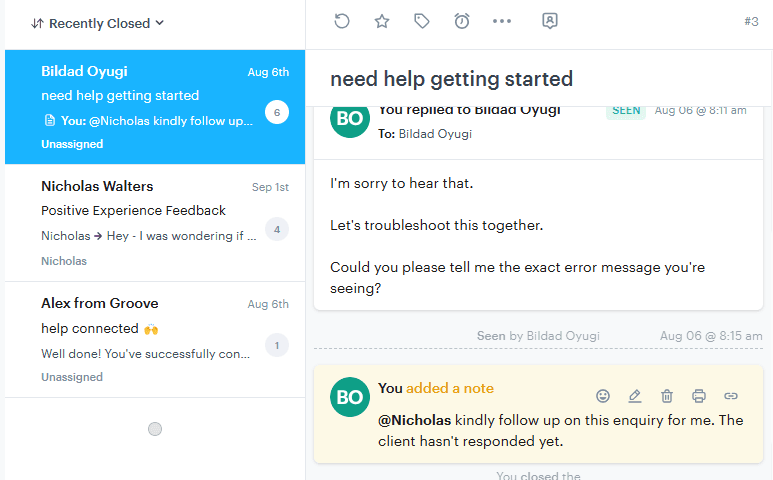
With their new shared inbox, your team can wave goodbye to scattered, haphazard, and ineffectual communication. A centralized approach empowers your agents to provide faster, more streamlined support.
2. Set Up a Clear Organizational System for Customer Communications
Effective organization is crucial for delivering high-quality customer support. Without a clear system, support teams quickly become overwhelmed. When your team is overburdened, you can expect inefficiencies and subpar service.
Poor organization in customer support manifests in several ways:
- Lost or overlooked emails. Without a structured system, important customer emails get lost or overlooked. You end up with delayed responses and dissatisfied customers.
- Inefficient workflows. Disorganized communication channels result in team members spending excessive time searching for information or duplicating responses in different channels.
- Inconsistent service. A lack of organization leads to inconsistent responses and service quality. Urgent matters are responded to later than low-priority inquiries. This damages customer trust in your brand.
So what does a well-organized customer support system look like? You’ll want to establish:
- Centralized information. All customer interactions should be easily accessible to the entire team. This will ensure that everyone has the information they need to provide consistent service.
- Prioritization and categorization. Emails and inquiries should be categorized and prioritized to ensure that urgent issues are addressed promptly.
- Clear status indicators. The status of each customer interaction should be clearly marked to help the team manage their workload effectively.
Let’s look at a few ways to bring order to the chaos and streamline your customer communications.
Organizing Tickets via Tags
Groove allows you to tag emails with custom labels, so you can categorize and prioritize inquiries. You might organize emails and other customer tickets by type, urgency, or department.
Whatever scheme makes sense for your business, tags let you quickly filter and access specific groups of messages. Among other benefits, this ensures that high-priority issues are addressed promptly.
Setting up tags is easy. On every email, you’ll find a tag icon. This opens a menu where you can create and manage tags to match your preferences:
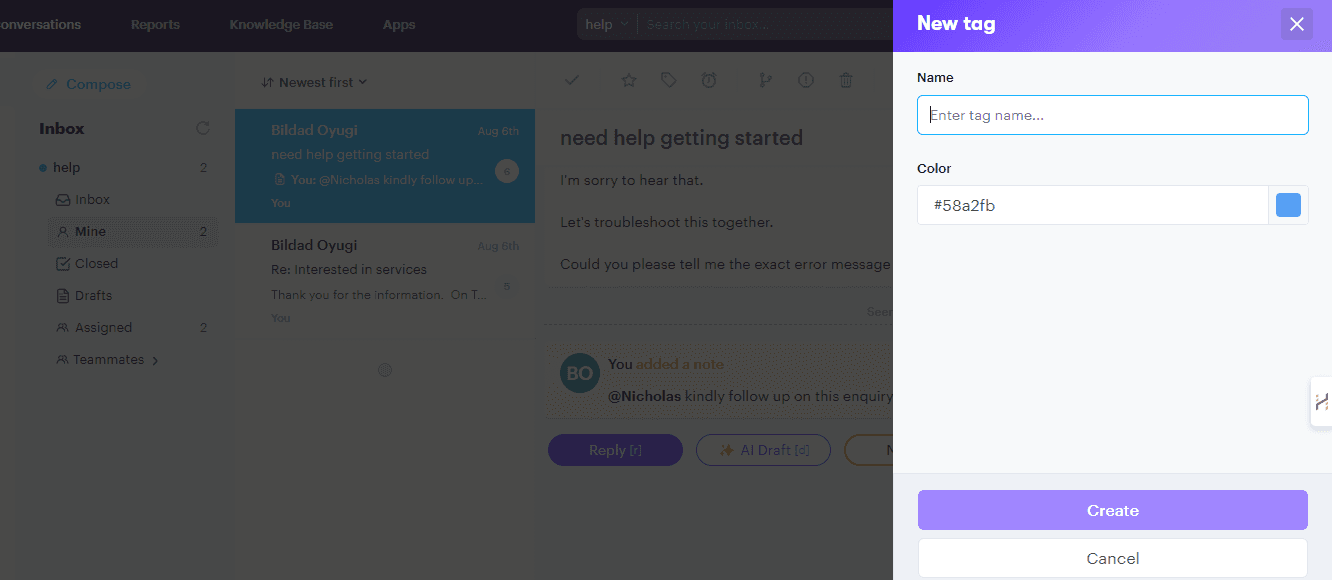
Once you have a structure in place that’s working for your team, you can even automate this process. Tags can be auto-assigned to conversations with specific keywords, saving your team from some busywork.
Customized Smart Folder Views
Another key organizational feature is custom folder views. These allow you to organize emails based on criteria such as priority, category, or assigned agent. This helps your team focus on critical issues and manage their workload more effectively.
Inside Groove under your inbox settings, you’ll find an option labeled Manage Smart Folders. Here you can create a new folder to your liking:
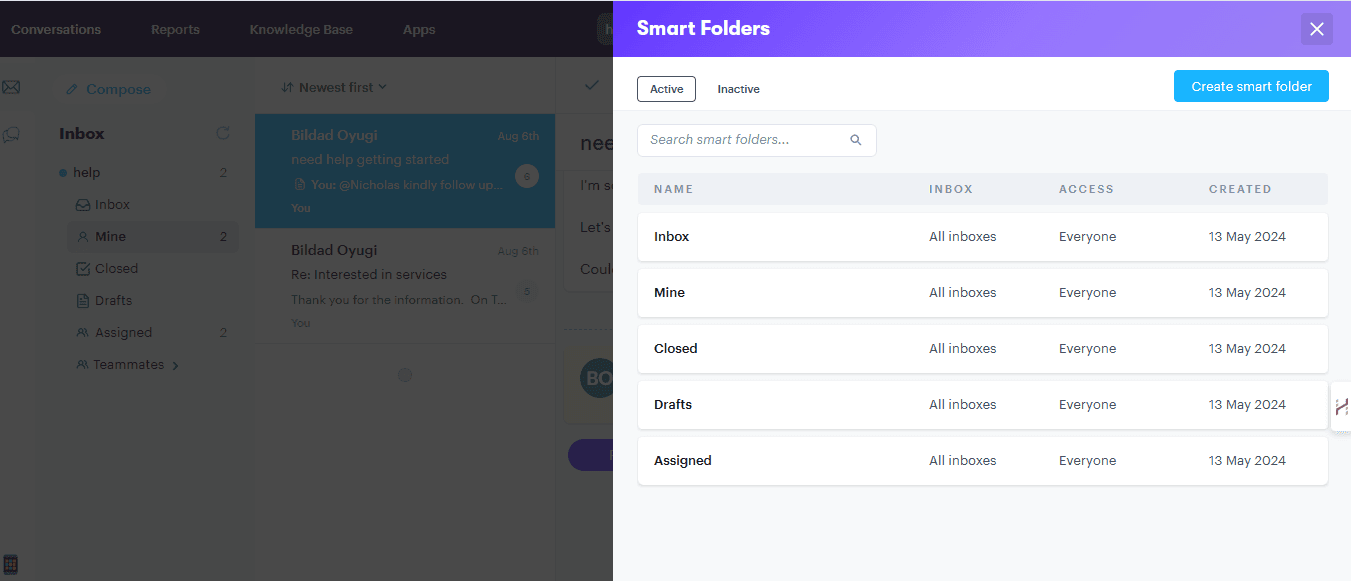
With a combination of folders, tags, and automated rules in place, you can have customer support running like a well-oiled machine in no time. Plus, all of this is easy to change as your needs and processes evolve.
3. Make Sure Everyone on the Team Has Clear Roles and Responsibilities
A customer service team where everyone is unsure of their specific duties is a recipe for disaster. The ambiguity can lead to confusion and duplicated efforts. As you might imagine, that tends to have a negative impact on both service efficiency and the overall customer experience.
When roles and responsibilities are not clearly defined, you have to deal with:
- Confusion and overlap. Team members may step on each others’ toes. The lack of clarity directly impacts your ability to streamline customer service and optimize workflows.
- Inefficient use of resources. Valuable time and resources can be misallocated, hindering your team’s productivity and ultimately affecting your bottom line.
- Inconsistent service. Customers may receive varying levels of service depending on who handles their inquiries.
Establishing clear roles and responsibilities means that each team member knows what they’re responsible for. When everyone is on the same page, you can expect:
- Better collaboration. Each team member understands their specific contributions to the overall customer service process.
- More accountability. Clear roles foster accountability, since team members know what is expected of them and can be held responsible for their performance.
- Consistent service. Defined roles ensure that customers receive consistent and reliable service.
How can you use clear roles to streamline your customer service?
Setting Custom Roles and Permissions
Groove allows you to set custom roles and permissions for team members, controlling access to specific features and information. This is something to set up as early as possible, once you know the scope of your team and the work to be done.
By defining custom roles that align with your team’s structure, and assigning permissions based on responsibilities, you ensure that team members have the necessary tools to perform their roles effectively. This not only improves workflow, but also makes it easier to provide consistent and high-quality service.
Assigning Conversations
Roles matter on the small scale too. To streamline customer service and avoid confusion, each inquiry should be assigned to a specific team member (or group/department as relevant).
Within Groove, conversations can be assigned to whoever you like. By leveraging this feature, you can delegate tasks based on each team member’s strengths and expertise. All you have to do is click on Assign to see a list of teammates:
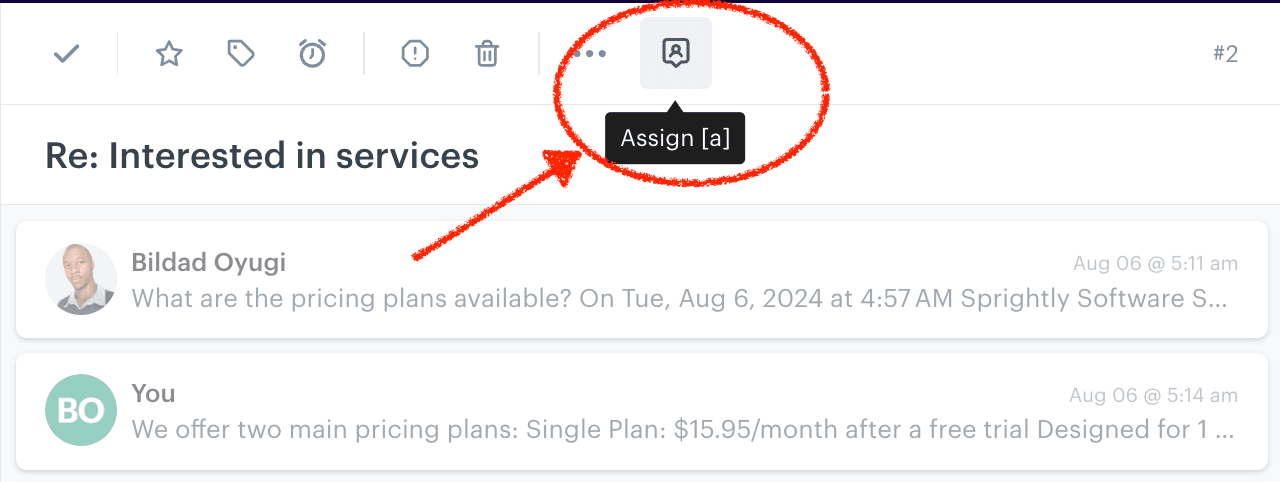
As with tags and folders, you can automate this process too. You can use round-robin assignment to make sure inquiries are well distributed among your team.
Plus, you can build custom rules so messages are auto-assigned to the right place – anything with “refund” in the text can be sent over to the agent who processes refund requests.
4. Automate Routine Tasks
Picture a world where your customer service team no longer has to spend countless hours on repetitive tasks. Instead, they can focus on delivering exceptional support and solving complex issues.
Doing everything manually leads to:
- Time-consuming and tedious busywork. Tasks like ticket routing and sending reminders can consume valuable time. This diverts attention from more critical customer inquiries.
- Increased risk of errors. Manual processes are more susceptible to mistakes, like misrouted tickets or missed follow-ups.
- Reduced productivity and efficiency. Repetitive tasks can sap your team’s energy, reducing overall productivity and morale.
As a startup or SMB, you might start by handling every interaction personally. And that’s great. But it isn’t sustainable long term. If you don’t have the resources to hire a massive customer service team, you can leverage automation to keep providing a high level of immediate care.
We’ve already seen a few of the automations you can put in place. Here are a few other key ways to streamline customer service via automation:
- Set reminders. Groove’s ‘snooze’ feature allows you to set automated reminders for specific tasks or deadlines, ensuring that nothing falls through the cracks.
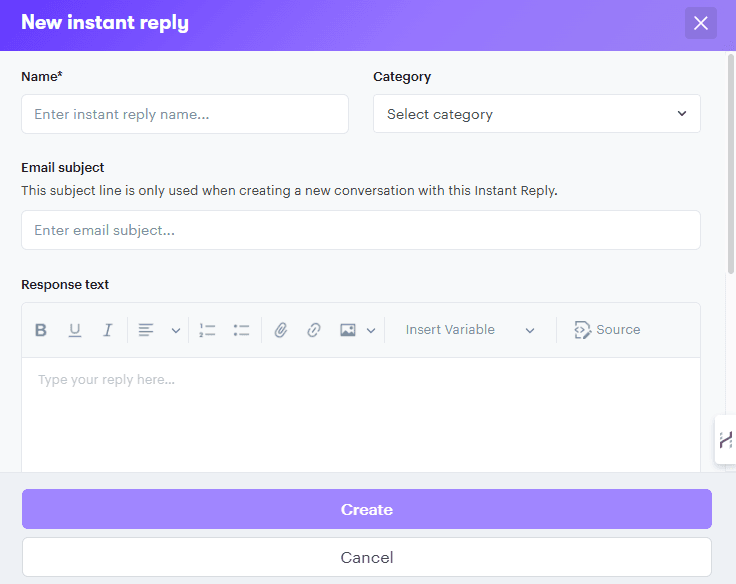
- Create canned responses. Instant replies revolutionize how your team handles common inquiries. You can build a library of pre-written responses for frequently asked questions, which your team can quickly access and personalize as needed.
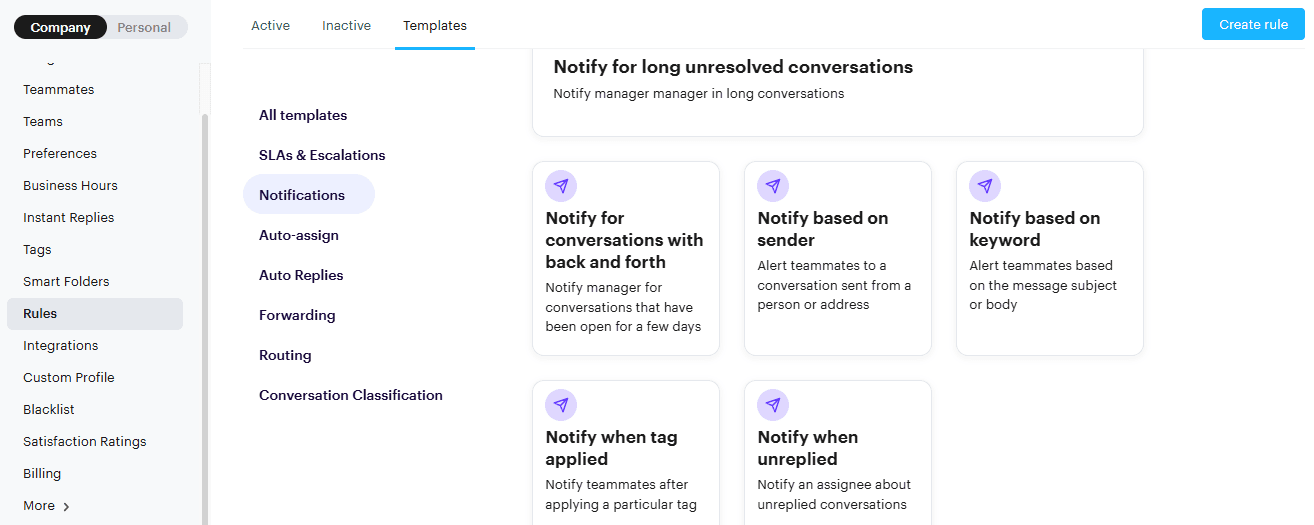
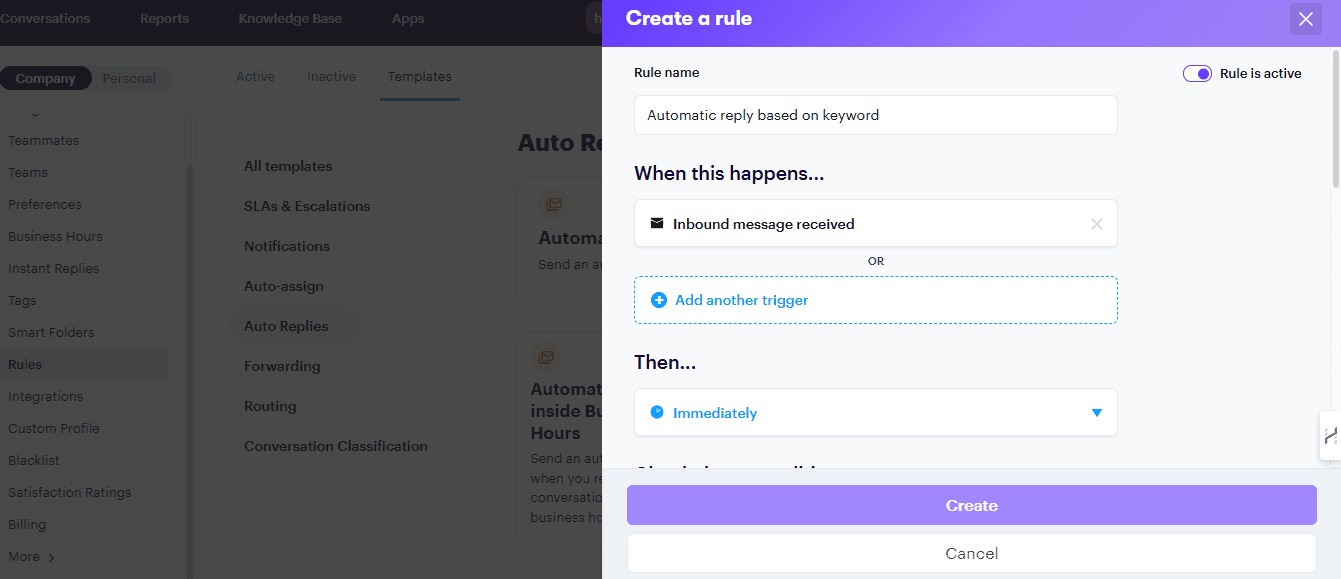
- Build a library of custom rules. You can set up rules that trigger specific actions. For example, when a ticket is tagged with a particular keyword, Groove can automatically suggest or send a relevant canned reply.
Not everything can be automated. But the more rote tasks you automate now, the more time your team saves over the coming months and years.
5. Make It Easy To View Customer Details and Records
When your support team can effortlessly access information about a customer, they’re able to provide more personalized and effective assistance. It’s annoying on both sides when customers have to repeat their details and re-explain their problems.
If customer information is scattered across different platforms or is difficult to access, you have to manage:
- Increased resolution times. Agents spend valuable time searching for relevant customer information, delaying resolutions and hindering efficiency.
- Impersonal interactions. Without easy access to customer histories, agents are unable to personalize their interactions, leading to a less satisfying customer experience.
- Inconsistent support. Incomplete information can lead to inconsistent service, as agents may not have the full context needed to resolve issues effectively.
Ensuring that your team has easy access to comprehensive customer records addresses these challenges by:
- Speeding up responses. Quick access to customer details allows agents to resolve inquiries faster.
- Enhancing personalization. Detailed records enable agents to tailor their responses to the individual needs and history of each customer.
- Providing consistent support. With complete information, agents can deliver consistent and informed support.
By centralizing customer data and making it easily accessible, Groove empowers your team to deliver faster and more personalized support. This enhances the customer experience and also boosts efficiency.
If you have Groove set up for your team, we’d suggest taking a look at the following options to streamline your customer service:
- Unified customer profiles. Groove consolidates customer interactions and information into unified profiles. You can view a customer’s entire history at a glance. This comprehensive view enables agents to provide personalized and informed support quickly.
- Customizable data fields. Groove allows you to customize data fields within customer profiles, so you can capture and view the most relevant information for your business’ needs. This customization also helps agents focus on key details that enhance service delivery.
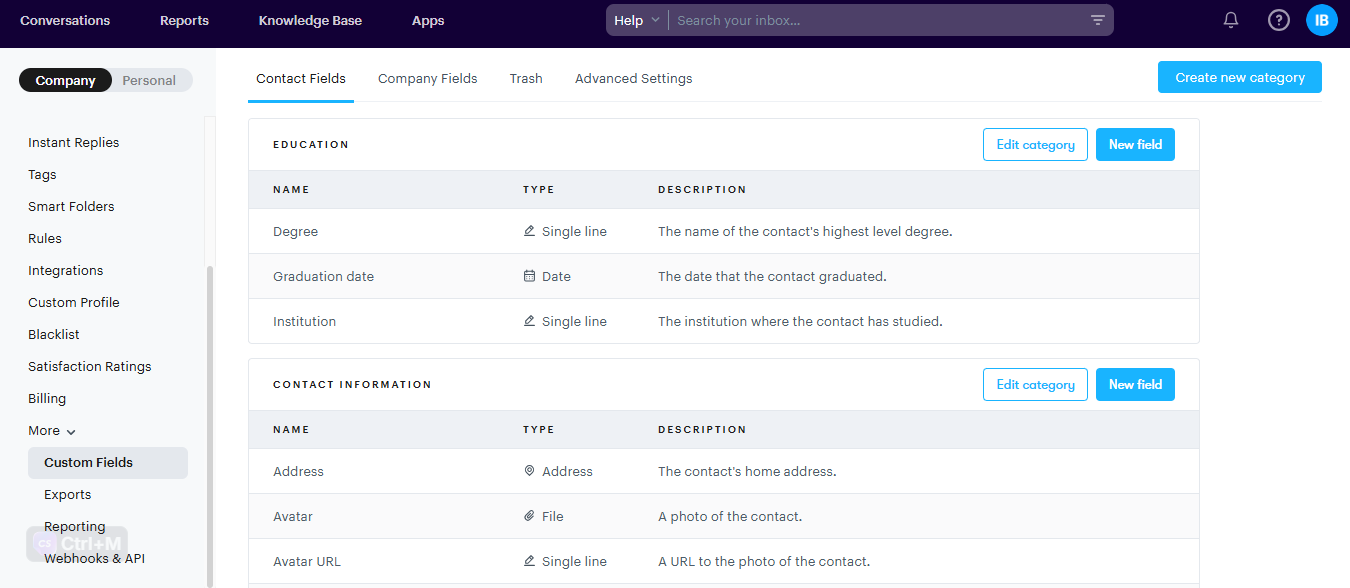
- Integrated CRM features. Groove integrates with CRM systems to pull in relevant customer data. This ensures that agents have access to up-to-date information. By leveraging these integrations, your team can seamlessly access customer records without having to switch between platforms.
6. Set Up Self-Service Options for Customers
Empowering people to find answers on their own can significantly streamline the customer service experience. Instead of waiting for a support agent, buyers can find the information they need instantly through a self-service portal.
Without effective self-service options, you’re often dealing with:
- Increased wait times. Customers may experience longer wait times for support, especially during peak hours. The lack of immediate solutions is frustrating, especially for simple or common issues.
- Increased support volume. Handling every inquiry through agent support can be costly and requires a larger team.
- Limited scalability. Relying solely on agent support limits your ability to scale customer service operations as your business grows
Offering self-service isn’t a replacement for traditional support. Instead, it supplements your team’s efforts by:
- Reducing support volume. Providing resources like FAQs and knowledge bases allows customers to find answers independently. This decreases the number of inquiries your team needs to handle.
- Enhancing customer satisfaction. Quick access to information empowers customers to solve problems on their own, leading to a more satisfying experience.
- Freeing up resources. With fewer routine inquiries, your team can focus on high-priority issues, improving overall productivity.
Creating a Customer-Facing Knowledge Base
There are many types of self-service resources. But we’d recommend starting with a dedicated knowledge base. This will serve as the hub for all the FAQs, guides, articles, videos, and other resources you provide for customers to proactively problem solve.
Out of the box, Groove allows you to build a comprehensive knowledge base with very little effort:
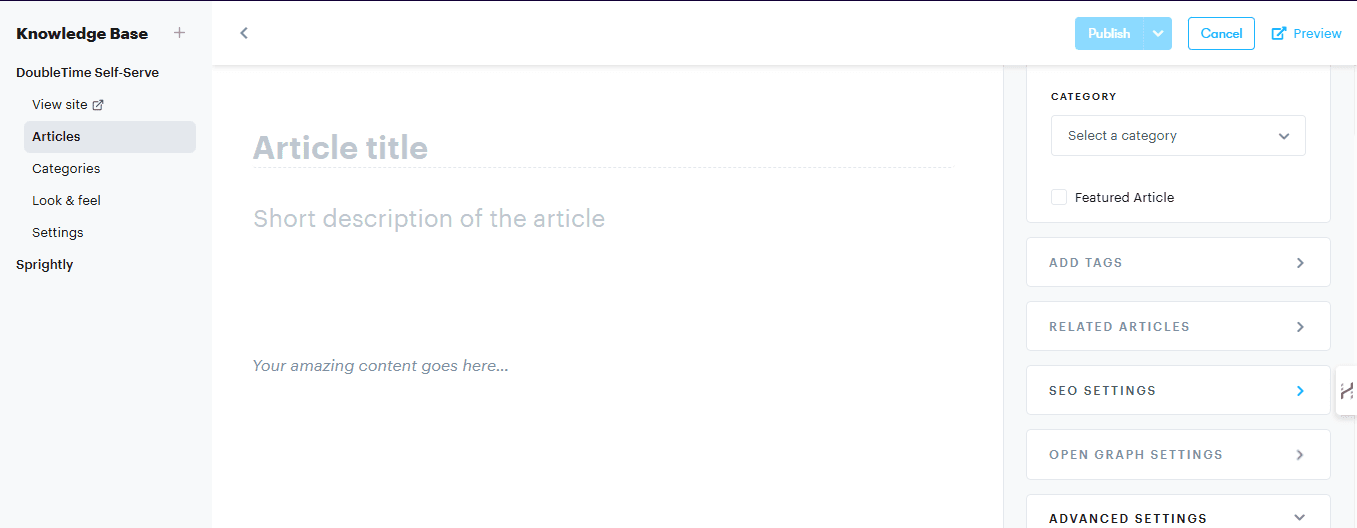
All you have to do is create the resources. Groove handles the technical details, so those resources will be live and easily accessible right away.
With a knowledge base in place, customers are empowered to find solutions independently. Your agents can even include knowledge base articles in their responses, saving them from having to repeat the same information time and time again.
7. Use Metrics To Identify Weak Spots and Keep Improving
To truly enhance your customer service, it’s important to rely on more than gut feelings. By referencing key metrics, you can discover where improvements are needed, refine your processes, and raise the quality of support your team provides.
Operating without clear metrics leads to:
- Blind spots. Without data, it’s challenging to identify where your support processes are falling short, making unresolved issues and inefficiencies more common.
- Inconsistent performance. A lack of benchmarks can result in inconsistent service delivery, and poor motivation from your team.
- Missed opportunities. Without insights into customer interactions, opportunities for improvement and innovation are often overlooked.
In other words, the right numbers help you streamline your customer service over time, making it better and better by:
- Highlighting weak spots. Metrics provide a clear view of where your processes may be lacking, allowing you to target specific areas for improvement.
- Ensuring consistency. By setting benchmarks and tracking performance, you can ensure that your team consistently meets service standards.
- Driving continuous improvement. Metrics offer insights into customer interactions, enabling you to refine processes and enhance the customer experience.
Tracking Customer Service KPIs
Analytics can seem intimidating. And many dedicated analytics tools are both expensive and complex.
That’s why Groove offers built-in reporting that’s automated, streamlined, and easy to understand. You can track and analyze key customer service metrics, without having to sort through a bunch of unimportant information.
You’ll get insights into response times, ticket volumes, and customer satisfaction scores, to name a few:
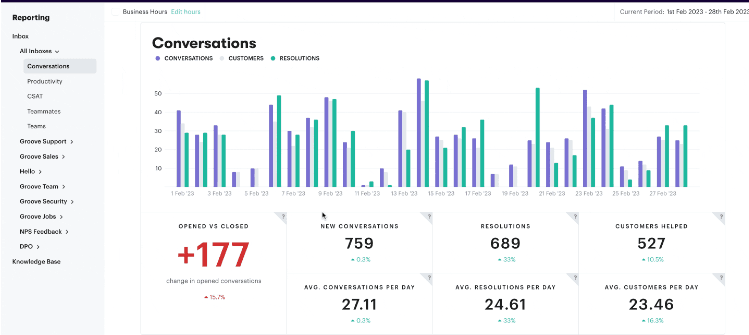
These reports help you identify trends and areas that require attention. You can view individual and team-wide performance, and even create customized dashboards that display whatever key performance indicators (KPIs) are most relevant to your business.
Of course, numbers aren’t everything! It’s also a good idea to gather customer feedback. This qualitative data provides insights into the customer experience, and highlights areas for improvement. We’d recommend setting up automated customer satisfaction ratings, and sending periodic long-form surveys.
Unlock the Power of Streamlined Customer Service
Streamlining your customer service takes some upfront work. The result? Increased customer loyalty, reduced costs, and a more empowered team.
Adopting the strategies we’ve looked at here allows you to create a personalized experience that anticipates customer needs and fosters long-term loyalty. At the same time, your team spends less time on confusion and busywork. It’s a win-win for everyone involved.
Groove is your partner in this transformation. As we’ve seen, it provides comprehensive features that streamline operations and elevate service quality.
Check out Groove’s free trial to unlock the full potential of your customer service team!
5 Help Scout Alternatives: Why Growing Support Teams Switch to Groove
Groove Fixes What Teams Don't Like About Help Scout: Flat Pricing, Built-In AI, and Native SLA Management. See the Full Comparison.
How Helply's Hallucination-Proof AI Eliminates the #1 Fear of AI Customer Support
Customer Support Automation That Hits 65% AI Resolution, Guaranteed. Helply's Action-Based AI, Safe Escalations, and Optimization.
