

Yesterday, we released a new feature that we’re really excited about.
How many times have you sent a response, and then as soon as you sent it, noticed that you:
- Included a glaring typo?
- Spelled a customer’s name wrong?
- Forgot to include an attachment?
- Didn’t finish the email?
That’s where Undo Send comes in.
To toggle the feature on or off, just go to Settings → Preferences and click on the checkbox next to “Undo Send.”
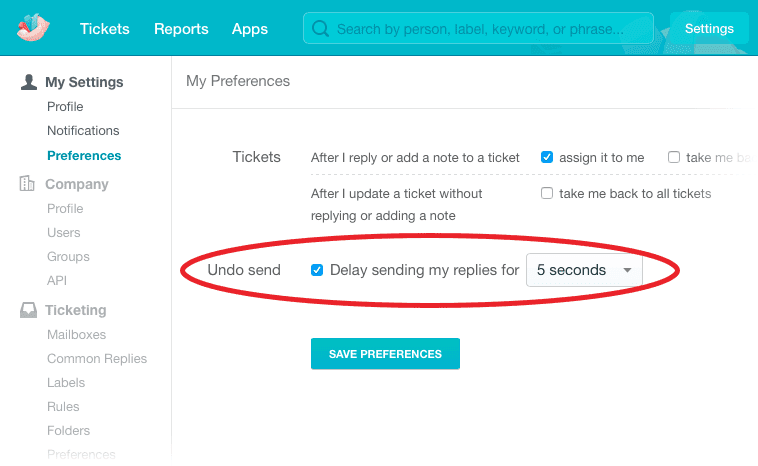
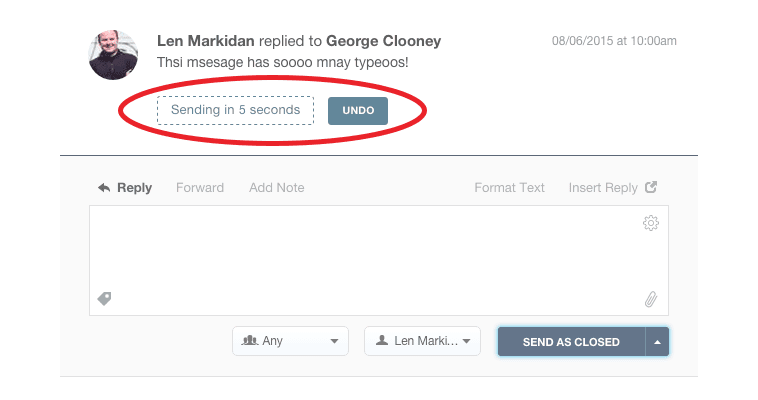
Now, any responses you send will be delayed for 5 seconds (you can toggle the delay with the drop-down menu in your settings), giving you the chance to undo sending if you realize you made a mistake.
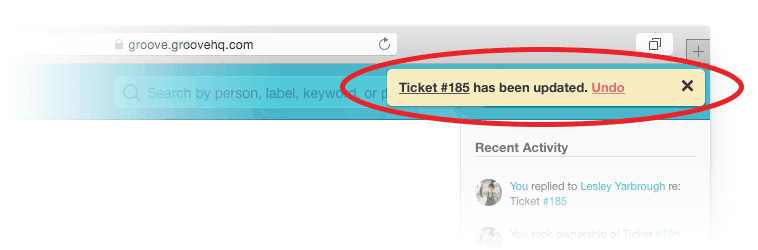
NOTE: If you’ve set your preferences to “take me back to all tickets” after you update a ticket, then your Undo send option will appear in the yellow notification at the top right of your screen.
Enjoy the new feature, and as always, let us know if there’s anything we can do to help!
Groove Partners with Import2 for Seamless Help Desk Data Import!
We are thrilled to share some fantastic news with you! Groove has joined forces with Import2 to bring you a seamless and efficient solution for importing data from other help desks. Our partnership with Import2 opens up new possibilities, making it easier than ever to transition your data into Groove. Whether you’re migrating from another […]
Groove 2023 in Review – A Year of Supercharged Support
2023 was a year of exponential growth and innovation for Groove! We poured our hearts (and countless cups of coffee) into crafting new features and optimizations to make your customer support experience smoother, faster, and more delightful than ever. Here’s an overview of the biggest and best changes that transformed Groove this past year. New […]
