
The Ultimate Guide to AI Knowledge Bases: Creating a Self‑Writing Help System

Modern companies invest heavily in customer support, onboarding, and training, yet an astonishing amount of institutional knowledge languishes in silos.
The average SaaS business handles hundreds or thousands of support tickets a month, but only a fraction of those learnings are ever recorded in a knowledge base (KB).
When teams do write documentation, it often takes hours per article, and that content quickly becomes outdated as products evolve.
This “graveyard effect” is not just a nuisance; it is a serious drag on growth and customer experience.
Out‑of‑date docs erode trust, cause confusion, and force support agents to spend time answering repetitive questions instead of solving complex problems.
The heart of the problem is that traditional knowledge bases are static. They rely on someone manually capturing information, writing the article, formatting it, and publishing it, then remembering to update it whenever something changes.
It’s no surprise that most KBs are messy, inconsistent, and rarely used. Internal teams don’t trust them, and customers often can’t find the answers they need, so they open tickets or ping support chat anyway.
Many businesses have responded by investing in AI tools that promise to make writing or searching easier—but these solutions typically automate small parts of the process rather than solving the whole problem.
Meanwhile, the landscape of AI has changed dramatically. Advances in large language models (LLMs), vector search, and generative AI make it possible to draft and summarise content, identify patterns in support conversations, and deliver more accurate search results.
Yet the market is flooded with tools that brand themselves as AI knowledge base software while focusing on narrow capabilities like rewriting text or answering natural‑language queries.
Most still require people to create, manage, and update documentation manually. The result is that businesses continue to waste time and fail to capture the bulk of institutional knowledge.
In this guide, we will explore how to build an end‑to‑end, self‑writing knowledge base that automatically captures knowledge from tickets and recordings, generates polished documentation, and keeps it up to date.
We will dissect why most AI KB tools fall short, review real‑world examples, and show how InstantDocs, the first AI knowledge base software to automate the entire lifecycle, can transform support and product documentation.
By the end, you will understand the technology behind self‑writing knowledge bases, the benefits they deliver, and how to get started.
TL;DR
Traditional knowledge bases are broken. They are incredibly time-consuming to create and even harder to keep updated. This leads to a "graveyard" of outdated articles that nobody trusts, leaving most company knowledge locked away in support tickets and chat logs.
While many current "AI" tools claim to be the answer, they only offer partial fixes like writing assistance or improved search. They fail to solve the fundamental problem because they still require humans to capture, write, and update content manually. The real solution is a "self-writing" knowledge base, a new system that automates the entire documentation lifecycle.
It uses AI to capture knowledge from support tickets and screen recordings, generate polished articles, and continuously update them. This approach dramatically saves time, ensures accuracy, increases customer self-service by deflecting tickets, and frees up teams for more complex work.
InstantDocs is the first platform to deliver on this vision, automating everything from content capture to identifying and filling knowledge gaps.
Understanding Knowledge Bases: The Foundation
Before diving into AI, it is important to define what a knowledge base is and why it matters. At its core, a knowledge base is a structured repository of information that employees, customers, or partners use to find answers quickly.
Internal knowledge bases help onboarding and operations teams learn processes, while external ones power help centers, FAQs, and product documentation.
A well‑maintained KB can dramatically reduce the number of support tickets by empowering users to self‑serve, accelerate onboarding of new hires, and provide a single source of truth across departments.
Knowledge bases come in different shapes and sizes. Some are purely text‑based collections of articles and FAQs. Others incorporate multimedia, embedding images, GIFs, and videos to illustrate workflows.
Modern platforms allow for rich formatting, code snippets, callouts, and interactive elements.
The documentation lifecycle typically follows a loop:
- A subject matter expert drafts the article
- Reviewers edit and approve it
- The article is published to the KB
- Someone revisits and updates it when products change or new questions arise
In practice, the last step is often neglected because the team that wrote the original document moves on, leaving content to rot.
Why do knowledge bases matter?
Support teams use them to deflect repetitive tickets—every question answered via self‑service frees up an agent to work on higher‑value issues.
For product and engineering teams, well‑structured docs help customers adopt new features faster and reduce churn.
Sales and marketing teams can share how‑to guides and case studies. Internally, standard operating procedures (SOPs) ensure consistency and compliance.
When documentation is accurate and easy to find, employees spend less time searching for information and more time getting work done.
Understanding the difference between a knowledge base and a help center is also crucial. A help center is often a customer‑facing portal that includes a knowledge base, community forums, chat, and contact channels.
The knowledge base is the documentation component that feeds into the help center, but can also be used internally. A well‑integrated KB supports both internal teams and external customers, allowing businesses to repurpose articles across public and private channels.
Despite the clear benefits, the majority of knowledge bases remain underused because maintaining them is labour‑intensive. Creating a single, thorough article can take hours, and the content may become obsolete within weeks.
Without proper ownership, articles decay, leading users to distrust the KB and revert to asking support or colleagues directly. This perpetual cycle of poor documentation leads many companies to dismiss KBs as more trouble than they’re worth.
However, as we’ll see in the next section, advances in AI are poised to change this dynamic.
The Problems with Traditional Knowledge Bases
The core problem with traditional knowledge bases is that they are time‑consuming to create and even more time‑consuming to maintain.
Information is captured manually, often by support agents or technical writers who already have full workloads.
Creating a single knowledge article may involve;
- Interviewing subject matter experts
- Writing the content
- Formatting it to match brand guidelines
- Inserting screenshots or GIFs
- Reviewing it with legal or compliance teams.
Once published, the article may never be revisited, even as the product evolves. This results in outdated content that frustrates users.
Another major issue is the lack of ownership and accountability. Many companies struggle to assign responsibility for KB maintenance.
Support agents might create an article to reduce repetitive tickets, but once they close those tickets, the article becomes someone else’s problem.
When no one is assigned to update content, articles can linger for months or years without changes.
The longer a document sits untouched, the more likely it is to contain incorrect information, making the entire knowledge base less trustworthy.
Traditional knowledge bases also suffer from knowledge silos. Information is scattered across various systems:
- Support tickets
- Slack channels
- Email threads
- Internal wikis
Even when teams want to centralise knowledge, the sheer volume of data can be overwhelming.
As a result, many companies document only a small fraction of the issues they resolve, leaving valuable insights locked away in ticketing systems or chat logs.
When employees can’t find answers in the KB, they resort to pinging colleagues or opening tickets, which further strains support resources.
The user experience of many knowledge bases leaves much to be desired. Articles may be hard to search, poorly formatted, or missing key details like screenshots and step‑by‑step instructions.
Without analytics, companies have no way to know which articles are being used or which ones need improvement.
As a result, content becomes inconsistent, and users lose confidence in the KB as a reliable source of truth.
AI‑powered tools have emerged to address some of these problems, but most only automate parts of the process.
For example, Notion AI offers a writing assistant that can generate text from prompts, rewrite existing content, translate into other languages, and summarise long documents.
It can also summarise meeting notes and documents. However, Notion still requires someone to structure and update the content manually.
It does not automatically transform support tickets or video recordings into articles. Slite has added a document verification system with automated reminders and AI‑suggested actions to keep playbooks current, and its Ask assistant answers questions by searching across verified documentation.
These features improve search and maintenance, but Slite still depends on manual content creation.
Guru takes a different approach with knowledge cards, digital index cards that capture bite‑sized information. Guru includes a verification workflow where designated experts periodically confirm each card’s accuracy, adding a verified badge.
This fosters trust but requires ongoing human involvement. Guru’s AI search pulls answers from cards and integrated apps like Slack and Teams, yet it doesn’t write or update the cards for you.
Confluence’s Rovo integrates with Confluence, Jira, and Slack to provide AI‑powered search and draft content creation. It helps research, draft, and refine documentation and offers features like meeting‑note summarisation and brainstorming assistance.
But, again, Rovo stops at drafting; it does not automatically ingest support tickets or video workflows.
Other tools like Document360 provide Eddy AI, which can generate outlines, improve grammar, change tone, and convert text between voice and speech.
These capabilities make writing easier, but don’t solve the problem of collecting data from support interactions. Helpjuice markets features that allow users to transform webpages into articles and turn tickets into articles.
However, details on full automation are sparse, and the product focuses on AI search and chat rather than continuous, automated updates.
The pattern is clear: most AI‑enhanced knowledge base tools focus on assisting writers or improving search, not on fully automating the creation and maintenance of documentation.
They might help you write faster, remind you to verify content, or answer questions across existing docs, but they still rely on humans to capture, format, and update information.
Without a holistic solution that automates the entire lifecycle—from capture to creation to update—the same problems persist.
Businesses are left juggling multiple tools, manually converting tickets into articles, copying content from video tutorials, and pushing updates across different channels.
The result is inconsistent, out‑of‑date documentation that continues to erode trust.
The Rise of AI‑Driven Knowledge Management
Despite these shortcomings, the promise of AI for knowledge management is real. Recent advances in natural language processing, large language models and vector search have opened the door to new ways of creating and managing documentation.
Rather than simply speeding up writing or enhancing search, AI can now ingest raw data from multiple sources, extract relevant information and assemble it into polished, user‑friendly content.
This shift is driven by two key factors: the abundance of data and the maturity of generative models.
Data Abundance
Businesses are sitting on mountains of unstructured data. Every support ticket, email thread, chat log, and demo recording contains nuggets of information that could answer future questions.
Historically, extracting those insights required manual effort. Today, AI systems can process and summarise these data streams, converting them into structured knowledge with minimal human oversight.
For example, language models can generate step‑by‑step instructions from a recorded screen capture or extract common questions from thousands of tickets.
These capabilities allow teams to capture knowledge at the source rather than rewriting it later.
Maturity of Generative AI
Over the past few years, large language models have become sophisticated enough to write coherent articles, answer questions, summarise documents, and even convert audio into text.
Tools such as Notion AI and Document360’s Eddy AI demonstrate that LLMs can assist with drafting and editing. Meanwhile, multi‑modal models can analyse images and video frames, enabling automated extraction of screenshots and descriptions.
When combined with vector search (which retrieves relevant content based on semantic similarity), these models can generate highly relevant documentation with little human intervention.
This evolution has led to a surge in products that position themselves as AI knowledge base software. Some, like Notion AI, emphasise writing assistance and summarisation.
Others, like Slite, focus on maintaining existing docs and surfacing answers through an AI assistant.
Guru leverages AI for search and verification, while Confluence’s Rovo integrates AI across the work management stack.
Document360 offers an AI writer for content refinement.
Helpjuice touts AI to convert webpages and tickets into articles.
However, as we discussed earlier, these tools stop short of full automation. They assist authors rather than replacing manual workflows.
The opportunity lies in end‑to‑end AI‑driven knowledge management:
- Capturing knowledge directly from the source (tickets, recordings, emails)
- Generating documentation automatically
- Formatting it to brand standards
- Publishing it across channels
- Continuously updating it when new data arrives
Such a system not only reduces the time to create documentation but also ensures that content stays accurate and up to date, dramatically improving user trust and adoption. This is what we mean by a self‑writing knowledge base.
What a “Self‑Writing Knowledge Base” Really Means
To understand the concept of a self‑writing knowledge base, imagine that every time your team resolves a support ticket, gives a product demo, or explains a feature in chat, that knowledge is automatically transformed into a polished help document.
There’s no need to copy‑paste information into a template, take manual screenshots, or record a separate video.
Instead, AI captures the interaction, extracts the key steps and information, writes the doc in your brand’s voice, and publishes it to your knowledge base.
As your product evolves, AI continually updates the document by monitoring new tickets and product changes. Humans only need to review and approve when necessary.
A self‑writing KB relies on several key components:
Data Capture
The system ingests information from multiple sources—support tickets, chat logs, emails, product release notes and screen recordings.
For example, when a support agent closes a ticket, the system copies the transcript and identifies the steps taken to solve the issue.
When someone records a product walkthrough, the system captures each click and action, along with the accompanying audio.
Content Generation
AI transforms raw data into structured content. Large language models draft the text, while computer vision extracts relevant screenshots from videos.
The system may also generate voiceovers, step‑by‑step instructions, and highlights. At this stage, the output is similar to what a technical writer would produce, but it happens instantly.
Human Review
For accuracy and quality control, a subject matter expert reviews the generated content. They can make edits or annotate the draft directly.
If the AI’s output is satisfactory, the reviewer simply approves and publishes it. Over time, as the AI learns from feedback, the need for manual edits diminishes.
Publishing and Distribution
Once approved, the documentation is published to the knowledge base and pushed to relevant channels—help center, in‑app widget, customer portal, or internal wiki.
Users can access the information where they need it, with consistent branding and formatting.
Continuous Updating
Unlike traditional KBs that decay over time, a self‑writing system monitors incoming data streams for changes.
If a new ticket highlights an undocumented use case or if a product update changes a step, the system flags the relevant document and automatically updates it.
This feedback loop ensures that articles remain accurate and relevant.
This process may sound futuristic, but it is already becoming a reality.
InstantDocs is the first platform to execute every step of this self‑writing loop.
The product combines a Chrome AI recorder that captures video workflows and auto‑generates a complete help document. It includes;
- Screenshots, transcripts, and voiceovers—with a notion‑like editor for organising content
- A knowledge gap detector that analyses support tickets for missing or outdated documentation
- Seamless integrations with tools like Zendesk, Intercom, and Confluence
By automating the capture, creation, and maintenance of documentation, InstantDocs embodies the definition of a self‑writing knowledge base.
Core Business Benefits of AI Knowledge Bases
Adopting a self‑writing knowledge base delivers transformative benefits across support, product, and operations. Here are the key ways AI‑driven KBs create value:
Dramatic time savings
Creating documentation the traditional way can take three to six hours per article. By automatically generating drafts from tickets and recordings, AI cuts that effort by up to 90%.
Support agents no longer need to write lengthy explanations; they simply record a process once, and the system does the rest.
This time savings is cumulative: as your library grows, your team spends less time repeating explanations and more time on high‑impact work.
Consistent accuracy
Manual documentation quickly becomes outdated because no one has time to revisit old articles.
Self‑writing KBs continuously refresh content by monitoring new support conversations and product changes. When a new issue appears frequently, the system generates a new doc; when a process changes, it updates the relevant article automatically.
This ensures users always access up‑to‑date instructions.
Increased deflection and self‑service
When customers can find clear answers quickly, they are less likely to open support tickets.
A self‑writing KB expands your library of articles and ensures they remain relevant, boosting self‑service adoption.
More deflected tickets mean your support team can focus on complex or high‑value queries, improving overall responsiveness.
Improved agent productivity
Support agents spend a significant portion of their time answering repetitive questions.
By auto‑converting those interactions into knowledge articles, agents spend less time writing and more time solving unique problems.
This also reduces burnout and improves job satisfaction.
Faster onboarding and training
New hires ramp up quicker when comprehensive, accurate documentation is available.
AI‑generated docs provide step‑by‑step instructions with screenshots and voiceovers, making it easier for new employees to learn processes.
Continuous updates mean they aren’t learning outdated procedures.
Higher customer satisfaction (CSAT) and retention
Customers appreciate being able to find answers instantly. Accurate documentation reduces frustration and improves the overall user experience. Satisfied customers are more likely to remain loyal and recommend your product to others.
Cross‑team alignment
A centralised, self‑writing KB serves as a single source of truth, enabling smoother collaboration between support, product, engineering, and success teams.
When everyone references the same documentation, misunderstandings decrease and feedback loops improve.
By shifting from manual to automated knowledge management, companies free up resources, improve the quality of their documentation, and create a competitive advantage.
The investment pays for itself through reduced support costs, higher customer satisfaction, and accelerated product adoption.
How AI Knowledge Base Tools Compare (and Why Most Fall Short)
Hundreds of products bill themselves as AI knowledge base software. To understand why most of them still leave you doing the heavy lifting, it helps to look at what each tool actually offers and where it falls short.
Notion AI: A helpful writing partner, but trapped in a walled garden
Notion’s AI functions as a writing companion: it can draft blog posts, emails, meeting summaries, and databases directly inside Notion.

You can ask it to summarise long documents or answer questions based on your workspace.
However, it does not automate actions outside of Notion—its connectors only search other apps, they can’t update tickets or run workflows.
Reviewers note that Notion AI is designed to keep you inside Notion; its usefulness drops when your work lives in tools like Slack, Jira, or your help desk.
For customer support or IT teams, it lacks essential capabilities such as ticket resolution, sentiment analysis, or triage automation, and cannot pull real‑time data from external systems.
Notion AI is also an add‑on to paid plans, making per‑user pricing expensive for larger teams. In short, Notion AI speeds up writing inside its own ecosystem, but still requires you to manually capture and update knowledge.
Slite: Verified docs and Q&A, but limited automation and clunky UX
Slite positions itself as a collaborative knowledge base with AI‑powered document verification and the Ask assistant.
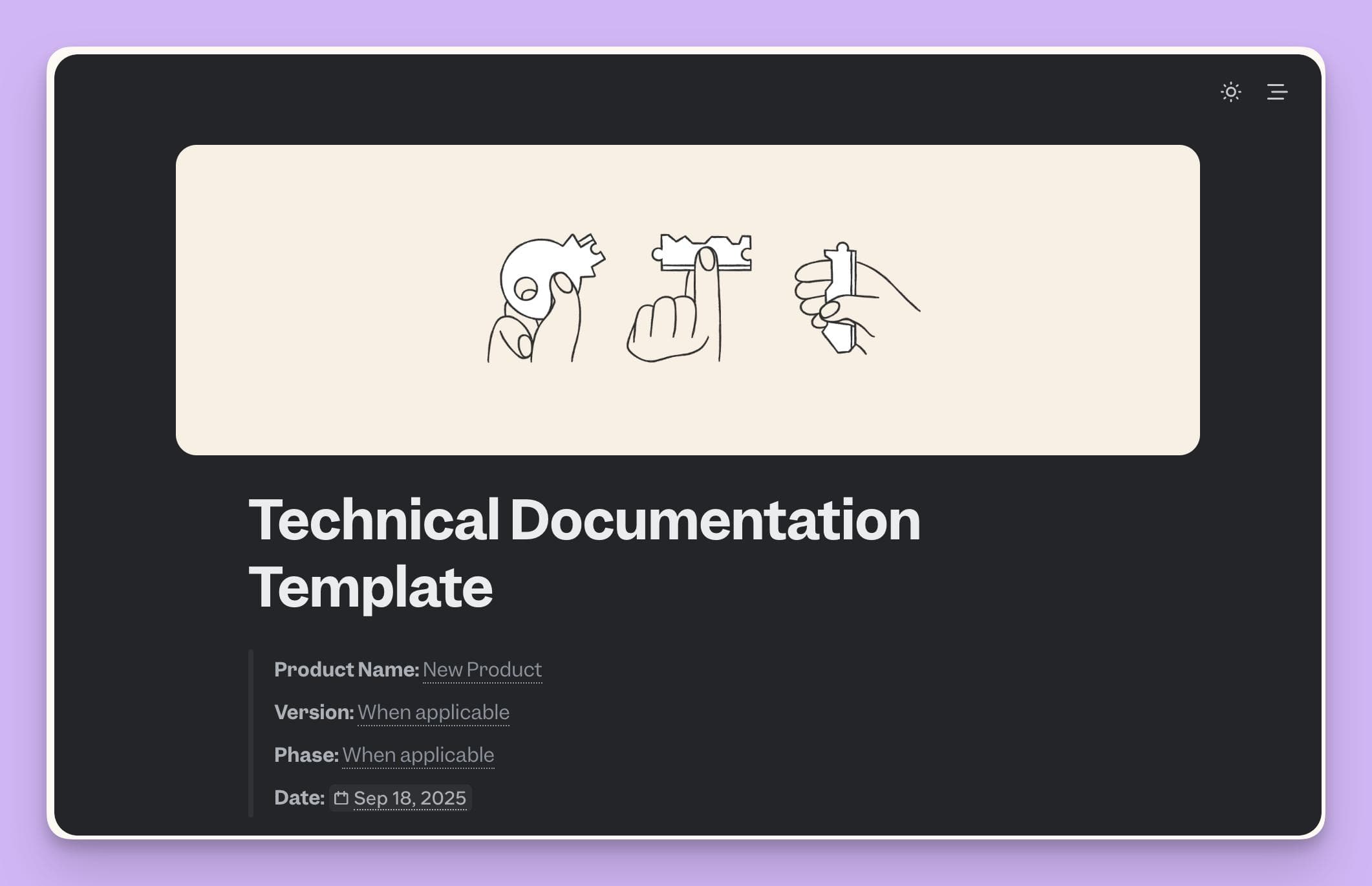
Verification workflows remind owners to keep docs current, and Ask provides natural‑language search across verified pages.
On paper, this helps maintain accuracy, but user reviews tell a different story: some call the interface clunky and say the learning curve is steep compared to Notion. Pricing can be challenging for small businesses.
Reviewers also complain that exporting or importing content is difficult, code formatting options are limited, and there’s no easy way to create automatically updated, searchable FAQs for specific teams.
Slite still requires writers to produce content manually; its AI does not transform support tickets or recordings into articles, nor does it proactively update outdated docs.
Guru: Smart cards with verification, but heavy manual upkeep and limited customization
Guru organises knowledge into cards and includes a verification workflow where designated experts periodically confirm accuracy.
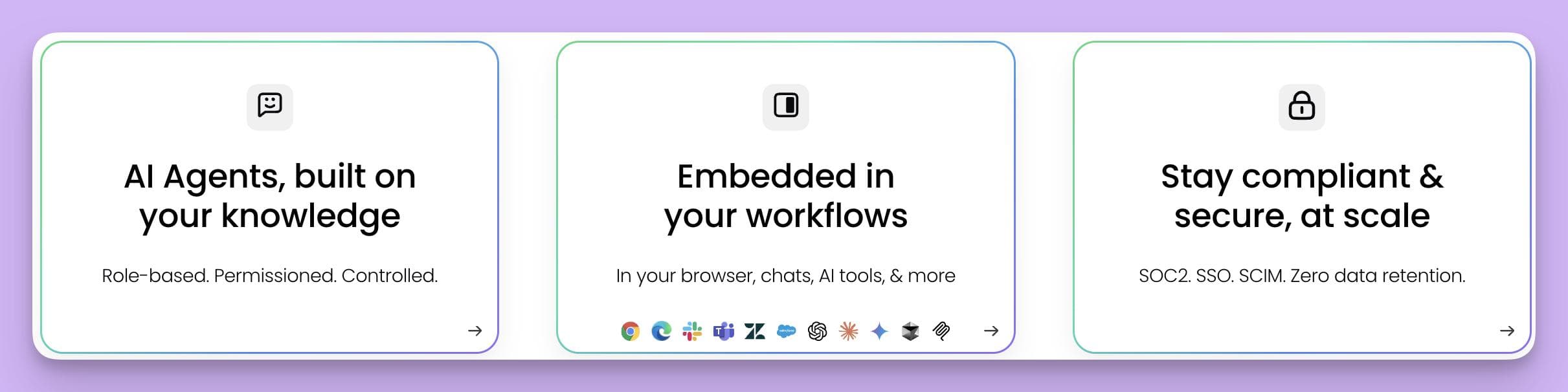
This builds trust and helps ensure content stays correct, but it also demands constant human involvement; users note that keeping cards verified is challenging, and without regular maintenance, the knowledge base becomes messy.
Guru’s AI search can pull answers from cards and integrated apps like Slack and Teams, but results suffer unless every card is carefully tagged and written.
The editing experience is limited—the card editor is basic and lacks formatting options compared to a full document editor. Pricing is per user and can get expensive as teams grow.
Additional reviews mention that you cannot open multiple cards side by side and formatting choices are restricted; the app works best in Chrome and has limited integration with other browsers or project management tools.
Guru’s strengths lie in capturing small pieces of knowledge, but it does not generate or update documentation automatically and requires ongoing manual curation.
Document360: Feature‑rich editor and AI writer, but steep learning curve and limited customisation
Document360 offers a robust knowledge base with rich editing tools and an AI writer (Eddy) that helps outline content, improve grammar, and adjust tone.
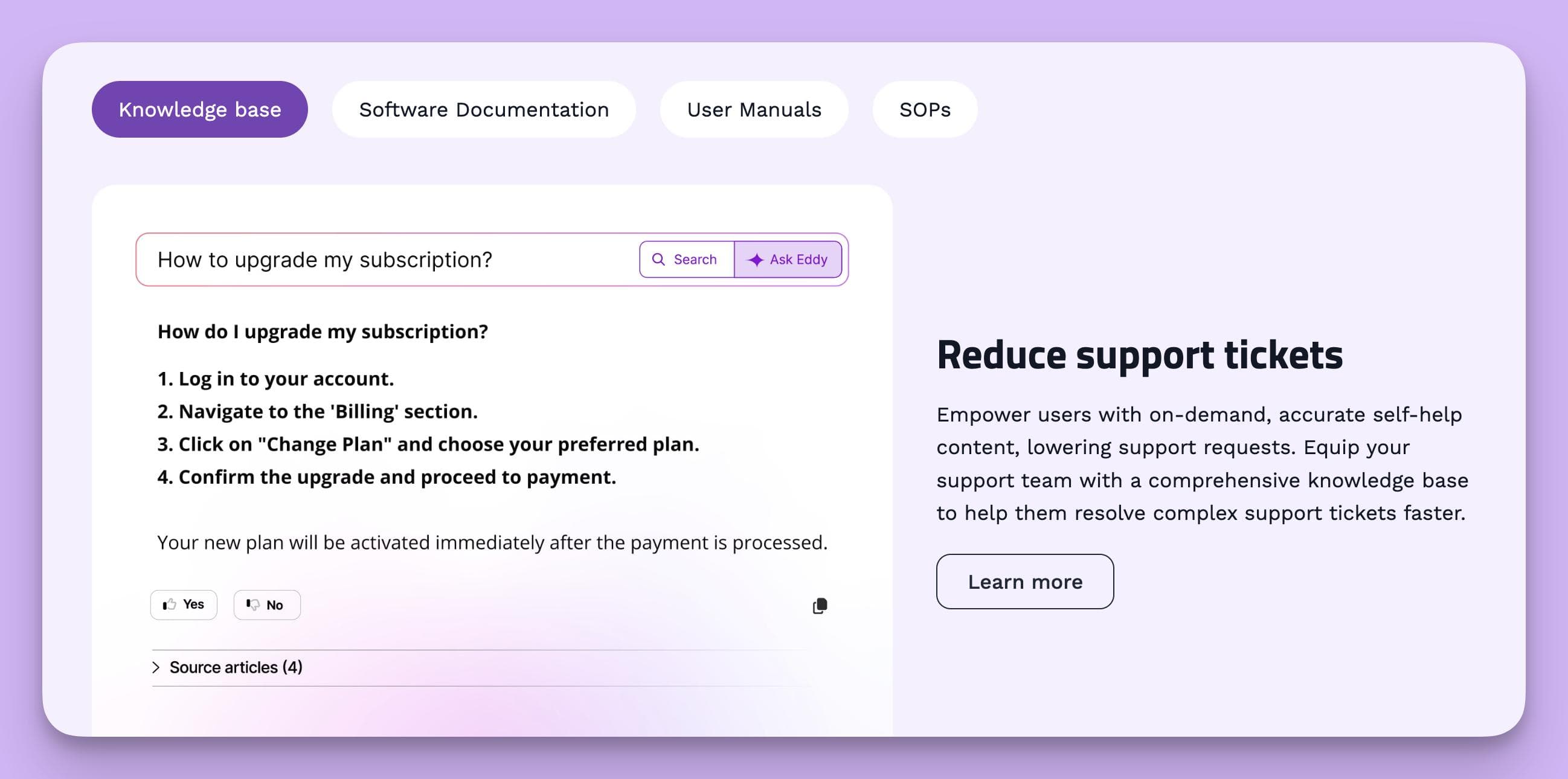
Despite this, user feedback highlights several drawbacks: the interface has a steep learning curve, especially for beginners.
Public knowledge bases offer limited customization options, and search can be inaccurate. There’s no offline access, and version control is basic.
Reviews on Software Advice report that recent pricing changes nearly doubled costs and that the licensing model requires purchasing an English license even when using another language.
Users describe the editor as fiddly—adding tables or editing across workspaces can be painful, and table headers can’t be frozen during scrolling.
These issues limit Document360’s appeal for teams seeking a frictionless, self‑updating KB.
Helpjuice: Customisable interface, but gaps in automation and collaboration
Helpjuice provides templates, versioning, and feedback tools for building both internal and external knowledge bases.
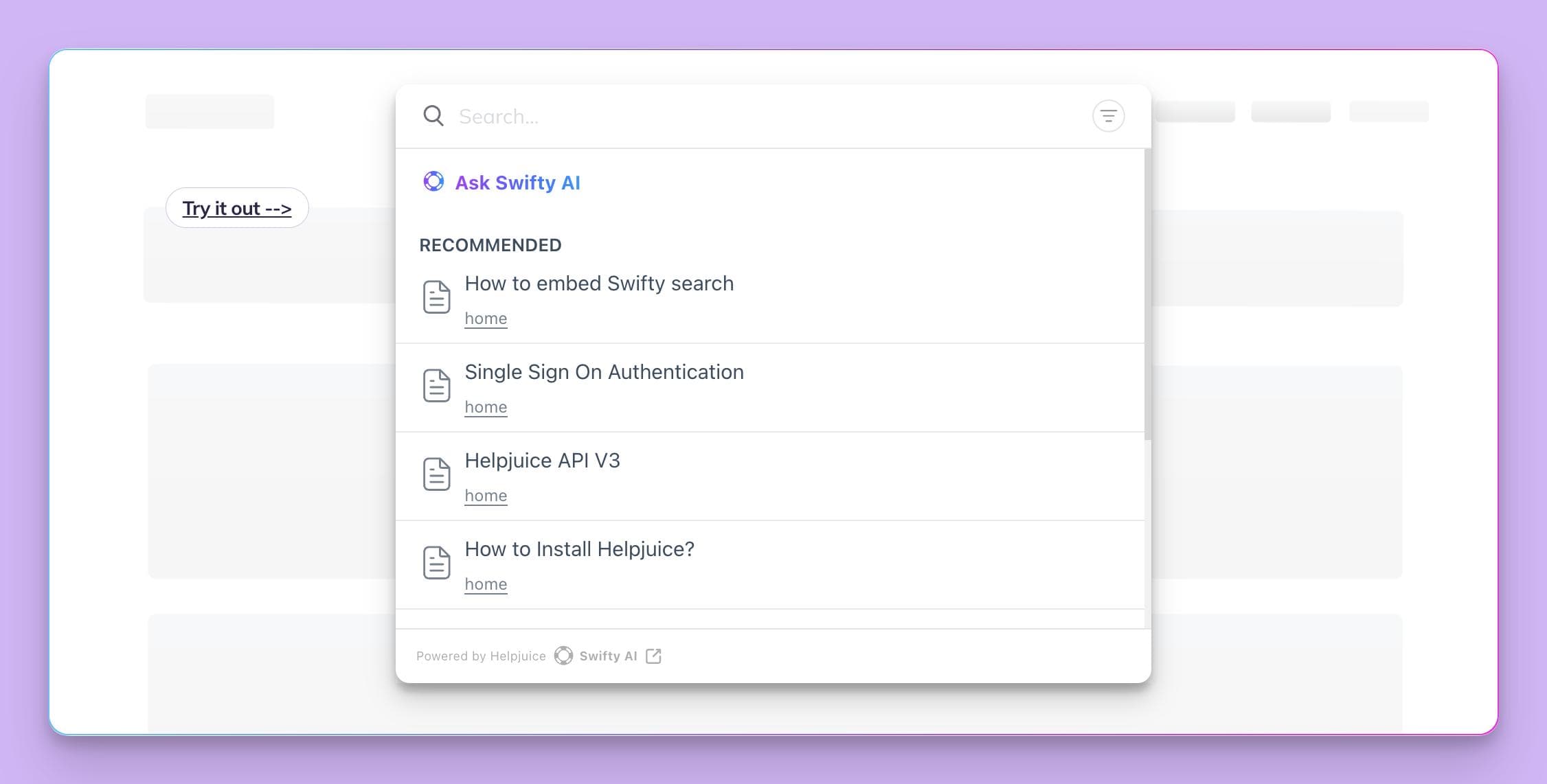
It supports comments, decision trees, duplicate detection, and granular permissions.
However, research.com lists several cons:
- A steep learning curve due to a non‑intuitive interface
- Limited branding and design customization
- Basic reporting
- Irrelevant search results
It also offers fewer and less flexible integrations with third‑party apps and minimal collaboration features.
Capterra reviewers echo these shortcomings, noting that authorisation management is per user rather than by group. The editor lacks table formatting and copy‑paste styles.
Also features like internal feedback, star ratings, favourites, or a video creation tool are missing.
Combined, these gaps mean Helpjuice still depends on manual writing and lacks the automation necessary for a self‑writing KB.
Atlassian’s Rovo (Confluence AI): Intelligent drafting and search, but still manual
Atlassian’s Rovo augments Confluence with AI that connects knowledge across Confluence, Jira, Slack, and other apps to provide smarter search and draft assistance.
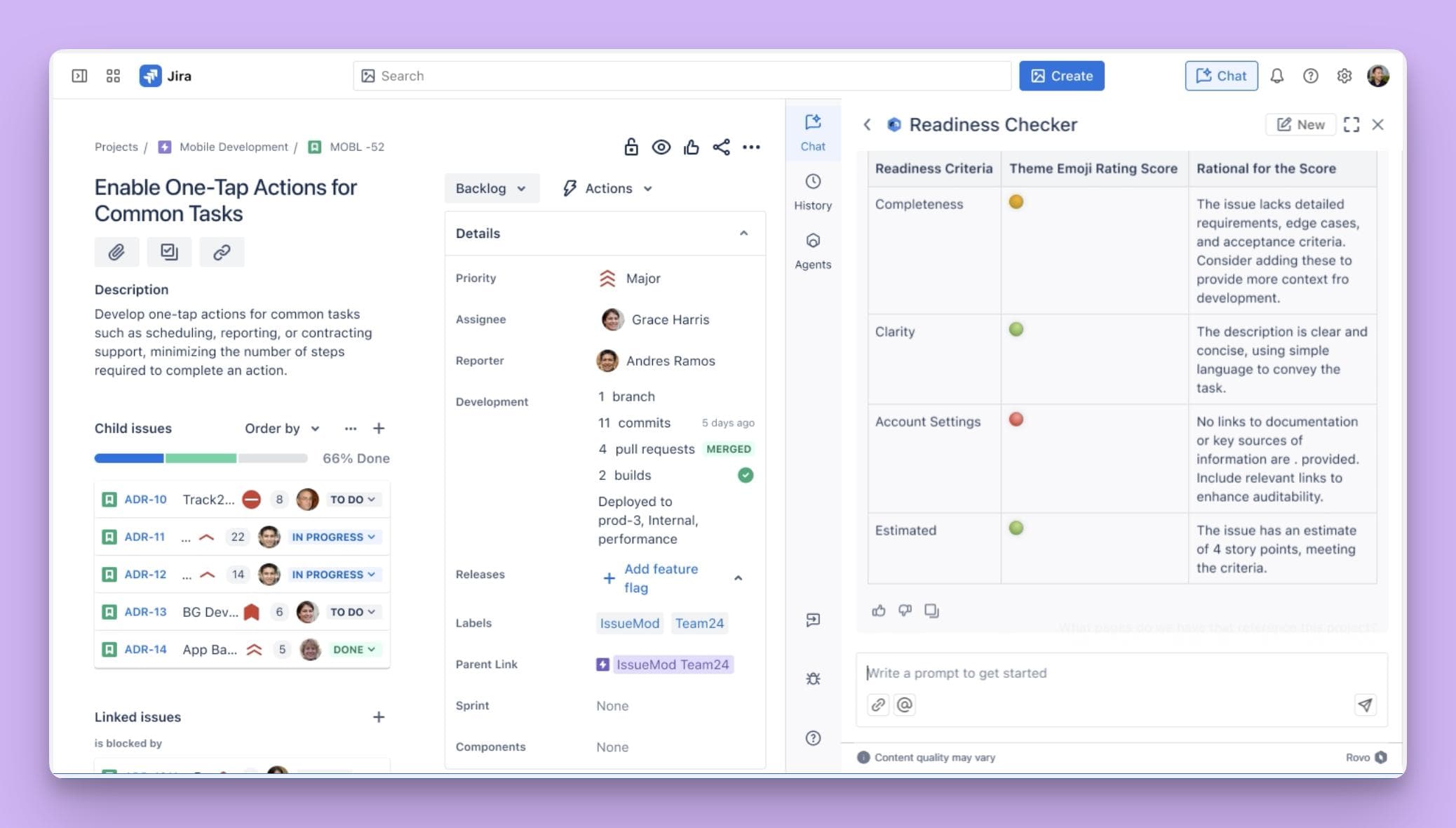
It can generate, refine, and summarise content and supports meeting‑note summarisation, brainstorming, and custom agents.
Yet Rovo remains an assistant: it helps draft content and find information, but does not ingest support tickets or record workflows.
You still need someone to create and update articles, and its benefits are largely limited to the Atlassian ecosystem.
There is no automatic conversion of tickets or recordings into docs, and no continuous updating loop.
Why InstantDocs Stands Apart
Looking across the market, you can see a clear pattern: most AI knowledge base tools automate only one or two steps in the documentation process.
- Notion AI accelerates writing but stays in its own garden;
- Slite verifies docs but leaves content creation to you;
- Guru’s cards require constant manual verification and provide limited formatting;
- Document360 offers a feature‑rich editor but a complex UI and limited customization;
- Helpjuice adds feedback and versioning but lacks automation;
- Rovo drafts and searches but doesn’t capture or update knowledge.
InstantDocs is the only self-writing knowledge base software that spans the entire lifecycle.
It records workflows via an AI recorder, automatically generates polished multimedia documentation. It detects missing or outdated content through ticket analysis, and keeps everything up to date.
By combining capture, generation, formatting, gap detection, and integrations in one tool, InstantDocs delivers a truly self‑writing knowledge base rather than a collection of AI point solutions.
Real‑World Use Cases and Case Studies
To appreciate how a self‑writing knowledge base changes day‑to‑day operations, consider these real‑world scenarios.
In each case, we’ll compare life before and after adopting InstantDocs and touch on how other tools would have handled the same situation.
Use Case 1: Scaling Support in a SaaS Business
Here’s a scenario: A mid‑sized SaaS company experiences rapid growth.
Support agents handle hundreds of tickets daily, many of which relate to the same common tasks—resetting passwords, configuring integrations, and troubleshooting errors.
The team uses Guru for knowledge management. Agents create knowledge cards summarising solutions, and a designated expert verifies each card periodically.
Although this system ensures accuracy, agents still spend time drafting cards and updating them when the product changes. Search works well, but many answers aren’t documented because it takes too long.
Now after adopting InstantDocs, the support team records each resolution via the AI recorder.
The system automatically generates a polished article, complete with screenshots and a voiceover.
Agents review the doc and publish it to their KB. When a similar ticket appears later, the system suggests the article, deflecting the ticket without manual intervention.
InstantDocs monitors incoming tickets, identifies new patterns, and flags any outdated articles for updates.
As a result, repetitive tickets drop and agents spend less time writing and more time solving complex issues, and support costs decline.
Use Case 2: Onboarding New Customers
Let’s say a B2B software company updates its product with new features every quarter.
To educate customers, the customer success team records training sessions and manually creates step‑by‑step guides using Notion.
Notion’s AI helps summarise content and rewrite text, but the team still needs to capture screenshots and embed them in articles. When the product changes, the team must revisit each guide and manually edit it.
With InstantDocs, the customer success team uses the AI recorder to capture training sessions.
The system automatically writes the transcript, extracts screenshots, generates step‑by‑step instructions, and adds a professional voiceover.
A polished help doc is ready immediately after the session. When features change, the Knowledge Gap detector identifies outdated sections and suggests revisions.
The team approves updates with a click, ensuring that new customers always access the latest training materials. Onboarding time decreases, and customer satisfaction rises due to consistent, high‑quality documentation.
Use Case 3: Product Documentation at Scale
Say an enterprise software company manages dozens of microservices. The documentation team uses Confluence with Rovo to draft and refine content. Rovo’s AI capabilities help polish text and summarise meeting notes, but engineers still need to write detailed tutorials and FAQs manually.
When product updates occur, the team must manually update each affected page—a daunting task that often lags behind releases.
By switching to InstantDocs, the company records internal demos and release meetings. InstantDocs generates fully formatted docs from the recordings and automatically publishes them.
When a service changes, the system monitors release notes and support tickets, prompts updates to relevant articles, and re‑publishes them seamlessly.
The documentation team spends less time writing and more time refining architecture guidelines and best practices. Engineers and customers benefit from immediate, accurate documentation.
Use Case 4: Operational SOPs and Compliance
Suppose a logistics company needs to maintain detailed standard operating procedures (SOPs) to comply with regulations. They use Slite to host their playbooks and rely on its verification reminders to keep documents current.
While this helps ensure compliance, writing SOPs still involves capturing steps manually and gathering screenshots. When a new regulation emerges, the team scrambles to update multiple documents.
With InstantDocs, the operations team records each SOP execution via the AI recorder. The system generates a document with step‑by‑step instructions, screenshots, and a voiceover.
InstantDocs' Knowledge Gap feature flags any missing or outdated processes and suggests updates. Because documentation is created automatically, the team can respond quickly to regulatory changes. This reduces risk and ensuring ongoing compliance.
These examples highlight how self‑writing KBs reduce workloads, improve accuracy, and deliver better customer and employee experiences.
Other tools provide partial solutions—search assistance, document verification, writing aids—but they still rely on human effort to capture and update knowledge.
InstantDocs automates the entire loop, transforming the way teams document and share information.
The Future of AI in Documentation
The concept of a self‑writing knowledge base is only the beginning. Over the next few years, we expect AI to revolutionise documentation in several ways:
Personalised Content Delivery
AI will tailor documentation based on user context, role, device, and behaviour. When an enterprise customer logs in, the KB will prioritise content relevant to their deployment.
New employees will see onboarding guides tailored to their department. Contextual help will appear in‑app, anticipating user questions and offering answers proactively.
Real‑time In‑product Guidance
Instead of searching a knowledge base, users will receive real‑time guidance within the product.
If they hover over a complex feature, an AI agent will surface a mini tutorial. As generative models become more powerful, they will produce interactive explanations, videos, or simulations on demand.
Predictive Documentation
AI will anticipate documentation needs by analysing trends in support tickets, product usage, and user feedback.
When a new pattern emerges, the system will proactively generate a doc or update existing ones before users encounter issues.
This predictive capability will drastically reduce support volume and ensure documentation is always one step ahead.
Agentless Support
As self‑service and contextual guidance improve, we’ll see fewer support agents handling basic tasks.
AI chatbots will answer common questions and hand over to humans only for complex, strategic issues. Knowledge bases will become living, interactive entities that evolve with user interactions.
Knowledge Graphs and Semantic Search
AI will build rich knowledge graphs connecting concepts, articles, and data across an organisation.
Semantic search will allow users to ask complex, multi‑step questions and receive comprehensive answers that draw from multiple sources.
This will further reduce silos and surface hidden connections between topics.
Ethical Considerations and Human Oversight
As AI assumes more responsibility for documentation, human oversight will remain critical. Businesses must ensure that content is accurate, unbiased, and accessible.
AI should augment human expertise, not replace it entirely. Transparent, auditable systems and robust governance will be essential to maintain trust.
In this evolving landscape, self‑writing knowledge bases will serve as the foundation for more advanced, context‑aware support systems.
Investing in AI‑driven documentation now prepares organisations for a future where knowledge is continuously captured, refined, and delivered wherever needed.
How InstantDocs is the Best Self-Writing Knowledge Base
InstantDocs was designed from the ground up to implement the self‑writing knowledge base vision.
Its features span every stage of the documentation lifecycle, from capturing knowledge to publishing and updating it.
AI Recorder
At the heart of InstantDocs is its AI recorder. This Chrome extension allows anyone to record a workflow directly in the product.
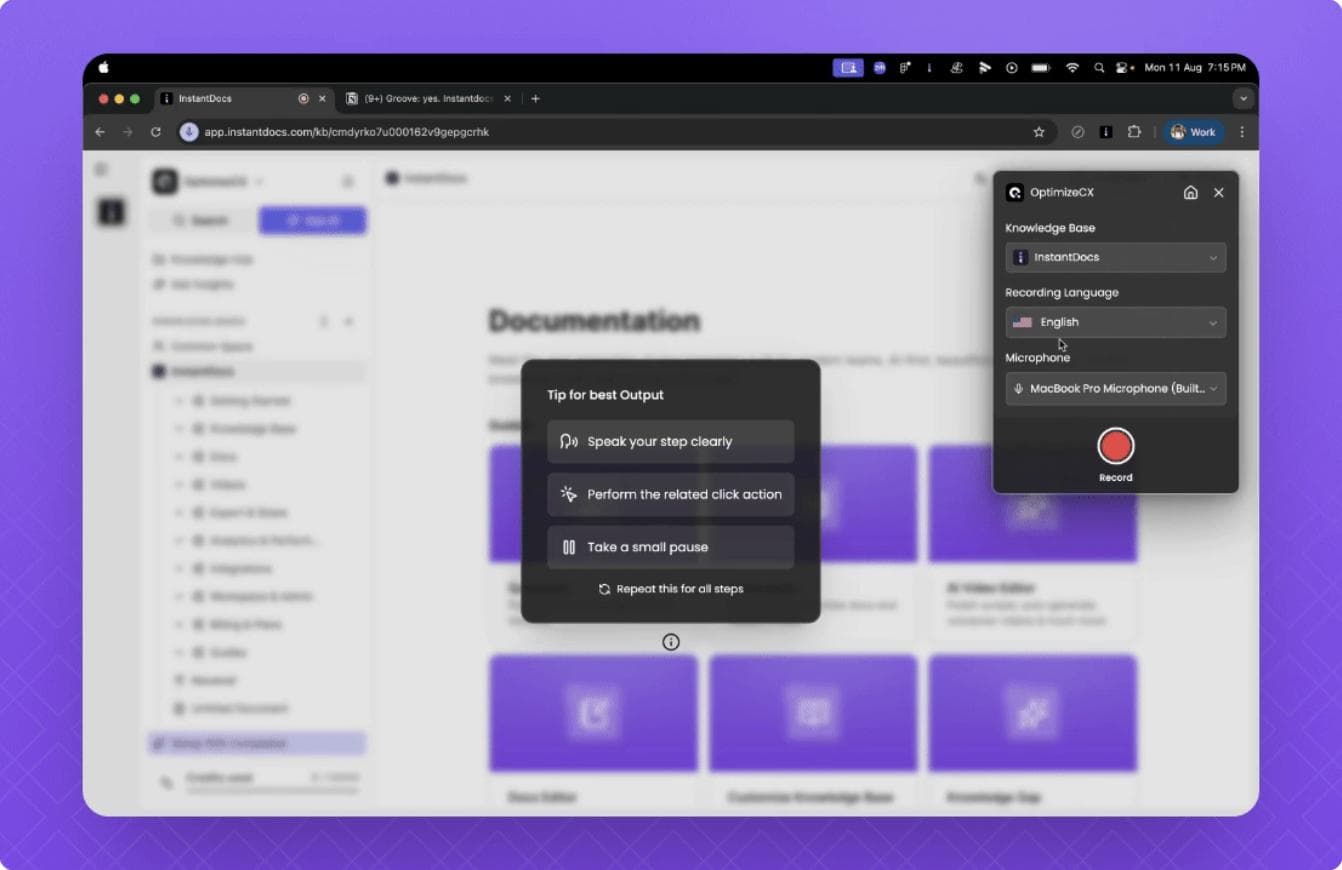
During a recording, the system tracks clicks, scrolls, and typed inputs while capturing the screen and audio. When the recording ends, InstantDocs automatically generates a complete help document:
- It extracts snapshots/screen captures from each step of the workflow.
- It writes a detailed transcript of the recording and cleans up any filler words or pauses.
- It creates step‑by‑step instructions that align with each screenshot.
- It adds a studio‑quality voiceover, replacing the original audio and synchronising it with the video.
The result is a professional, polished help doc in minutes. Users can edit the script if needed, but in most cases, the automatically generated content is ready to publish immediately. This feature alone eliminates hours of recording, transcribing, and formatting work.
Video Editor
InstantDocs includes a built‑in video editor for refining the generated videos.
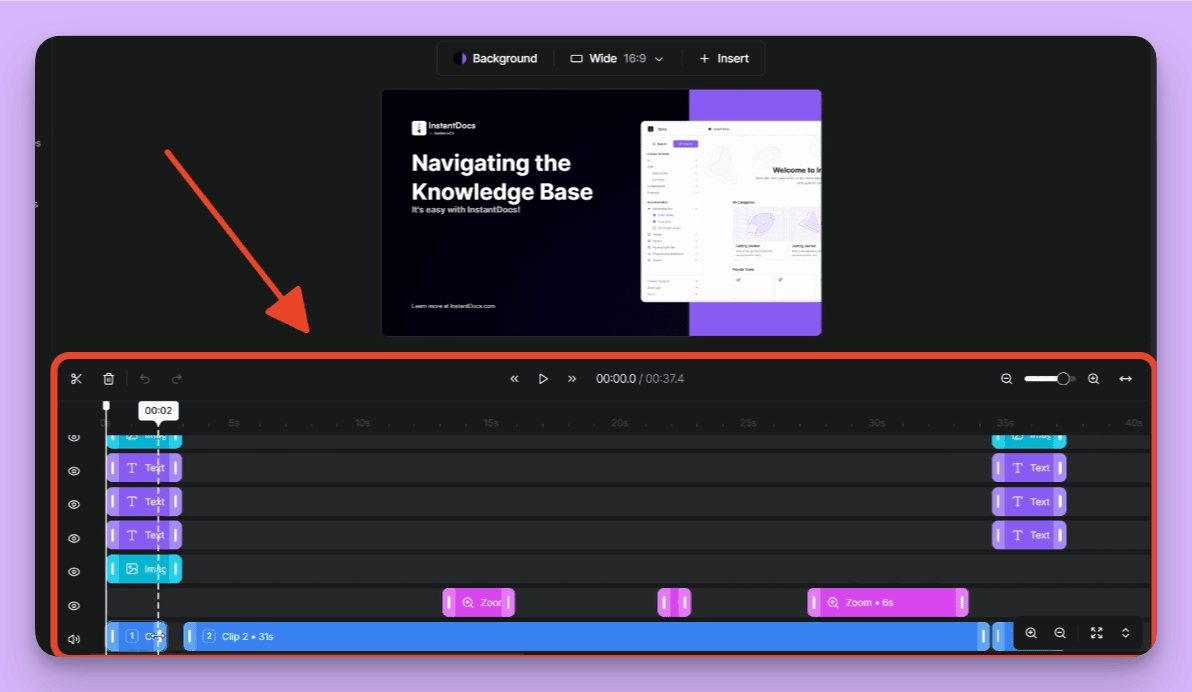
Users can adjust the script, fix syncing issues, swap intro or outro templates, and add on‑screen elements or background changes.
This ensures that help videos are not only informative but also visually appealing. Because the editor is integrated directly into the platform, there’s no need to export to separate tools.
Notion‑like Editor & Knowledge Base
Documentation is not just about content creation; it’s about organisation and discoverability.
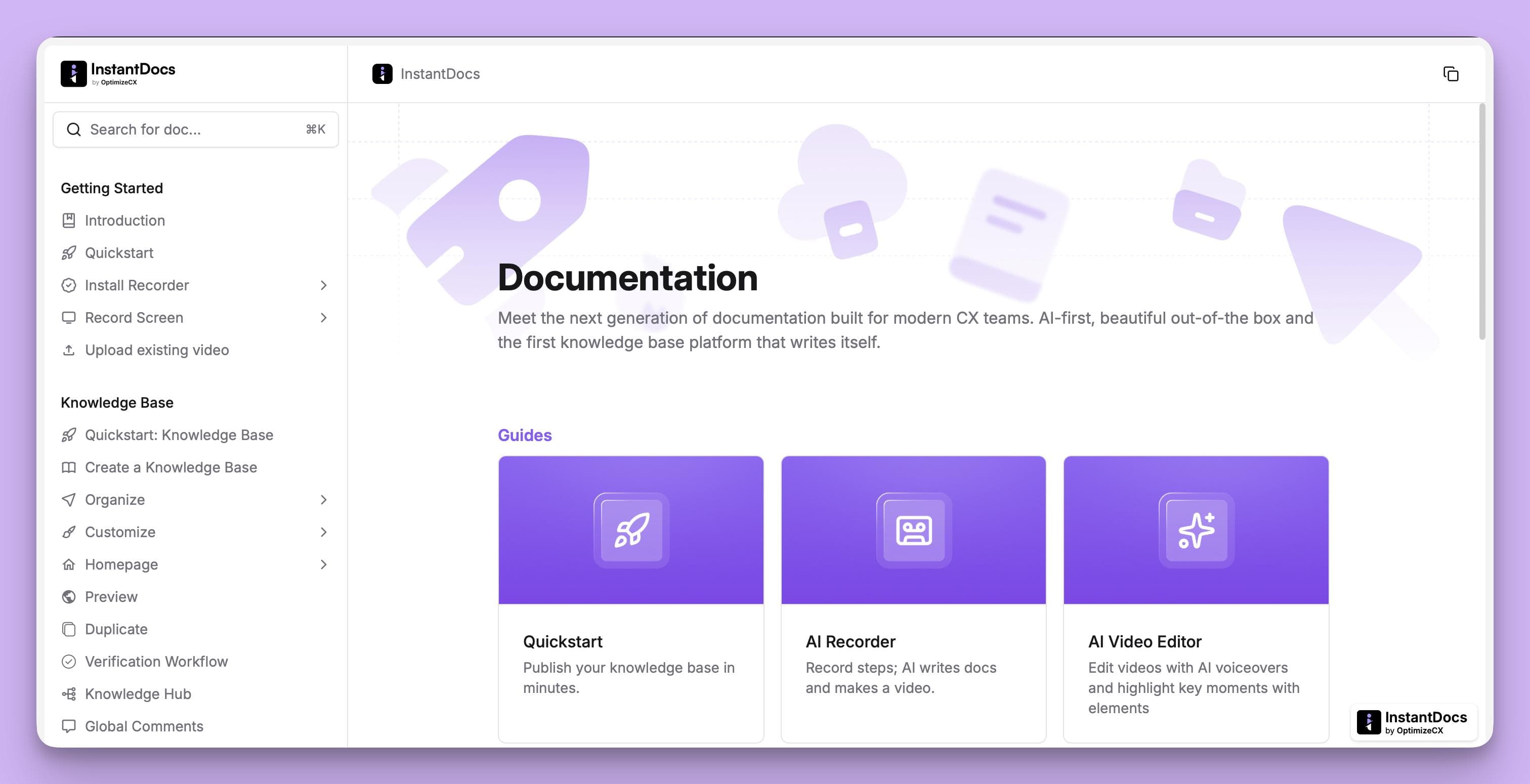
InstantDocs offers a notion‑style editor that uses drag‑and‑drop blocks and rich text formatting.
Users can organise documentation into collections and sections, build a central knowledge base with a customisable landing page, and apply branding to match their company’s style.
This editor combines the flexibility of a wiki with the polished presentation of a knowledge base platform, ensuring that users can find information easily and enjoy a consistent experience.
Knowledge Gap
One of InstantDocs’ most powerful capabilities is its Knowledge Gap feature. By analysing support tickets, the system automatically identifies missing or outdated documentation. It classifies gaps into two types:
- Missing – recurring questions or issues that have no corresponding article.
- Outdated – articles that don’t reflect recent product changes or contain incomplete information.
For each gap, InstantDocs surfaces related support tickets and summaries. It then offers an option to auto‑generate a new doc or update the existing doc.
Users can review the draft, make edits if necessary, and publish it instantly. In future releases, InstantDocs plans to fully automate this loop, generating and publishing docs upon approval.
This ensures your knowledge base evolves in lockstep with your product and support operations.
Integrations
InstantDocs integrates with popular support and documentation tools, including Zendesk, Intercom, Groove, Confluence, Notion, Crisp, and Google Docs.
These integrations allow teams to import existing knowledge bases and support data, ensuring a seamless transition. Connections use OAuth or API tokens for secure data transfer.
By combining these features—automatic capture and generation, world‑class formatting, gap detection, and deep integrations—InstantDocs delivers a truly self‑writing knowledge base.
It covers the entire lifecycle of documentation, from recording workflows to updating articles, making it unique in the market.
How to Get Started with a Self‑Writing Knowledge Base
Implementing a self‑writing knowledge base is easier than it might seem. Here’s a step‑by‑step guide to getting started:
Step #1: Audit Your Existing Knowledge Base
Identify which articles are outdated, which are missing entirely, and which are working well. Use analytics (where available) to see which pages are most frequently used. This will give you a baseline to measure improvement.
Step #2: Gather Your Data Sources
Compile support ticket histories, chat transcripts, email threads, and any existing training or demo recordings. These will serve as the raw inputs for your AI system. Ensure you have permission to use this data and remove any sensitive information if necessary.
Step #3: Evaluate AI Knowledge Base Platforms
When choosing AI knowledge base software, look for systems that automate the entire lifecycle—capture, generation, formatting, gap detection, and updates. Consider how each tool handles multi‑modal content (video and screenshots), offers brand‑aligned formatting, and integrates with your existing stack.
Step #4: Create Pilot Documentation
Start by recording a few common workflows or converting some support tickets. Use the AI recorder to generate docs and test the editor to organise them. Share the results with your team and collect feedback on clarity and usefulness.
Step #5: Set Up Review Workflows
Decide who will review the generated docs. For critical processes, you may want a subject matter expert to approve each article. For routine topics, you might choose to auto‑publish drafts and review them periodically.
Step #6: Promote Adoption
Encourage support agents, product managers, and customer success teams to use the knowledge base as the first point of reference. Provide training on how to record workflows and approve drafts. Integrate the KB into your help center, product and support tools so users can find answers easily.
Step #7: Measure and Iterate
Track metrics like time spent creating documentation, number of articles generated, ticket deflection rates, and user satisfaction.
Use this data to identify areas of improvement and adjust your processes. As the AI learns from your feedback, the quality of generated docs will improve.
Adopting a self‑writing knowledge base is not a one‑time project; it is a continuous process of capturing, creating, and improving.
The payoff, however, is significant: you will unlock institutional knowledge, empower your team to work more efficiently, and deliver a better experience to your customers.
Conclusion: The Knowledge Revolution Is Here
The way companies document and share knowledge is undergoing a revolution. Traditional knowledge bases—static, manually maintained, and often out‑of‑date—are no longer sufficient for modern businesses.
Advances in AI now allow us to capture knowledge directly from support interactions and product workflows, generate polished documentation automatically, and keep it updated without constant human intervention.
While many tools claim to offer AI knowledge base software, most only automate pieces of the puzzle.
InstantDocs stands out by automating the entire lifecycle—from recording workflows to detecting knowledge gaps and publishing updated articles.
Investing in a self‑writing knowledge base means more than just adopting a new tool; it signals a commitment to continuous learning and customer empowerment.
By reducing the time spent writing and updating documentation, you free your team to focus on innovation and strategic work. By providing accurate, accessible information, you improve customer satisfaction and retention. And by connecting knowledge across your organisation, you build a culture of collaboration and transparency.
We are at the beginning of a new era in documentation. Those who embrace self‑writing knowledge bases now will lead the way in delivering seamless, AI‑powered experiences. The knowledge revolution is here—don’t get left behind.
5 Help Scout Alternatives: Why Growing Support Teams Switch to Groove
Groove Fixes What Teams Don't Like About Help Scout: Flat Pricing, Built-In AI, and Native SLA Management. See the Full Comparison.
How Helply's Hallucination-Proof AI Eliminates the #1 Fear of AI Customer Support
Customer Support Automation That Hits 65% AI Resolution, Guaranteed. Helply's Action-Based AI, Safe Escalations, and Optimization.
